SA
SA  KW
KW  IE
IE AU
AU UAE
UAE UK
UK USA
USA  CA
CA DE
DE  QA
QA ZA
ZA  BH
BH NL
NL  MU
MU FR
FR 

















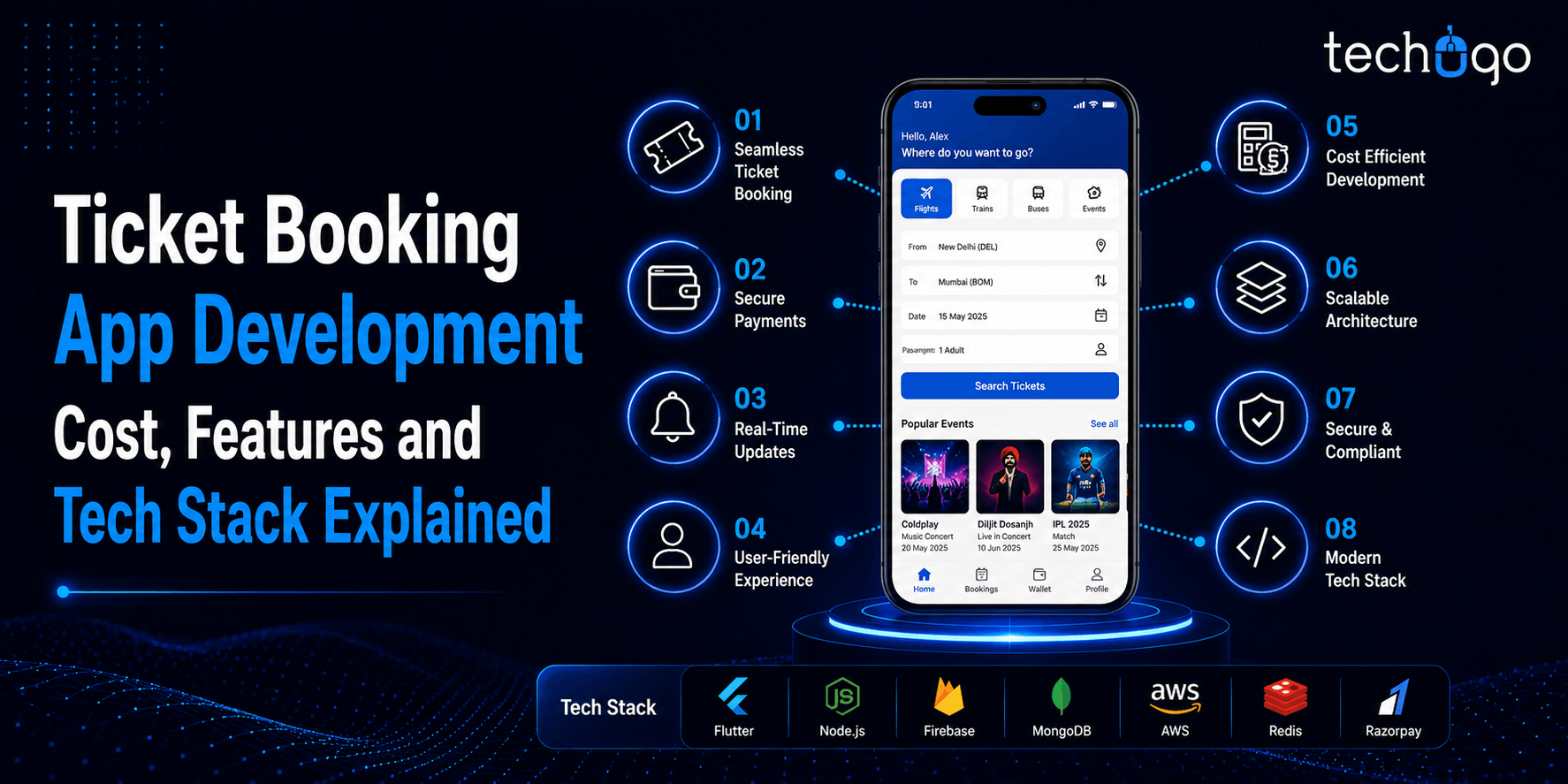


Today, our world is tech-driven in every possible manner, letting every service available on our In 2026, digital transformation continues to redefine how users access everyday services, and ticket booking is one of the strongest examples of this shift. From movies and concerts to sports events and travel, users now expect instant, seamless, and mobile-first booking experiences.
Yes, with this app type, it becomes easy to book tickets and get rid of mental and physical stress that comes as complimentary baggage with the traditional ticket booking process. Further, the easy payment option, lets the user make the payment through their convenient mode, and pick the seat of their choice effortlessly.
Now, you must be wondering what all it takes to make a successful ticket booking app?
To help you get the quick rundown of the development journey related to this app, we have brought this post for you today.
With this article, you can explore how much cost is required to develop a ticket booking app. And what are the required features, panels, and tech stack to craft an impeccable solution?
Just scroll this post further…
Types of Ticket Booking Apps (Movies, Events, Travel, Sports)
When we say ticket, it’s just a digital access pass that lets you skip the line and skip the messy manual booking process to use a service, take a trip or attend an event. In 2026, ticket booking apps have become a basic digital convenience, enabling users to complete transactions ranging from travel seats to entertainment shows in a flash.
There are several kinds of ticket booking applications available on the market, which are applicable for different industries and different user requirements. Among them, travel booking apps have the largest pie of the industry, as travel is an immediate need and a very large market segment. However, other categories are quickly growing as well with increasing digitisation of economy and society.
The whole idea of creating a ticket booking app is not to sell tickets but to reduce pain points while booking, de-link from brick and mortar counters and give the user a hassle free experience with no waiting at queues, manual confirmation of tickets or late night anxiety.
Below are the major types of ticket booking apps available in the market:
- Movie Ticket Booking Apps
Used for booking cinema tickets, selecting seats, checking show timings, and getting instant confirmations for movie experiences. - Event Ticket Booking Apps
Designed for concerts, live shows, exhibitions, festivals, and entertainment events where users can explore and book passes in advance. - Travel Ticket Booking Apps
One of the largest segments, covering flight, train, and bus bookings with real-time availability, pricing, and schedule management. - Sports Ticket Booking Apps
Used for booking tickets to live sports events such as cricket, football, and other stadium-based matches with seat selection features. - Multi-Service Ticket Booking Platforms
These apps combine multiple categories like travel, movies, and events into a single platform, offering users an all-in-one booking experience.
Panels for ticket booking app portal
- Admin panel
- User Panel
Both panels have certain features within their spaces to make the app functional in the best possible way.
Essential features to be added in the ticket booking app
There are many features that must be a part of the ticket booking app, to make it work efficiently. To help you understand what all features must be there in your app, we have collected the information herewith…just read further…
1. User panel
Login/sign up
This feature helps the users to register on the app by providing some necessary details. And there is the convenience of login through the social media account as well.
Location selection
With this feature, it becomes easier for the users to book a ticket on the basis of location, and check availability as detected by the GPS.
Homepage
From the home page, users get the option to explore all the events or movie tickets to be booked. They can also check pricing, calendar, settings, and other required functionality of the app.
Booking window
After selecting the ticket, users can book the tickets through the booking window and pick their favorite seats effortlessly.
Rating
This feature lets the users leave ratings and helps others in booking the next event.
2. Admin panel
Login
This feature allows the admin to login to the application and starts the function.
Dashboard
To work on the mechanism of the app, with this feature admin can view and track the overall app functionality and business performance.
Managing users
It lets the users manage users’ list, add or remove, and add new service providers.
Managing shows
With this feature, admin can see all the listed shows and filter shows by category, date, time, location, and venue, or other important keywords.
Managing managers
Let’s admin to handle the dates, show-time, price range, venue location, and events.
Earnings management
It allows admin to view the total earnings, and further edit, view, or delete the percentage of commission from the venues, etc.
3. Advanced features
Calendar
This is one of the most useful features for the ticket booking apps, as it allows the users to manage the calendars and keep track of the schedules to stay prepared in advance, and not to miss the event.
Google map
The worth of mapping cannot be ignored at any given situation, where your app gets the guidance to book your nearest location place to book the ticket.
Smart search
With this feature, it becomes easier for the users to search smartly and get suggestions on the basis of their past search history and nearby available options.
Multi-payment options
For a successful app to come into existence the multi-payment options must be considered as there are different people out there, who want to have multiple preferences for the payment.
24/7 customer support
Efficient customer support is a mandatory fact to win the trust of your user-base. You can offer chatbot support to handle the basic queries and offer nerve-ending online support to your users.
Cloud storage
A ticket booking app works with massive data, and this can be managed and controlled by cloud storage.
Role of AI and Automation in Ticket Booking Apps
Ticket booking apps in 2026 are no longer basic platforms—they are expected to be smart and personalized. Users don’t want to spend time searching; they want instant, relevant suggestions and a smooth booking experience.
This is where AI and automation make a real difference. AI understands user behavior and preferences to recommend the right events, movies, or travel options, while automation handles backend tasks like bookings and support efficiently.
As a result, businesses can offer faster, more personalized experiences, improve customer satisfaction, and optimize operations—all without increasing costs.
Key Benefits of AI and Automation in Ticket Booking Apps
- Personalized recommendations
Users get event, movie, or travel suggestions based on their past behavior, searches, and preferences. It feels more relevant and saves time.
- Smarter pricing strategies
AI helps businesses suggest better pricing models based on demand, peak hours, and user activity, improving conversions.
- Faster booking experience
Automation reduces manual steps, making the entire booking process quicker and smoother.
- 24/7 customer support through chatbots
AI chatbots handle common queries instantly, reducing waiting time and improving customer satisfaction.
- Better demand prediction
Platforms can predict peak booking times and manage inventory (seats/tickets) more efficiently.
- Reduced operational cost
Automation replaces repetitive manual tasks, allowing businesses to scale without increasing support or management costs.
- Improved customer satisfaction
Users get faster responses, accurate suggestions, and hassle-free booking experiences.
- Fraud detection and secure transactions
AI systems help detect unusual activity and ensure safer payments and bookings.
Technology Stack for Ticket Booking App Development
A strong technology stack is the backbone of any successful ticket booking app. In 2026, the focus is on building scalable, fast, and secure platforms that can handle real-time bookings, high traffic, and seamless user experiences without downtime.
- Frontend Development- ReactJS, Next.js, Vue.js, Tailwind CSS
- Backend Development – Node.js, Spring Boot, Django, Microservices Architecture
- Database Management – MySQL, PostgreSQL, MongoDB
- Caching and Performance – Redis, Memcached
- Cloud and Hosting – AWS, Google Cloud, Microsoft Azure
- Payment Integration – Stripe, PayPal, Razorpay
- DevOps and Deployment – Docker, Kubernetes, CI/CD Pipelines
- Messaging and Notifications – Kafka, RabbitMQ, Firebase Cloud Messaging
- Monitoring and Logging – ELK Stack, Prometheus, Grafana
This modern stack ensures your app is reliable, scalable, and ready for future growth.
How much does it cost to develop a ticket booking mobile app?
The cost of the app depends on various factors, and it is hard to make one factor responsible for it. It is the medley of features, functionalities technologies, outsourced teams, and many other aspects, that come together and provide an estimation of the cost. Henceforth, it is very much necessary to share the concept to get the ACCURATE cost.
You would be surprised to know that cost to create a ticket booking app, can be as low around $10,000 and even can go to $50,000. So if you are willing to get the exact numerical figure for your ticket booking app concept, then get in touch with our team of experts today and get the cost estimation.
Reach us today and receive a risk-free quote for ticket booking app concept hassle-free!
FAQ
1. How much does it cost to develop a ticket booking app in 2026?
The cost to develop a ticket booking app in 2026 ranges from $15,000 to $120,000 or more. It depends on features, app complexity, integrations, and scalability requirements.
2. Which technology stack is best for ticket booking app development?
A modern stack includes ReactJS or Next.js for frontend and Node.js or Spring Boot for backend. Cloud platforms like AWS ensure scalability and performance.
3. How long does it take to build a ticket booking app?
A basic app can take around 3 to 4 months to develop. Advanced apps with custom features may take 6 months or more.
4. Can a ticket booking app handle real-time seat availability?
Yes, modern apps use real-time databases and caching to manage seat availability. This ensures accurate and instant booking updates.
5. Is cloud integration necessary for ticket booking apps?
Yes, cloud integration helps handle high traffic, ensures scalability, and improves performance. It also enhances data security and uptime.

Get in touch
We'd love to hear from you.