SA
SA  KW
KW  IE
IE AU
AU UAE
UAE UK
UK USA
USA  CA
CA DE
DE  QA
QA ZA
ZA  BH
BH NL
NL  MU
MU FR
FR 



















📌 Key Takeaways
- Create a Google Play Developer account before publishing your app.
- Optimize your app listing with the right title, description, and screenshots.
- Use Google Play Console to manage releases, testing, and updates.
- Ensure app quality and compliance for faster approval.
- Focus on marketing and updates to drive long-term app growth.
Did you know?
As per Statista, the Google Play Store hosts over 3.5 million apps, making it one of the largest app distribution platforms globally.
What’s more?
According to Google, Android powers over 3 billion active devices across 190+ countries, giving businesses access to a massive, ever-growing user base.
But how is this information beneficial for you?
Simple. The rise of digital-first businesses has pushed brands (startups and enterprises alike) toward building mobile apps to stay relevant, accessible, and competitive. And naturally, the next step is to publish and upload those apps on the Google Play Store to reach users worldwide.
Yes, you’ve read that right.
The journey doesn’t end with app development. In fact, uploading and publishing your app on the Play Store is a critical step. A step that directly impacts your app’s visibility, reach, and success.
If you’re an entrepreneur planning to build an Android app to bridge the gap between your business and customers, you’re probably asking the same question –
how to upload an app on Google Play Store?
Well, in that case, you’re exactly where you need to be.
BUT FIRST…
Key things to know before uploading an app on Google Play Store
Before you move ahead with the process to upload an app on the Google Play Store, there are a few important things you should be clear about. Skipping these can delay your app submission or worse, lead to rejection.
First, you’ll need a Google Play Developer Account.
This is your entry point to the Google Play Console, where the entire app publishing and management process takes place. There is a one-time registration fee of $25, and approval usually takes a couple of days.
Next, your app must comply with Google’s policies.
Google has strict guidelines around user data, privacy, permissions, and content. Missing a privacy policy or mismanaging user data is one of the most common reasons apps get rejected.
Another key thing is the file format.
Google now requires developers to upload apps using the Android App Bundle (AAB) instead of APK files. This helps optimize app size and performance across different devices.
You should also be prepared with your app store listing details
These details include title, description, screenshots, icon, and category. This isn’t just a formality; it directly impacts your app’s discoverability through App Store Optimization (ASO).
Lastly, testing matters more than most people think.
Before you publish your app on Google Play Store, make sure it has gone through proper internal or closed testing. Bugs, crashes, or performance issues at launch can affect both approval and user retention.
Getting these basics right makes the entire Google Play Store app submission process smoother and sets a stronger foundation for your app’s success.
Ready to Take Your App Live on Google Play?
From development to Play Store submission, our experts can help you build, optimize, test, and launch your Android app.
Requirements to create a Google Play Developer Account
Before you’re all set to publish an app on the Google Play Store, make sure that it satisfies the following aspects:
1) Sign up with Google Play
Before starting the app uploading process on Google Play Store, it is necessary to sign up using a Google Play Developer Account via the Google Play Console.
Not only this, but if you develop and submit an Android App Bundle (AAB), enrolling in Play App Signing is a must. This ensures secure app distribution and allows Google to manage your app’s signing key.
For starters, Android App Bundle is a publishing format that combines your app’s compiled code and resources, helping deliver optimized versions of your app to different devices.
2) Keep up with the download size limit
Notably, Google Play supports app downloads up to 150 MB for the base module. Therefore, if it surpasses the limit, it may create issues during the app submission process.
In such cases, developers can use Play Feature Delivery or Play Asset Delivery, which allows users to download only the code and resources required to run the application efficiently.
Step-by-step process to upload an app on Google Play Store
Now that you’ve reached the stage where you can finally connect with your customers through your flawless app, here’s the step-by-step process on how to upload an app on the Google Play Store using the Google Play Console.
Take a look!
Step 1. Sign up with a developer account
The first step in the Google Play Store app submission process is to sign up with a Google Play Developer Account via the Google Play Console.
Developers must pay a $25 one-time fee to open the account that’ll additionally offer multiple features and functions and app management tools as well.
Details and credentials need to be entered, and once the account is submitted, it takes around 48 hours for verification and approval.
Step 2. Link the developer account with Google Payments Profile
Does your app support in-app purchases or paid downloads?
If yes, then it must be linked to a payments profile.
All you need to do is sign in to your Google Play Console account and then navigate to ‘Reports’ →‘Financial Reports.’
Now, select the ‘Set up a merchant account now’ options and fill in the details. Once done, the merchant account will be automatically linked to the developer account. Thus, app sales can be managed from the same.
Step 3. Create your application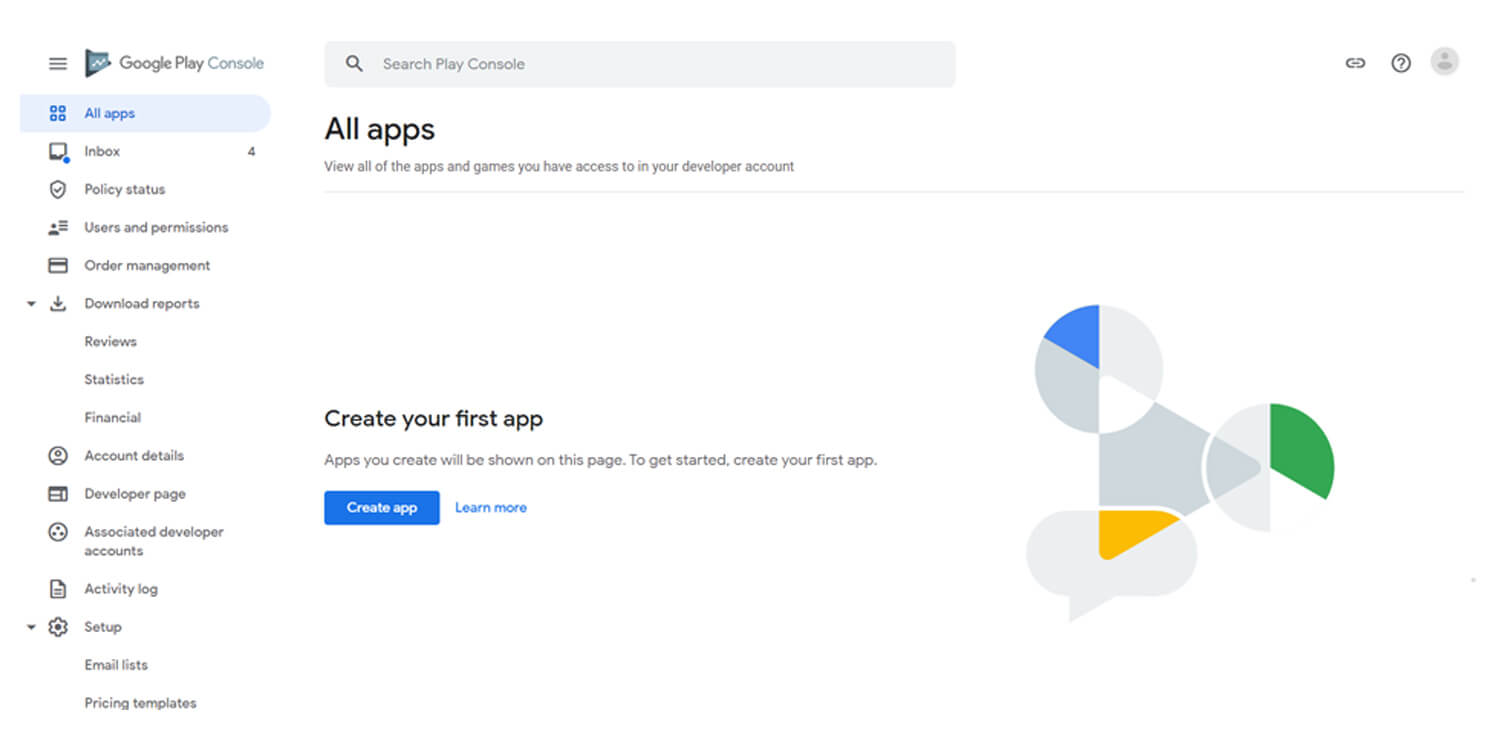
Follow the steps mentioned below to create your app listing on the Play Store:
- Tap ‘Menu’ and select ‘All Applications.’
- Click on the ‘Create Application’ option.
- A drop-down menu will pop up. Tap on the applications’ default language from the same.
- Enter the app’s name/ title, and hit the ‘Create’ button.
Note: The title can be tweaked later if required.
Step 4. Enter the app store listing details
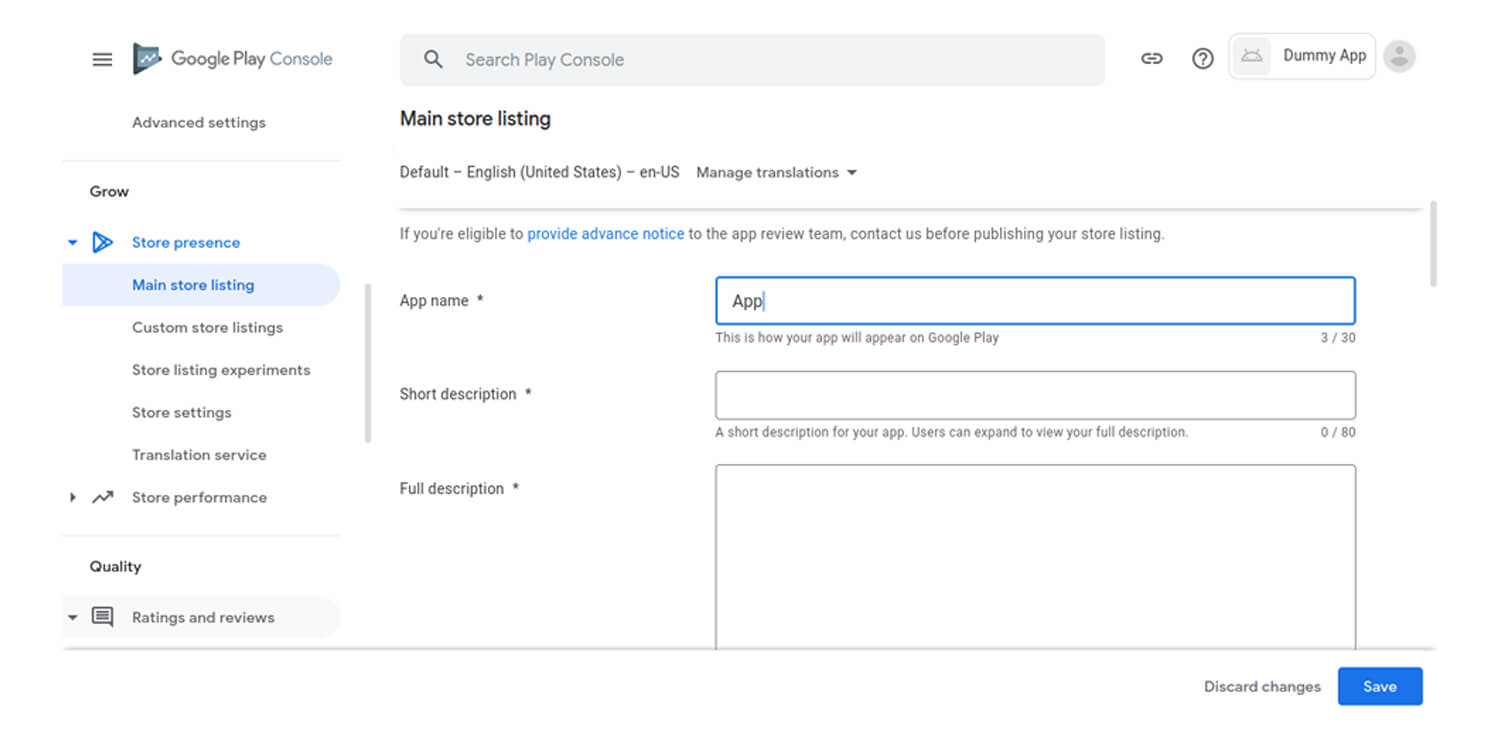
This step is crucial for App Store Optimization (ASO) and visibility on the Google Play Store.
You’ll need to add:
- App description (optimized with relevant keywords)
- App icon and feature graphic
- Screenshots (mobile + tablet)
- Category and sub-category
- Contact details (email, phone, website if available)
These details directly impact your app’s discoverability and install rate.
Step 5. Develop and upload the app release
This is where you upload your app package using the Android App Bundle (AAB) format.
Steps:
- Go to Release Management
- Select App Release
- Choose release type:
- Internal Test (up to 100 testers)
- Closed Test (selected testers)
- Open Test (available on Play Store for testing)
- Production Release (live for all users)
- Click Create Release
- Upload your AAB file
- Review and save changes
Step 6. Rate your app
App rating is mandatory before publishing. Missing this step can block your app from going live. To start rating the content, follow the steps below:
- Navigate to the left side menu on the screen and select the ‘Content Rating’ option.
- Hit the ‘Continue’ button and enter your e-mail address. Once done, click on the ‘Confirm’ option.
- Answer the questionnaire and tap ‘Save Questionnaire’ once completed.
- Select the ‘Calculate Rating’ option, and the rating will be updated on the Play Store.
- Click the ‘Apply’ button to confirm the content rating.
Step 7. App pricing and distribution
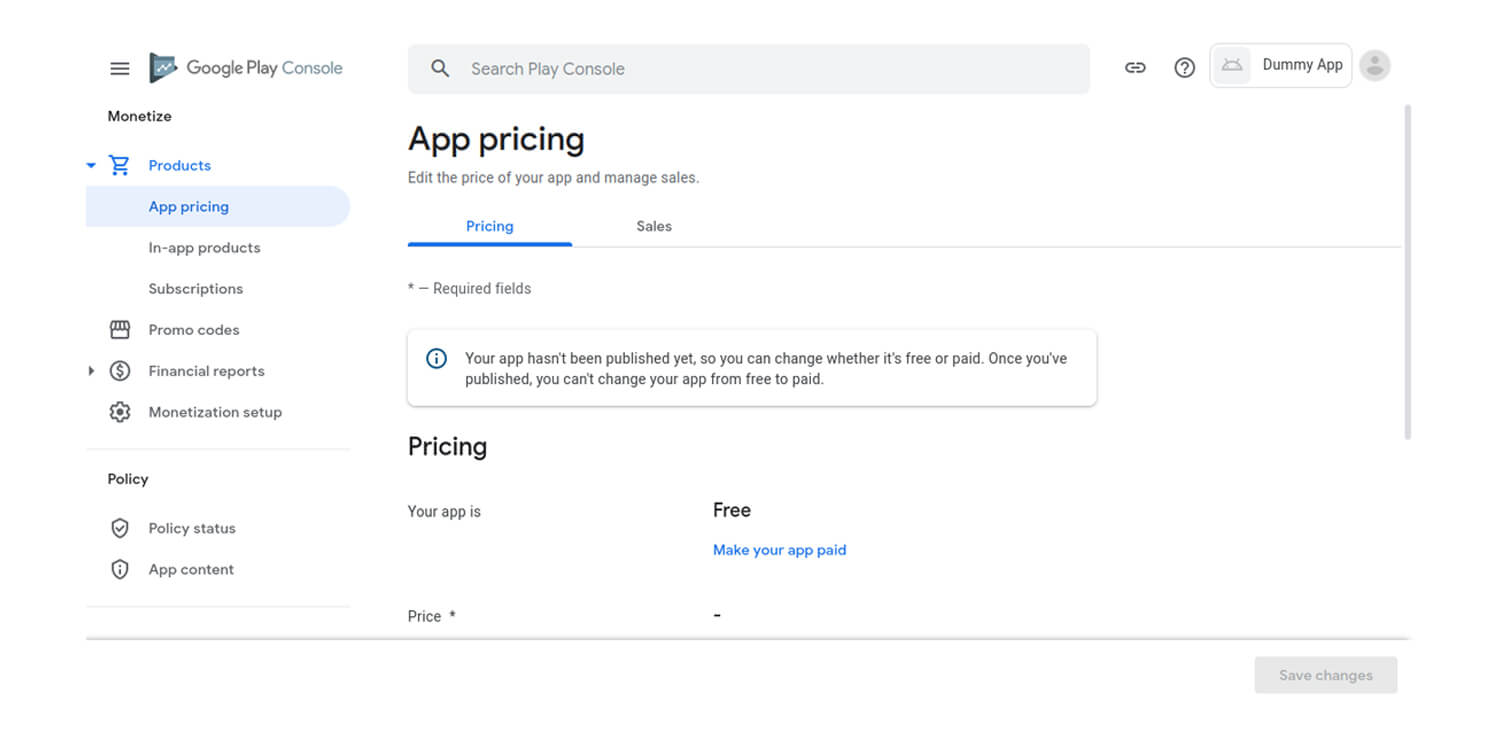
It is vital to figure out the countries you’re targeting to release your app on Play Store.
Why specific countries, you ask?
It is because Google does not support the worldwide release of the app; thus, only a few countries have to be selected.
Furthermore, app pricing is a significant step. Think once, twice, or even thrice before deciding if the app will be free or paid. Because apps published as free cannot be converted into paid apps later, only pricing adjustments are allowed.
To do the same,
- Go to the ‘Price and Distribution’ section, and select free or paid as per your choice.
- Next, select the countries to release your application or if the app is suitable for children under 13 or not.
- Also, don’t forget to select if your app wants to allow ads or not.
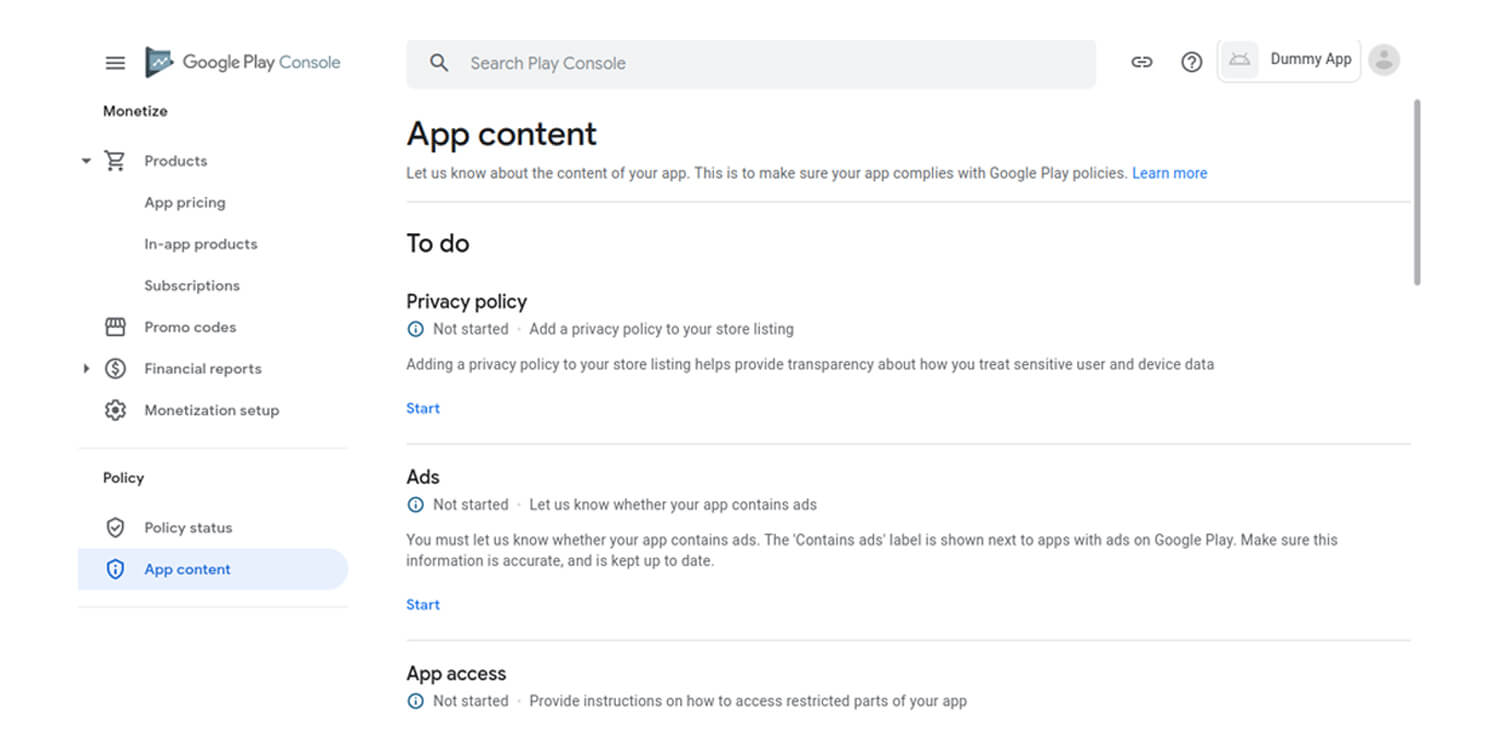
Step 8. It’s time to publish- FINALLY!
Once you’ve accurately followed all the steps, it’s time to upload the app to Play Store. To do the same, the steps are:
- Go to App Releases
- Select Manage Production
- Click Edit Release
- Review everything
- Click Start rollout to production
- Confirm submission
THE APP IS NOW SUCCESSFULLY UPLOADED!
Are you excited to witness what comes next? Wait for your application to get approved by the Play Store, as it may take a few hours or days before it’s finally live.
Common mistakes to avoid while uploading an app
Uploading an app on the Google Play Store may seem straightforward, but a few common mistakes can delay approval or even lead to rejection. Avoiding these early can save both time and effort.
- One of the biggest mistakes is ignoring Google Play policies. Google has strict guidelines around user data, permissions, and content. Missing a privacy policy or requesting unnecessary permissions can quickly get your app rejected.
- Another common issue is submitting an incomplete app listing. Many developers rush through this step, but missing screenshots, weak descriptions, or incorrect categories can impact both approval and visibility.
- Then comes the wrong file format. Google Play now requires apps to be uploaded in Android App Bundle (AAB) format. Submitting outdated APK files or incorrectly configured bundles can create unnecessary delays in the app submission process.
- Skipping proper testing is another mistake that shows up later and painfully. Apps with crashes, bugs, or performance issues often fail during review or receive poor ratings immediately after launch.
- A lot of developers also underestimate App Store Optimization (ASO). Ignoring keywords in your title and description means your app may go live but remain invisible to users.
- Lastly, incorrect content rating or pricing setup can block your app from publishing altogether. These steps may seem minor, but they are mandatory in the Google Play Console workflow.
Getting these basics right ensures a smoother Google Play Store app submission process and increases your chances of a successful launch.
Post-launch strategy for success: Marketing, updates, and growth
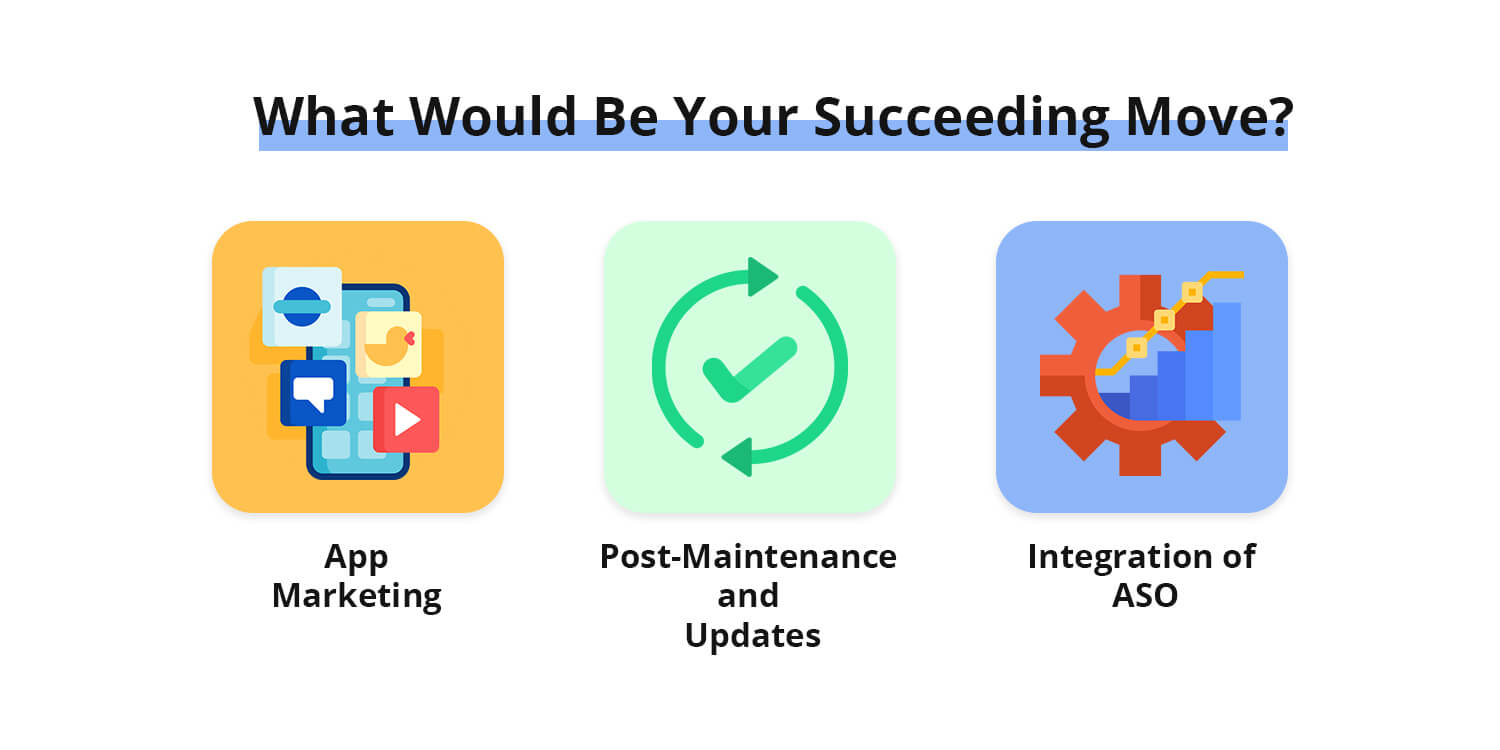
Once the app is uploaded on Play Store, the matter isn’t done and dusted! Your job still continues since you’ll have to follow a few steps to enable your app to acquire the exposure it deserves.
Don’t worry, we have got you covered. Take a sneak peek!
App marketing
What’s better than marketing your app on social media? As recorded in 2021, up to 57.6% of the population is on social media that spends hours using the same.
Micdrop!
Post-maintenance and updates
Mobile apps involve technicality and continuously need to be checked on! You might have to fight bugs and other issues that may appear once the app is all developed and live.
The best suggestion is to hire the best mobile app development company that would accompany you in your success journey!
App Store Optimization (ASO) for better visibility
One of the most popular practices followed by Android app developers is the adoption of ASO, which emphasizes app visibility and engagement.
Role of AI in app publishing and optimization
Publishing an app on the Google Play Store is no longer just a manual process. Today, AI is playing a growing role in how apps are launched, optimized, and scaled after going live.
AI in app store optimization (ASO)
To begin with, AI helps improve App Store Optimization (ASO). Instead of guessing keywords, AI tools analyze search trends, competitor apps, and user behavior to suggest high-performing keywords for your app title and description. This improves visibility and installs on the Play Store.
AI in content creation
AI is also being used to generate and refine app descriptions. With machine learning tools, developers can create multiple versions of app content, test them, and identify what drives better conversions.
AI in performance monitoring
Another key area is performance tracking. AI systems integrated with the Google Play Console can detect crashes, predict issues, and suggest fixes before they impact user experience.
AI in user behavior analysis
User behavior analysis is where Artificial Intellegence becomes especially useful. It tracks how users interact with your app, identifies drop-off points, and highlights which features are performing well or underperforming.
AI in review and sentiment analysis
AI tools can also analyze large volumes of user reviews. Instead of manual reading, they summarize feedback, detect sentiment patterns, and highlight recurring complaints or feature requests.
AI in predictive growth strategy
Finally, AI helps in forecasting growth. It can suggest optimal update timings, identify user segments, and guide decisions to improve engagement after you publish your app.
In short, while the process to upload an app on the Google Play Store remains structured, AI is transforming everything around it, from optimization to long-term scaling.
Also Read : Top 10 Best AI Tools for Coding in 2026: Top Picks for App Developers & Programmers
Google Play Store approval time and review process
The approval process on the Google Play Store usually takes 24 to 72 hours, but in some cases it can extend to 3–7 days depending on app complexity, policy checks, and review workload.
Once you submit your app through the Google Play Console, Google performs a policy and security review to ensure the app follows all guidelines, including data safety, permissions, and content compliance.
If everything is correct, your app gets approved and goes live. However, if issues are found, the app may be rejected or sent back with required changes before re-submission.
In short, approval is usually quick but it fully depends on how well your app follows Google’s publishing policies.
Cost to upload and maintain an app on Google Play Store
Uploading an app on the Google Play Store requires a one-time $25 registration fee for a Google Play Developer Account via the Google Play Console.
After that, publishing apps does not have any direct listing fee. However, the overall cost depends on app development, updates, and maintenance.
Maintenance costs vary based on features, bug fixes, server usage, and regular updates needed to keep the app running smoothly and compliant with policies set by Google.
In short, publishing is low-cost, but maintaining a high-quality app involves ongoing investment.
Build an App Ready for the Next Big Launch
Have an app idea? Our Android app experts can help you turn it into a market-ready product.
To sum up
So, was this the guide you were looking for?
Most likely – YES.
We’ve covered everything you need to know about uploading your app on the Google Play Store, from setup to submission. But publishing your app is just the beginning.
What truly decides success is what comes after: visibility, downloads, and user engagement. That’s where a strong marketing and ASO strategy makes all the difference.
If you’re planning to take your app live and want to do it the right way, we can help you shape the entire journey, from development to launch and growth.
Let’s build something impactful together. Get in touch.
Frequently asked questions
Q. How to Publish an App on PlayStore?
It may take about two days to publish an app on Play Store. But when you fail to follow the Google guideline to upload an app to the marketplace, it may take a little longer. However, it may take one week or more than that.
Q. How much does it cost to upload an app on the Play Store?
Although it may seem like uploading an app requires a lot of investment, the actual cost is quite minimal. You need to create a Google Play Developer Account, which comes with a one-time registration fee of $25. Once the account is set up, you can upload and publish apps on the Google Play Store without any additional listing charges. However, development, maintenance, and marketing costs may vary depending on your app requirements.
Q. Is it free to upload an app on the Play Store?
Yes, publishing or uploading an app on Google Play Store doesn’t cost you even a single penny. But as mentioned earlier, it requires a Google Developer Account to publish an app on the platform. Once you create an account on Google Play Store, you don’t need to pay any fees for uploading your app.
Q. What is Google Play Console?
Google Play Console is the official platform by Google that allows developers to upload, manage, and publish Android apps on the Google Play Store.
Q. What file format is required to upload an app?
Google Play Store now requires apps to be uploaded in Android App Bundle (AAB) format instead of APK.
Q. What happens if Google rejects my app on the Play Store?
If Google rejects your app, the Play Console provides information about the policy or technical issue that caused the rejection. Review the specified issue, make the required changes, and submit the updated app for another review. Addressing the exact policy violation before resubmitting can help avoid repeated rejection.
Q. Can I update my Android app after it is published on Google Play?
Yes. You can release updates to an app after it goes live on Google Play. Upload a new app bundle with an incremented version code, complete the required release information, and submit the update through Google Play Console. Google reviews updates against its applicable policies before they become available to users.
Q. How can I transfer a Google Play app to another developer account?
A published Android app can be transferred to another Google Play developer account when the transfer requirements are satisfied. The original and receiving accounts must meet Google’s eligibility conditions, and the transfer is initiated through Google Play Console. Certain account, app, and financial information may need to be prepared before the transfer.
Q. What should I do if my app is published but not appearing in Google Play search?
First, confirm that the app is fully published and available in the target country or region. Then review its store listing, indexing, metadata, category, and overall App Store Optimization strategy. Search visibility can also vary based on relevance, competition, user behavior, and the app’s performance.
Q. Can I publish multiple Android apps under one Google Play developer account?
Yes. A Google Play developer account can be used to manage multiple applications, provided each app complies with Google’s developer policies and publishing requirements. Each application has its own store listing, release configuration, testing requirements, and publishing workflow within Google Play Console.

Get in touch
We'd love to hear from you.