

 SA
SA
 KW
KW
 IE
IE AU
AU UAE
UAE UK
UK USA
USA
 CA
CA DE
DE
 QA
QA ZA
ZA
 BH
BH NL
NL
 MU
MU FR
FR















If you are managing a church, you know how complex it is. You need to keep track of members, organize events, manage finances, and so on. You may not realize it, but you need church management software.
Churches are going digital. More than 65% of churches in the U.S. are expected to use digital tools for operations management in 2025. Using this software will be like having your personal digital assistant. It will keep track of all members, help plan the budget, simplify routine tasks, and more. All while saving you time and promoting community engagement.
So, picking up the best church management software is crucial for the success of any ministry. Since there are many church facility management software available in the market, choosing the right software can be quite confusing. So, what to look for in church management software while investing? This is what we’re going to discuss today.
11 Must-Have Features for Church Management Software
When evaluating solutions, look for these key church management software features:
1. A Customizable Contact Database
Church is all about building community and nurturing relationships. So, it is important for any software for church management to feature a customizable contact database. Using that database, you can easily find all members’ information in one place and customize it.
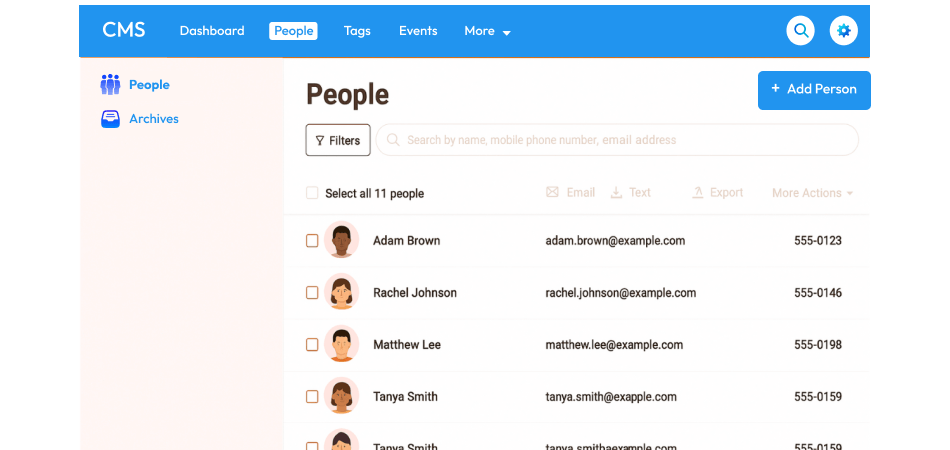
You/admin can check their background check renewals, spiritual gifts, child food allergies, or anything that can help with the church management. In addition, you can organize the contact list, connect with church members, and discover who the members are in your community.
Your ChMS (church management software) database should:
- Have unlimited contact storage with no extra cost.
- Have customizable fields for search & filter.
- Be accessible over mobile, desktop, and tablet.
- Create & share photo directories.
Remember, the best church management software lets you add custom fields, tag members, and easily access their data. Detailed information can only be stored and organized with customizable data fields.
2. Online Giving, Text-To-Give, and Mobile App Payments
Cashless transactions are common, and your church management software must offer different digital giving options. Your church members are more likely to donate if the online payment facility is available. Even better would be to allow them to give financial gifts via an app or text message.

So if your church facility management software supports online giving, text-to-give, and mobile app payments, all in a secure and user-friendly way, tasks like donation tracking and collection become much more easier. Moreover, members can contribute anytime, from anywhere.
Your software for church management should:
- Track members who donated and their gifts.
- Show insights on the church’s financial health, like financial reports, charts, etc.
- Easily create end-of-year tax statements and send them.
3. Volunteer Scheduling
Churches rely on volunteers, and managing their schedule is one of the most important aspects of church management. It is very complex to connect and coordinate with multiple ministries, like the bookstore, security, tech, hospitality, etc.
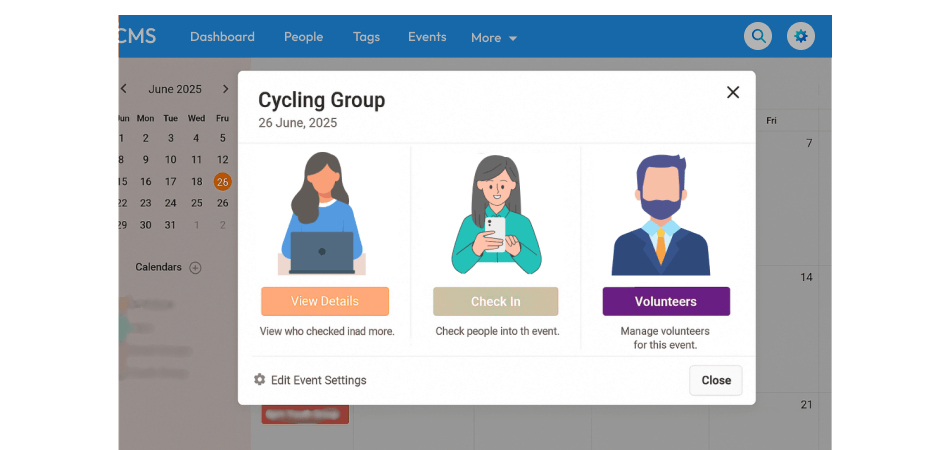
Hence, it is crucial for ChMS to simplify volunteer management and scheduling. It should allow recruitment and scheduling, so that no one misses any shift. You can easily communicate with and assign volunteers for ministries and events. If it features automated reminders, it’s a huge plus.
4. Child Check-in
Safety has always come first, and when it comes to a child, it becomes a top priority. Parents mostly look for an excellent children’s ministry in church.
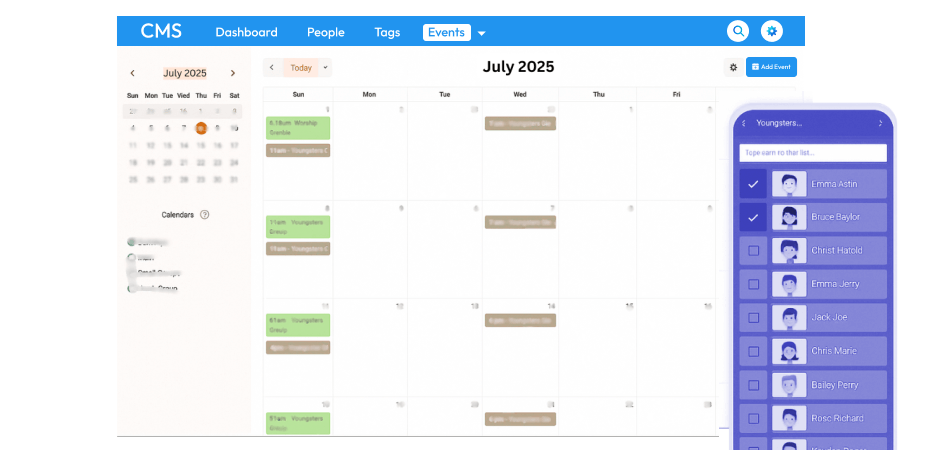
Apart from fun, a key element to an effective children’s ministry is having an organized environment where parents don’t have to think twice before leaving their children, but rather feel comfortable knowing their children are safe.
Look for a church management software that features a child check-in system that helps ensure secure drop-offs and pick-ups, with digital ID tags and live tracking.
5. Email and Text Communication
Since effective communication keeps the congregation engaged, a communication platform is necessary. Email and text are the easiest ways to communicate with church community members. You can make important announcements, inform about upcoming events, fundraising campaigns, volunteer opportunities, workshops, classes, etc.
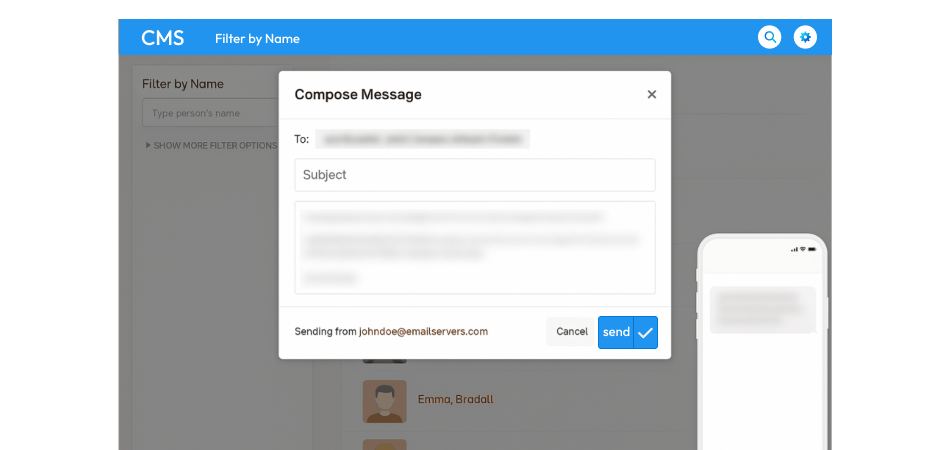
The best church management software shouldn’t miss an integrated email and text messaging feature. This way, you can reach out to multiple members by sending a message in specific groups.
6. Group Management
As we’ve already mentioned, creating groups in the ChMS is the best way to organize church members and visitors and inform all of them about anything with just a click.
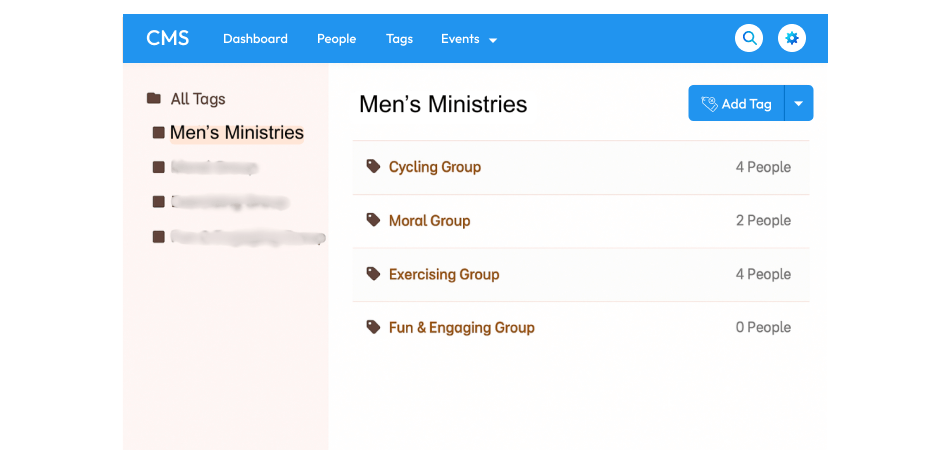
You can segregate the members according to ministry or anything specific, like Bible study, kids’ ministry volunteers, hospitality crew, elders, worship team, etc. ‘Group’ is a key function of any software for church management for better organization and church management.
Group organization in a church management software should:
- Have a tagging feature so that you can tag an individual and notify them when you talk about something specific to them.
- Work seamlessly with the email and text message tool.
- Feature automation so that members are automatically added to groups based on specific criteria.
7. Affordable Price
Churches have fixed budgets. Some churches are small in size, and they don’t have big budgets. Whatever the excess budget they have, they’re willing to spend it on starting a new ministry, hiring a new staff member, or upgrading the building.
So it is important to find a church facility management software that offers great value for money. Your ChMS should be budget-friendly, which means it should offer all essential features without asking for high costs. It should cost less than $100 per month, and possibly as little as $75. Many solutions offer subscription-based pricing, often scaling with the size of your congregation.
Pay attention to hidden costs too. The best church management software team helps migrate and transfer your data for free.
“BONUS TIP: SaaS-based church management software is often more affordable and scalable. To help you build that, connect with Techugo, a leading software development company in US, UK, Canada, and UAE.”
8. Registration and Scheduling of Events
No more clipboard sign-ups for Bible studies, Vacation Bible School, or church potlucks. The best church management software centralizes all your ministry events so that you can have a clear view of what’s happening, when, and where.
Your church management software should feature event registration and automated follow-up options, and allow members to register online themselves and sync calendars easily. So that they don’t miss anything. Custom registration forms will be plus.
By using a single software, you can create event pages, manage registrations, process payments for paid events, and send automated notifications.
For a smooth event planning and execution, a good church facility management software is a must.
9. Attendance Tracking and Reporting
Understanding participation is vital for church growth. So, for church leaders, it is important to know who is attending what. Because tracking and reporting attendance allows them to reach out to absent members and encourage them to participate more in services, classes, and activities. So that a more engaged and connected community can be built.
Your church management software must provide real-time data and reports on attendance. It should also give insights into engagement trends, seasonal fluctuations, and help identify areas for pastoral care. Leaders can even get an idea of what services and events are most popular through attendance reports.
10. Financial Reporting
Church finances need transparency, and this becomes easy when everything is tracked under a single tool, i.e., church management software. The software should offer robust financial tracking and reporting. You make sure it tracks tithes, donations, expenses, and offerings.
Look for church management software features that generate detailed financial reports, summaries, and year-end statements for transparency and compliance.
This transparency will further help leaders with audits, budget planning, monitoring the financial health of the church, and maintaining accountability.
11. Leader and Member Engagement
Ultimately, the software should promote stronger relationships. Features that promote engagement, like member portals, prayer request submissions, and opportunities for feedback, empower both leaders and members to connect more deeply with the church community.
So your church management software must have options to assign tasks, share content, and keep members and leaders connected. Also, communication via email and text plays a crucial role in the leader and members’ engagement.
Build a Smarter Church Management Solution
Turn your church’s administrative needs into a scalable digital solution with the right features, integrations, and user experience.
Why SaaS is Ideal for Church Management Software
SaaS (Software as a Service) is a smart choice for churches in 2025. It makes software easier to use, cheaper to manage, and faster to update.
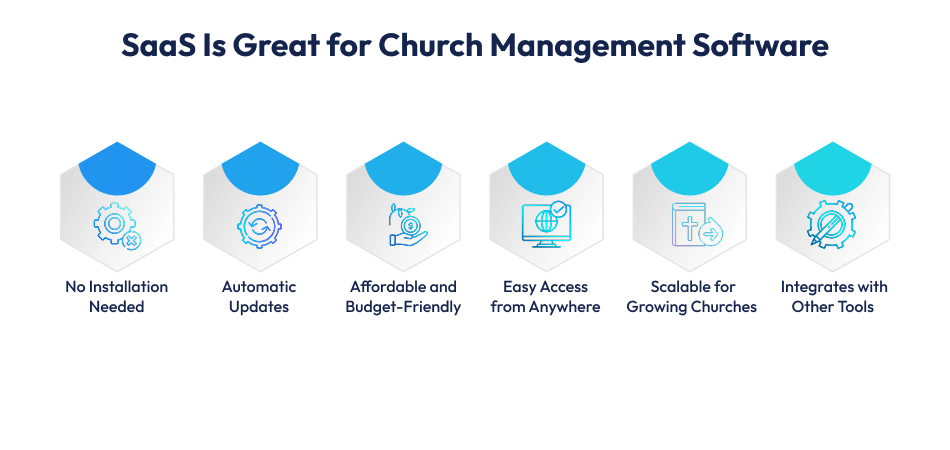
1. No Installation Needed
With SaaS-based church management software, there’s nothing to install; you just go to the browser, sign in, and start working. It saves time and avoids tech headaches.
2. Automatic Updates
The best SaaS application development companies keep your software up to date. You don’t need to worry about downloading or installing updates. New features are added automatically.
3. Affordable and Budget-Friendly
Churches often work with tight budgets. SaaS offers monthly or yearly pricing plans, so you don’t need to pay large amounts up front. It reduces overall software development cost while giving access to premium features.
4. Easy Access from Anywhere
You can use SaaS church software on phones, tablets, or laptops. Whether you’re at the church or working remotely, all your tools are in one place. This is perfect for mobile churches and churches with teams in different locations.
5. Scalable for Growing Churches
As your church grows, you can add more users or features without starting over. SaaS is scalable. You pay for what you use and upgrade only when needed. That’s why it’s great for custom software development.
6. Integrates with Other Tools
SaaS platforms often connect with other useful software. For example:
- Facility management software to manage church buildings and bookings
- SaaS contract management software to manage employees, suppliers, and contracts.
This gives you a full solution to manage all church operations.
Work with Techugo – The Right SaaS App Development Partner
To build powerful software for church management, you need a team that understands both your mission and your tech needs.
Techugo, which stands out as a leading SaaS application development company in USA, Canada, UK, and UAE, has a team with years of experience in providing SaaS application development services across industries. They are skilled in building user-friendly SaaS MVPs and have complete knowledge of church facility management software.
Techugo has a strong track record in SaaS product development company projects. We’ve delivered over 1400 mobile apps, showing significant results, including 1M+ downloads in 6 months and earning 4.7-star ratings in app stores. We have experience working with Fortune 500 companies as well as startups. This shows how capable we are of delivering high-quality, complex projects.
Techugo has well-positioned itself in helping religious communities to transform digitally with SaaS app development services. We at Techugo, an expert mobile app development company in USA, can guide you from idea to launch, and beyond.
SaaS is the future of church management software – simple, affordable, and scalable. Let’s build the best tools for your ministry.
Benefits of Church Management Software
Church Management Software (ChMS) helps churches run better. It handles daily tasks so leaders can focus on ministry and people. Here are some key benefits of using software for church management:
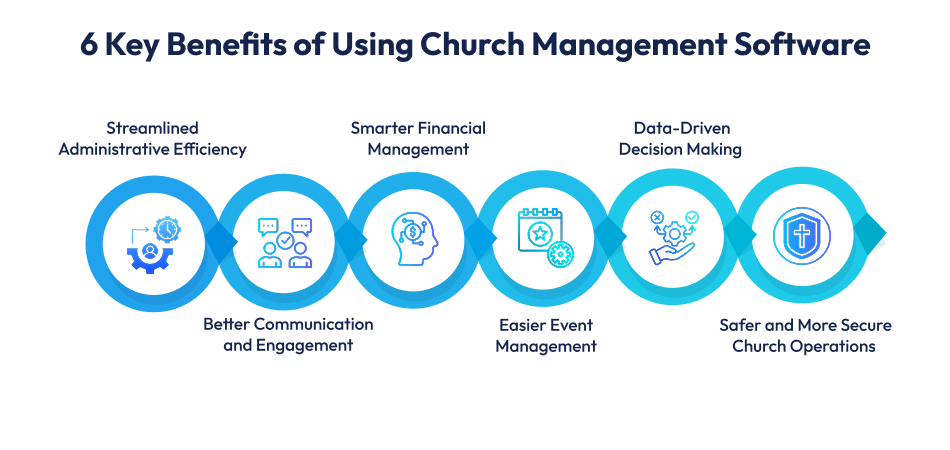
1. Streamlined Administrative Efficiency
The era of paperwork in church administration is over. Church management software saves time and reduces paperwork. It automates your daily tasks like attendance tracking, volunteer scheduling, and member records. too.
No more manual data entry or juggling Excel spreadsheets. Staff and volunteers can use that time for ministry work.
Church facility management centralizes everything securely – member data, donations, event details, and volunteer info. With ChMS, you don’t need to organize scattered notes or find missing files. It organizes everything and manages all church activities smoothly in just a matter of minutes. Workflows are smooth. Errors are fewer.
2. Better Communication and Engagement
Church software enhances the way you communicate with your members. It uses built-in tools for email, text messages, and app notifications, and sends group messages or personal updates. Using this software, nobody can miss any events and news related to the church.
Admin can view member profiles and prayer needs, and offer personalized care and follow-up. It lets members submit requests, feedback online and helps manage volunteers better.
You can recruit and schedule volunteers with ease. Reminders and updates are automatically sent to members to keep ministries organized and fully staffed.
3. Smarter Financial Management
Church management software makes accounting easy. It supports online, text, and mobile giving, making donations easy. The software tracks tithes, offerings, and expenses in real-time.
It uses clear reports for budgets and stewardship planning, and reconciles finances faster and with fewer errors. You can easily share reports with upper management, generate giving statements for tax season, and stay compliant with financial guidelines.
4. Easier Event Management
You can create event pages, manage signups, and accept payments online. You can send automatic reminders to attendees.
There is no need for manual registration lists; you can avoid scheduling conflicts by using a centralized calendar, tracking bookings for rooms, equipment, and volunteers. Ultimately, you can know what’s happening and when.
5. Data-Driven Decision Making
Church management software helps you grow with data. You can get insights from reports on attendance, giving, and engagement, and learn what’s working and where you need to improve.
You can make smart decisions, use data to plan ministries and outreach, and allocate resources where they’re needed most.
6. Safer and More Secure Church Operations
ChMS protects your data and your people. A good church facility management software includes data encryption and backup. It only allows authorized users to access sensitive information.
For ChMDS, child safety is a top priority as it secures child check-in tools that keep track of kids during programs so that parents and leaders can relax, knowing children are safe.
“In short, opting for a church management software is a strategic investment. It’s a way to run your church better, connect with people, and serve with purpose.”
Church Management Software Development Cost in 2025
| Estimated Cost of Developing Church Management Software | ||
| App Level | Estimated Cost | Features Included |
| Basic ChMS | $5,000 to $10,000 | Member management and event scheduling. |
| Medium ChMS | $10,000 to $15,000 | Donation tracking and communication tools, in addition to the basic app features. |
| Advanced ChMS | $15,000 to $25,000 or more | Comprehensive solutions with advanced features and high customization. |
The costs mentioned above are general cost estimates; however costs depend on various factors. There are many factors that affect church management software development costs. It is important for you to understand those factors before planning and budgeting.
- Feature complexity – the more the features, the higher the cost.
- GDPR regulatory compliance
- Integration with third-party software.
- Development team location
- Reporting and analytics requirements
- Post-launch support and maintenance
- Customization needs
- Platform selection (iOS vs Android)
- UI/UX – intuitive design and user-friendly interfaces
- Scalability and future-proofing
Depending on particular needs and market conditions, the above cost estimates may change. Schedule a free consultation call with our expert professionals. They will provide a more accurate assessment customized to your church’s requirements.
FAQ’s
1. Can church management software support multiple church locations?
Yes. Church management software can support churches operating across multiple campuses, branches, or locations by providing a centralized platform for managing information and administrative operations. Each location can maintain its relevant data while authorized administrators can access an overall view of the organization. A multi-location system can also help standardize workflows, permissions, and reporting across campuses while allowing individual locations to manage their own operational requirements.
2. Can church management software integrate with accounting platforms?
Yes. Church management software can integrate with accounting platforms to streamline the exchange of relevant financial data between systems. This can reduce repetitive data entry and help administrators maintain more consistent records. Depending on the integration, information can be transferred through APIs or other supported integration methods. Churches should evaluate whether the software supports their existing accounting platform and whether the integration can accommodate their specific financial workflows.
3. Does church management software support role-based access?
Yes. Role-based access allows churches to control which users can view, modify, or manage specific areas of the platform. For example, an administrator may have broader access than a ministry leader or staff member. Permissions can be configured according to organizational responsibilities, helping limit access to sensitive information and reducing the risk of unauthorized changes. When evaluating a ChMS, churches should check whether roles and permissions can be customized as their organizational structure changes.
4. Can church management software be customized for different denominations?
Yes. Custom church management software can be adapted to accommodate the operational structures and workflows of different denominations. Churches may have different administrative processes, terminology, ministry structures, approval workflows, and reporting requirements. A customizable platform can be configured around these requirements instead of forcing every organization to follow a fixed workflow. During development, churches should clearly define their denomination-specific requirements so the software architecture and user experience can accommodate them.
5. How can churches migrate data from an existing system to new software?
Churches can migrate existing information from spreadsheets, databases, legacy church management platforms, or other systems into a new ChMS. The migration process generally starts with identifying the data that needs to be transferred, removing duplicate or outdated records, standardizing data formats, and mapping existing fields to the corresponding fields in the new system. The data can then be imported or transferred using supported migration tools, APIs, or custom scripts. Testing and validation should be performed after migration to identify missing, duplicated, or incorrectly mapped information.
6. Can church management software work with third-party APIs?
Yes. Third-party API integrations can allow church management software to exchange data with external applications and services. APIs can be used to connect the platform with accounting systems, communication services, payment providers, websites, mobile applications, or other business tools, depending on the requirements. When selecting or developing a ChMS, churches should review the available APIs, integration capabilities, authentication methods, data synchronization requirements, and documentation to ensure the platform can work effectively with their existing technology ecosystem.
7. What type of support should churches expect after deploying church management software?
Post-launch support can include technical assistance, software maintenance, bug fixes, security updates, performance monitoring, troubleshooting, and future enhancements. Depending on the provider, support may be available through email, phone, live chat, ticketing systems, or dedicated account teams. Churches should also clarify the scope of maintenance, response times, update policies, data backup procedures, and additional development costs before selecting a provider. A clearly defined support agreement can help ensure that the software continues to function effectively as the church’s requirements evolve.
8. Can church management software support different user roles for staff and administrators?
Yes. Church management software can provide separate user roles for administrators, pastors, ministry leaders, staff members, coordinators, and other authorized users. Each role can be assigned specific permissions based on its responsibilities. For example, one user may only need access to particular administrative functions, while an administrator may require access to broader system controls. This approach helps organizations maintain structured access to information and reduces unnecessary exposure to sensitive data. The ability to create and modify custom roles can be particularly useful as the church expands its team structure.
9. How long does it take to implement church management software?
The implementation timeline varies depending on the complexity and scope of the church management solution. Factors such as the number of users, amount of existing data, data migration requirements, third-party integrations, customization, testing, training, and deployment approach can all affect the timeline. A relatively straightforward implementation may require less time than a highly customized platform that integrates with several external systems. Before development or deployment begins, churches should establish requirements, define milestones, prepare their existing data, and create a testing plan to reduce implementation delays.
10. What technologies can be used to build custom church management software?
Custom church management software can be developed using different technologies depending on the required features, scalability, integrations, security requirements, and deployment environment. A typical solution may include a web-based administrative platform, cloud infrastructure, a backend application layer, a database, APIs, and optionally mobile applications for authorized users. Technologies such as React, Angular, Node.js, .NET, Java, Python, PostgreSQL, MySQL, and cloud platforms can be considered depending on the project’s architecture. The technology stack should ultimately be selected based on the church’s functional requirements, expected user volume, integration needs, long-term maintenance, and scalability goals.
Ready to Build Your Church Management Software?
Partner with experienced developers to create a secure, scalable church management platform tailored to your organization’s requirements.
Summing Up…
In 2025, well-chosen church management software is more than just a tool; it’s a strategic asset for your ministry.
By prioritizing features like a strong contact database, multiple giving options, efficient scheduling, and complete financial reporting, alongside the benefits of a SaaS model, your church can thrive in its mission.
Utilize the power of technology to connect, grow, and serve your community more effectively than ever before.
Get started with Techugo, one of the best church management software development companies in US. Till then, visit our portfolio and see our developed products achieving significant success in the market.

Get in touch
We'd love to hear from you.