 SA
 KW
 IE
 AU
 UAE
 UK
 USA
 CA
 DE
 QA
 ZA
 BH
 NL
 MU
 FR

















📌 Key Takeaways
- Important features include e-prescribing, inventory tracking, insurance claims, patient management, and analytics.
- Automation helps reduce manual work, prescription delays, and inventory management challenges.
- Healthcare integrations enable seamless data exchange between pharmacies, EHRs, PBMs, and suppliers.
- Pharmacy software development costs range from $30,000 to $300,000+ depending on complexity and scope.
Pharmacy businesses in the USA come in many forms. This ranges from independent retail and hospital pharmacies to specialty drug providers and large pharmacy chains, and they are all in search of better ways to handle their prescriptions, inventories, billing, and patient services.
However, tackling these operations through manual processes or by means of old systems poses its own problems and obstacles; namely, delays in prescription processing with different kinds of discrepancies in stock, errors in insurance claims, and various compliance requirements.
This is where pharmacy management software development starts playing its role.
The opportunity in pharmacy software is further explained in this report. The pharmacy management system market size in 2026 is estimated at $116.45 billion, growing from the exponential base of $101.07 billion in 2025. Moreover, the projections for 2031 show this market size will grow to $236.28 billion, growing at a compound annual growth rate (CAGR) of 15.22% over 2026 – 2031.
When you have read all this, the question remains: “So, what does it take to develop pharmacy management software for the US market?” How much does it cost, and should you invest in a custom solution or choose an off-the-shelf product?
What Is Pharmacy Management Software Development?
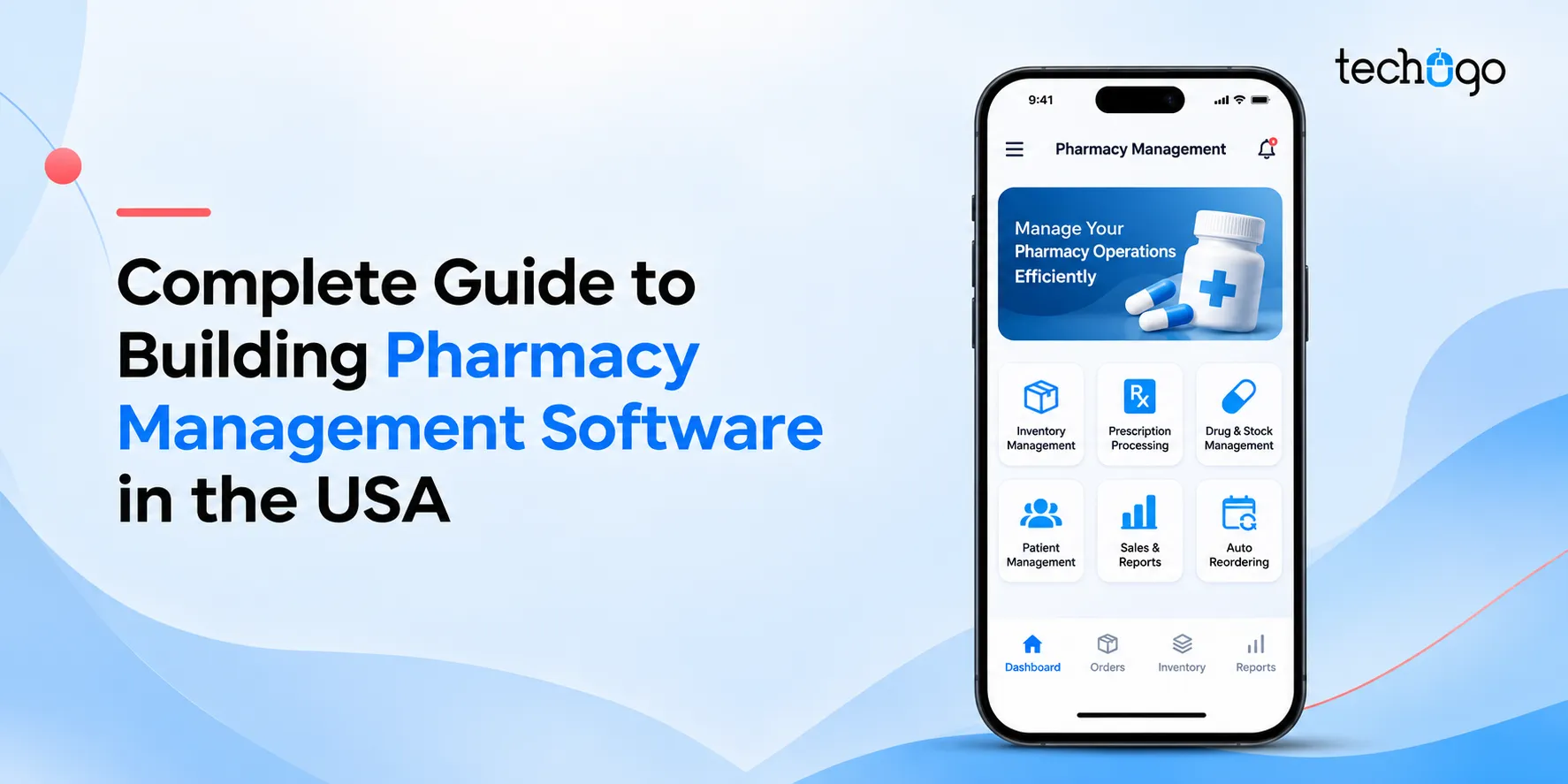
The process of designing and building custom or generic software that maintains prescriptions, dispensing, inventory, billing, insurance claims, and regulatory compliance for a pharmacy is nothing but pharmacy management software development.
These solutions bring essential pharmacy operations together under one system, reducing the need for repetitive work and helping pharmacy teams get hold of the information that is necessary.
Depending on the business model, the features could look like this (but don’t worry, the important ones will be explained later):
1. Prescription processing and refill management
2. Medication inventory tracking and automated reorder alerts
3. Patient profiles and medication history
4. Insurance claim processing and pharmacy billing
6. Electronic prescription (e-prescribing) workflows
7. Reporting and business analytics
9. Notifications for prescription readiness and refill
Looking To Develop Pharmacy Management Software?
Partner with Techugo to build a solution tailored to your business needs.
Why Is Pharmacy Management Software Important In The USA?
In the USA, pharmacies have played an important role from a customer and business standpoint. Pharmacy management software is the backbone that drives insurance businesses, wholesalers, and even patients. So, here are some of the reasons why such software works in the North American market:
1. Managing Prescription Workflows: Prescriptions, refills, transfers, and medication-related requests are what pharmacies in various US states handle. So, what can help them here? Well-designed prescription management software keeps track of prescription status, organizes such activities, and flags potential issues.
2. Improving Medication Inventory Management: A pharmacy is a business of maintaining stocks at all levels. Whether it is a medicine for fever or even a simple syrup. But the risk of overstocking and understocking remains. To overcome this, pharmacy management software development services are designed to track both metrics mentioned above, along with expiration date, and comfort purchase plan.
3. Regulation & Compliance: Regulations and compliance not only in the USA but in other countries around the world are important to abide by. Therefore, a combination of DEA (Drug Enforcement Administration), FDA (Food & Drug Administration), and others must be followed in the 50 states.
4. Simplifying Insurance Claims & Billings: Insurance claims and billing have always been in a turf war with each other. Billing says something else, and insurance companies claim that it does not match (in some cases). But this is simplified through custom pharmacy management software solutions that track submission status, identify reasons for rejection, and much more.
5. Patient Safety Support: This is as simple as it sounds. Custom pharmacy management software development systems take into account patient history, control e-scripts, and send alerts for automated refills.
Types of Pharmacy Management Software For US Pharmacies
Not every pharmacy operates in the same manner. An independent pharmacy may have different requirements than those of a hospital pharmacy. Therefore, understanding what the available types are and how they will help your business is important. So, here’s the list:
Specialty Pharmacy Software
When considering this, specialized storage, additional patient support, prior authorization, or close monitoring are factors you must know about. However, cost is a major factor that can go up substantially. Through medical software development, it supports:
1. patient enrollment
2. benefits verification
3. former authorization tracking
4. tracking medication adherence programs
Compounding Pharmacy Software
Developed for customized medications that are based on individual prescriptions is what compounding pharmacy software targets. Compounding pharmacy software supports:
1. formulation records
2. ingredient inventory
3. batch tracking
4. calculations
5. labelling
6. preparation workflows
Hospital Pharmacy Management Software
When it comes to hospital pharmacy, medication management with hospitals and large healthcare facilities are the greater beneficiaries. Generally, it includes:
1. medication dispensing workflows
2. formulary management
3. medication administration integrations
4. unit-dose distribution
5. electronic health records
Independent & Community Pharmacy Software
Under pharmacy management system software development, independent and community pharmacies are developed for single-location or a small community. If you take a look at the DNA of such pharmacy software, these systems focus on:
1. localized prescription processing
2. medication alignment
3. point-of-sale (POS) integration
4. patient outreach
Enterprise & Multi-Location Health System Software
Developed for enterprise-level hospital chains, health systems, and regional groups that need centralized multi-location reporting, standardized workflows, and strict EHR integration. With the help of pharmacy software development, this software can provide:
1. consolidated reporting
2. location-level permissions
3. Inventory visibility
4. standardized workflows
Home Infusion & DME (Durable Medical Equipment) Software
Home infusions and DME are certainly more personalized than anything else in the group. It combines the best of:
1. pharmacy dispensing + home nursing
2. equipment delivery
3. multi-part delivery
4. clinical documentation
Key Features of Pharmacy Management Software
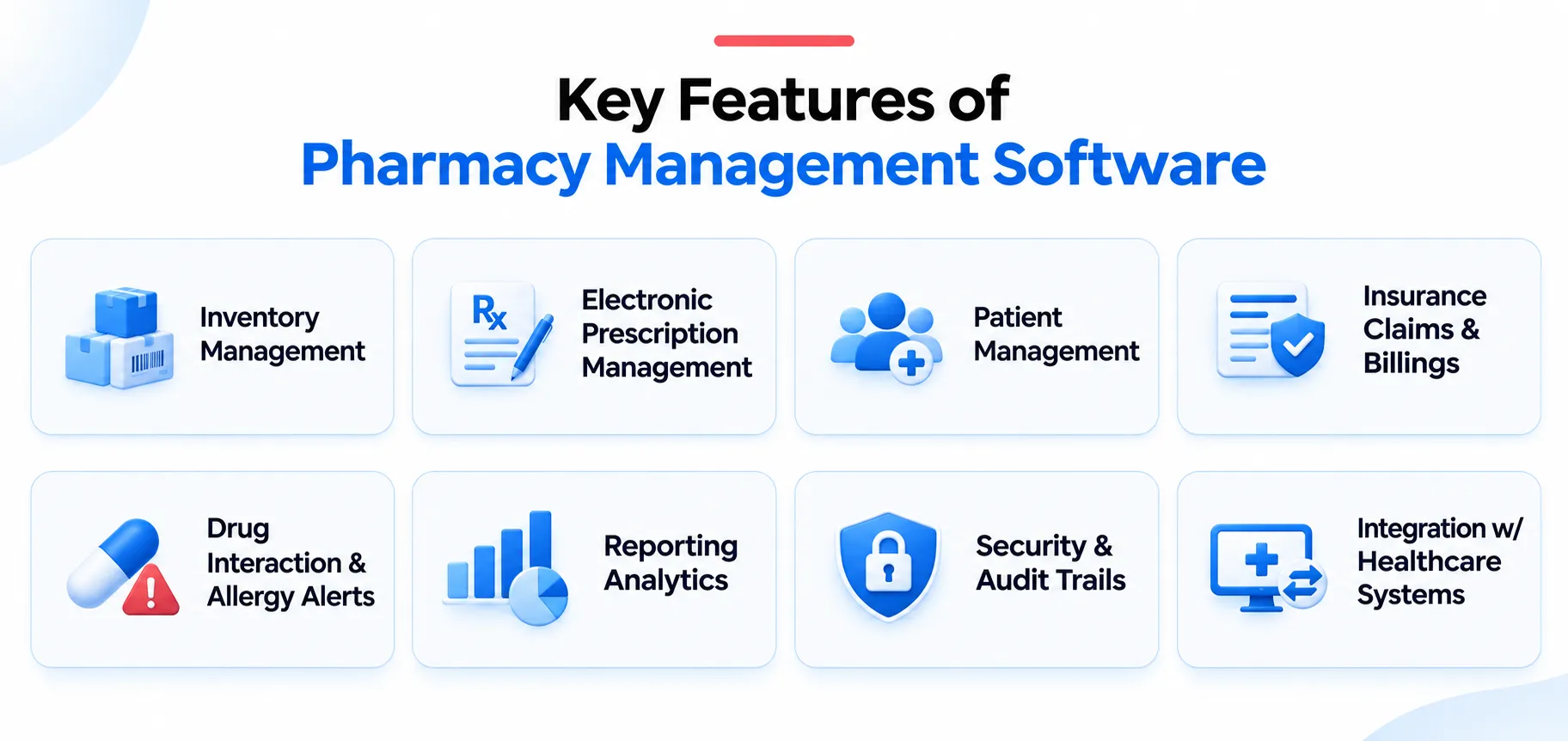
Pharmacy management system features are one of the most important, if not the most essential, aspects of the whole software. So, to understand and implement the modules of pharmacy management systems, it is important to know about them.
Therefore, take a look at the features of pharmacy management systems in the USA:
Inventory Management
1. Medication tracking using National Drug Code (identifiers)
2. Batch, lot number, and expiration date management
3. Low-stock alerts and automated reorder notifications
4. Inventory tracking for prescription drugs, over-the-counter (OTC) products, and other pharmacy items
5. Supplier and pharmaceutical wholesaler management
6. Inventory reconciliation and support for applicable drug recall procedures
Electronic Prescription Management
1. Integration w/ US e-prescribing networks and supported prescribing platforms
2. Support for NCPDP (National Council for Prescription Drug Programs) SCRIPT standards for prescription transactions
3. Electronic prescribing of controlled substances (EPCS) subject to DEA requirements
4. Prescriber identity verification and required authentication workflows through healthcare app development
Patient Management
1. Centralized patient profiles w/ contact information and history of prescriptions
2. Medication profiles, recording allergies, and relevant clinical information
3. Insurance information and pharmacy benefit deals
4. Support for patient privacy and safeguards under applicable HIPAA-compliant healthcare app development
5. Access controls for authorized pharmacy staff
Insurance Claims & Billings
1. Integration with supported pharmacy benefit managers and claims processors
2. Electronic prescription claims submission and adjudication workflows
3. Coordination of eligible third-party payer billing and patient payments
4. Reimbursement reporting and claims reconciliation
5. Patient copayment and deductible calculations based on available payer information
Drug Interaction & Allergy Alerts
1. Drug-interaction alerts using supported clinical drug databases
2. Allergy conflict and duplicate therapy notifications
3. Dosage range and medication safety warnings, where supported
4. Clinical decision-support tools for pharmacist review
5. Configurable alerts to reduce unnecessary interruptions
Reporting Analytics
1. Prescription volume and dispensing performance reports
2. Medication inventory, expiration, and wastage analysis
3. PBM claim rejection and reimbursement trend analysis
4. Controlled substance inventory and transaction reports, where applicable
5. Operational reports to support audit and applicable regulatory environment
Security & Audit Trails
1. Role-based access control for pharmacists, technicians, administrators, and other authorized staff
2. Strong authentication and secure account management
3. Encryption of protected health information (PHI) in transit and at rest
4. Safeguards designed to support applicable HIPAA Privacy, Security, and Breach Notification requirements
5. Secure backup, recovery, and incident monitoring capabilities
Integration With Healthcare Systems
1. Integration with US electronic health record (EHR) and electronic medical record platforms
2. Connectivity with supported e-prescribing networks
3. Integrations with PBMs, insurance claims processors, and paper systems.
4. API-based data exchange using applicable standards such as HL7 FHIR where appropriate
5. Connections with pharmaceutical wholesalers and inventory suppliers through a medical software development company
Benefits of Pharmacy Management Software Development
Why would you even go for pharmacy software development? It must give you considerable benefits which elevates your current pharmacy system, adds to its functioning, or maybe you are just looking for a new one.
So, here are some of the benefits of pharmacy management systems:
1. Streamlined Prescription Management
Pharmacy management software helps streamline prescriptions in a single database. It can collect e-prescriptions, help track prescriptions, remind patients to refill their prescriptions, record medications dispensed, and provide pharmacists with reviews of workflows.
The result? The pharmacy team spends less time managing paperwork and more time focusing on patients.
2. Better Inventory Management
Custom pharmacy management software solutions allow your company to control stock levels, trace the batch numbers used, keep track of expiration dates, and receive automated alerts for reordering.
Advanced technologies can also analyze data related to patterns of selling and dispensing in the past to your business to know what will be needed in the future.
3. Improved Billing & Insurance Claim Processing
In the United States, pharmacy billing can involve third-party payers, pharmacy benefit managers (PBMs), eligibility checks, claim submissions, rejections, and reimbursement tracking.
Programs like pharmacy management software can simplify the daily work process through billing activities. Depending on the type of integration, it may provide claim submission, payment tracking, rejection handling, and reconciliation services.
4. Enhanced Patient Experience
In this world of confusion and too much information, what do patients really want? It is simple, convenient, reliable, and easy-to-access services. This definitely makes their life simpler.
What if you had to wait in long queues? This will surely worsen your experience, which further leads to missed refill notifications and unclear prescription laws. So, better to go for telemedicine app development, which allows video calls and phone calls and actually makes the experience worthwhile.
5. Stronger Data Security & Access Control
Sensitive data such as patient identities, prescription records, medication histories, and insurance details are all things that a pharmacy app holds. So, protecting each one of them is important to create lasting trust and meet regulations.
Modern pharmacy software can incorporate role-based access controls, encryption, audit logs, secure authentication, and recovery mechanisms.
6. Data-Driven Business Decisions
Without reliable operational data, pharmacy owners may struggle to understand which products sell consistently, where money is being lost, or when staffing levels need adjustment.
So, a pharmacy management software development company can provide dashboards and reports covering inventory turnover, sales trends, prescription volumes, claim rejections, and more.
Challenges In Pharmacy Management Software Development
For businesses targeting the US pharmacy market, these challenges can become even more complex due to healthcare regulations, payer requirements, and state-specific pharmacy laws. These can be some heck of a challenge. So, let’s explore some of the major ones:
1. Ensuring Regulatory Compliance
Pharmacy software may need to support HIPAA requirements, DEA regulations for electronic prescriptions for controlled substances, state pharmacy laws, and relevant NCPDP transaction standards.
The challenge is that these requirements can vary depending on the software’s functionality, the pharmacy’s location, and the type of information being processed.
2. Integrating With Existing Healthcare Systems
Pharmacy management software rarely operates independently. It often needs to communicate with electronic health records (EHRs), e-prescribing networks, pharmacy benefit managers (PBMs), insurance payers, wholesalers, and payment platforms. However, these systems may use different APIs, data formats, transaction standards, and authentication mechanisms.
For example, integrating prescription workflows with an e-prescribing network may require specific standards and vendor approval, while insurance claim processing may involve separate payer connections.
3. Protecting Sensitive Patient Information
Pharmacies handle highly sensitive information, including patient identities, prescription histories, medication details, and insurance records. Protecting such information is important for maintaining patient trust and meeting applicable privacy and security obligations.
At the same time, pharmacy staff need quick access to relevant information to perform their daily responsibilities.
4. Managing Real-Time Inventory & Medication Availability
Inventory is an essential part of the pharmacy software that needs to be updated for multiple locations. Stock levels change continuously as prescriptions are distributed, new shipments arrive, medicines expire, and products are recalled.
If inventory information is inaccurate, pharmacies may experience stockouts, overstocking, dispensing delays, or financial losses.
5. Handling Complex Insurance Billing & Claims
Pharmacy billing in the USA can involve multiple payers, PBMs, reimbursement rules, eligibility checks, and claim rejection scenarios. A claim may be rejected because of incorrect patient information, coverage limitations, formulary restrictions, or missing transaction details.
Managing these issues manually can increase administrative workload and delay reimbursement.
How Much Does Pharmacy Management Software Development Cost In The USA?
The cost of developing a pharmacy app for the USA market is a serious point of contention. But basically, it covers the project’s scope, features, technical complexity, security needs, and whatnot.
So, are you making guesses about your pharmacy application’s cost? Don’t make them because here is the detailed breakdown:
| Type of Software | Estimated Development Cost (USD) | Typical Scope |
| Basic / MVP Pharmacy Software | $30,000 – $70,000 | Inventory billing, basic reporting, user management |
| Mid-Level Pharmacy Software | $70,000 – $130,000 | Prescription workflows, patient records, supplier management, selected integrations |
| Advanced-Level Pharmacy Solution | $130,000 – $210,000 | Multi-location operations, insurance claims, e-prescribing integrations |
| Enterprise-Grade Pharmacy Software | $210,000 – $300,000+ | Complex healthcare integrations, high availability, specialty workflows |
Factors Affecting Pharmacy Management Software Development Cost
Have you considered why two pharmacy software solutions with different budgets offer similar features? The answer usually comes down to the details behind the functionality. Here are the major factors that influence development costs:
Features & Functional Complexity
The quantity and difficulty of features directly influence the needed development effort.
A system that is limited to inventory tracking and billing purposes is quite simple compared to a system that needs to manage prescriptions, claim submission, patients’ portals, delivery coordination, and analytics, for example.
Every newly added feature calls for a certain mix of interface creation so that it will be developed, tested, protected, and integrated.
Third Party Integrations
Integrations are often among the most important cost drivers in pharmacy software development. So, depending on the business model, a pharmacy may need to connect with:
1. Electronic prescribing networks
2. Electronic health records (EHRs) and pharmacy systems
3. Pharmacy benefit managers and insurance payers
4. Drug wholesalers and suppliers
5. Payment gateways
6. Drug utilization and medication reference databases
7. Prescription drug monitoring program (PDMP) systems
8. Delivery and logistics platforms
Security & Compliance Requirements
When it comes to US pharmacy software, this may involve HIPAA regulations, audit logging, access controls, secure data transmission, retention policies, and additional requirements for specific prescription workflows.
If the software supports electronic prescriptions for controlled substances, applicable Drug Enforcement Administration (DEA) requirements may introduce further design, authentication, auditing, and testing work.
UI/UX Design
A bad, or should I put it lightly, a poorly organized interface can make the routine work slower and increase the likelihood of mistakes. Investing in thoughtful UI/UX design helps create intuitive prescription queues, a clear inventory dashboard, efficient search tools, and accessible patient-facing features.
The cost depends on the number of user roles, screens, workflows, accessibility needs, and usability testing requirements.
Technology Stack & Deployment Model
When you ask “how to create a pharmacy management system?, one of the important things it involves is the technology stack and the deployment model. This is because the pharmacy model may use cloud infrastructure, a web-based architecture, mobile applications, or an on-premises deployment.
On-premises deployments may provide greater infrastructure control but can require additional investment in hardware and internal IT support.
Data Migration & Legacy Systems
Many pharmacies in the USA have data regarding years of prescriptions, inventory, supplier, billing, and patient information. So, moving this data to a new system requires careful planning. This process usually involves data mapping, cleansing, de-duplication, validation, and reconciliation to ensure that records are transferred accurately.
Moreover, older or legacy systems can introduce additional challenges when they lack documentation, use incompatible formats, or provide limited integration options.
Custom Pharmacy Management Software v/s Off The Shelf Solutions. Which One To Choose?
So, when you have come to the decision to invest in HIPAA-compliant healthcare app development or just normal pharmacy software, the next question is whether to build a custom solution or purchase an existing one.
Both options have their own advantages. The right choice depends on your pharmacy’s operational needs, budget, growth plans, and healthcare software integration requirements. Therefore, here is the much-needed difference:
| Comparison Factor | Custom Software | Off-the-Shelf Software |
| Initial Investment | Usually Higher | Usually lower |
| Time To Launch | Longer | Shorter |
| Workflow Flexibility | High | Depends on available configuration |
| Integration Options | Can be tailored | Depends on vendor capabilities |
| Maintenance | Requires an agreed support model | Often partly vendor-managed |
| Scalability | Can be designed around growth needs | Depends on product limits and pricing |
| Product Control | Greater control over roadmap and architecture | Primarily controlled by the vendor |
| Best Suited For | Specialized workflows and long-term differentiation | Standard pharmacy operations and quicker deployment |
Which option is right for your pharmacy?
Choose custom pharmacy management software if:
1. Your pharmacy has specialized workflows that existing products don’t support.
2. You operate multiple locations with complex operational requirements.
3. You need integration alternatives that standard solutions do not provide.
4. You want greater control over product development and future improvements.
5. Your long-term business strategy makes the investment worthwhile.
Use off-the-shelf solutions if:
1. Your business processes are relatively simple.
2. You need to get your business up and running quickly.
3. Money is not allocated to the custom development project.
4. An existing product meets your integration, security, and compliance needs.
5. You want a vendor to manage the entire product and service process.
Need Seamless Healthcare Integrations?
Let Techugo integrate your software with EHRs, PBMs, e-prescribing networks, and more.
US Healthcare Regulations & Compliance Requirements For Pharmacy Software
Sensitive patient information, managing prescriptions, supporting insurance transactions, and maintaining records involving regulated medications. Depending on the system’s functionality and the businesses using it, different federal and state requirements may apply. Hence, here are the major requirements development teams should elevate.
HIPAA Compliance
The Health Insurance Portability & Accountability Act (HIPAA) protects sensitive patient health information and establishes requirements for covered entities and their business associates.
Some major compliance requirements under this include:
1. Protection of patient confidential information and restricted access to authorized personnel.
2. Adopt administrative, physical, and technical precautions to secure electronic protected health information (ePHI).
3. Make sure employees have access only to relevant information.
4. Use data encryption in the course of transmission and storage.
5. Use strong login, session control, and appropriate authentication measures.
Keep records of system access and other operations.
DEA Requirements For Electronic Prescriptions For Controlled Substances
Pharmacy software that handles electronic prescriptions for controlled substances must follow applicable Drug Enforcement Administration (DEA) regulations.
So, under this, key requirements include:
1. Ensure controlled-substance prescriptions are processed through compliant systems.
2. Take necessary steps to ensure identity verification and authentication for authorized users of the system.
3. Ban access to the workflow for controlled-substance prescriptions.
4. Collect data regarding all transactions that happen with the prescriptions in the system.
5. Create a necessary structure for safe storage and access to electronic prescription records.
State Pharmacy Laws & Licensing Requirements
A pharmacy software in the US must account for state-specific pharmacy laws and regulations, as pharmacy practice is regulated at both federal and state levels.
Under this, important points include:
1. Support workflows relevant to licensed pharmacies and authorized personnel.
2. Track records of prescriptions, refills, and dispensaries.
3. Facilitate record retention requirements as prescribed by state regulations.
4. Accommodate applicable pharmacist oversight and workflow requirements.
5. Support state-specific rules for controlled substance prescriptions.
6. Design workflows that accommodate the variations and differences in the state laws.
NCPDP Standards & Electronic Prescribing
The National Council for Prescription Drug Programs (NCPDP) develops standards that support pharmacy transactions and electronic prescription data exchange.
Key factors under NCPDP include:
1. Support applicable NCPDP SCRIPT standards for e-prescribing transactions.
2. Roll out the relevant standards for submitting and processing prescription claims.
3. Ensure the communication process between pharmacies, prescribers, and payers is both secure and smooth.
4. Ensure that the integrations follow necessary standards and versions.
5. Meet the required network, vendor, and transaction testing standards.
Drug Supply Chain Security Act (DSCSA)
The Drug Supply Chain Security Act (DSCSA) establishes requirements for tracing certain prescription drugs throughout the US pharmaceutical supply chain.
Thus, depending on the pharmacy’s role, software may need to support:
1. Keep transaction and product tracing data relevant.
2. Support verification workflows for applicable prescription medications.
3. Support detecting and handling suspect or possibly counterfeit products.
4. Keep necessary documentation and information regarding the supply chain.
5. Help with adequate communication with vendors and other trading partners.
Prescription Drug Monitoring Programs (PDMPs)
Prescription Drug Monitoring Programs (PDMPs) are state-based systems that track certain controlled substance prescriptions to support medication safety and prevent misuse.
So, pharmacy software may need to support:
1. Make a connection with state monitoring systems wherever necessary.
2. Facilitate the reporting of relevant prescriptions of controlled substances.
3. Limit access to PDMP information to those above-mentioned.
4. Handle variations in reporting timelines and access requirements.
5. Ensure that sensitive prescription information is transmitted securely.
Future Trends In Pharmacy Management Software Development
As technology continues to evolve, pharmacy management software is expected to play a greater role in improving efficiency, supporting clinical workflows, and delivering convenient pharmacy services.
Here are some key trends shaping the future of pharmacy management software development:
Artificial Intelligence & Predictive Analytics
AI is becoming increasingly useful in healthcare operations, including pharmacy management. AI-powered tools can analyze historical prescription volumes, inventory movements, and purchasing patterns to help pharmacies make more informed decisions.
Potential applications include:
1. Predicting medication demand
2. Identifying potential inventory shortages
3. Supporting expiration and waste reduction
4. Automating administrative tasks
5. Generating operational insights through intelligent reporting
Cloud-Based Pharmacy Management Systems
Instead of relying entirely on local servers, pharmacies can use cloud-based platforms to access operational data across authorized locations.
Some of its key benefits include:
1. Easier access to centralized information
2. Simplified software updates and maintenance
3. Improved collaboration across pharmacy locations
4. Flexible infrastructure scaling
5. Reduced dependence on on-site hardware
Automation & Intelligent Workflow Management
Automation is expected to become a more prominent part of pharmacy operations. Modern pharmacy systems can automate repetitive administrative tasks, allowing staff to focus on activities that require professional judgement and patient interaction.
Some examples include:
1. Automated refill reminders
2. Low-stock notifications
3. Prescription status updates
4. Routine billing and claim workflows
5. Supplier reorder alerts
Advanced E-Prescribing & Healthcare Interoperability
The future of pharmacy software depends heavily on its ability to exchange information with other healthcare systems. Pharmacies increasingly need connected workflows involving prescribers, EHR platforms, payers, medication databases, and other healthcare providers.
So, future development is likely to focus on:
1. More seamless electronic prescription workflows
2. Improved interoperability with EHR systems
3. Adoption of updated healthcare data exchange standards
4. Better prescription status communication
5. More reliable medication and patient information exchange
Mobile Pharmacy Applications & Digital Patient Engagement
Patients increasingly expect convenient digital access to pharmacy services. The mobile applications and patient portals can help pharmacies provide more accessible and personalized experiences.
Potential features include:
1. Digital prescription refill requests
2. Medication pickup notifications
3. Prescription tracking status
4. Medication reminders
5. Secure communication with pharmacy staff
Why Partner With Techugo For A Pharmacy Software?
Selecting a suitable partner for development can help you overcome an operational issue by achieving a digital solution according to your plan. Techugo is a potential partner for the pharmacy software project aimed at delivering a solution that matches the particular business needs instead of just implementing standard procedures.
Here are some ways in which Techugo will help you out:
1. Business-Focused Software Development: A strong medical software development company like Techugo begins by understanding your workflows, operational bottlenecks, user roles, and business goals.
2. Custom Features & Scalable Architecture: Based on what you need, the answer may include prescription oversight, inventory monitoring, billing workflows, reporting dashboards, patient-facing applications, or managing multiple sites.
3. Integration Planning: We, as a development partner, identify these dependencies early, assess the feasibility of the required integrations, and account for third-party access, certification, and maintenance costs.
4. Security-Conscious Development: With us, you will get answers on how the team approaches access controls, encryption, secure coding, auditability, risk assessment, and incident response.
The Final Word
When it comes to the US market, success means more than simply having a highly capable application. The solution should not only consider the operating model of the pharmacy but also the possible third-party integration requirements, compliance with health regulations, data security, and long-term maintenance requirements.
The cost of the project can vary from around $30,000 for a simple solution to a few hundred thousand dollars and more for a complicated enterprise solution.
So, the key is to start with a clear understanding of your pharmacy’s needs, prioritize the features that deliver the most value, and choose a development partner that can support your long-term goals.
FAQs
1. How long does it take to develop pharmacy management software?
Development timeline typically varies depending on the complexity of the project. Basic / MVP solutions take about 1 – 2 months, mid-level ones take 4 – 9 months, advanced ones require 6 – 12 months, and enterprise ones need 6 – 14+ months.
2. Can pharmacy management software support multiple locations?
Yes, it can centralize inventory, prescriptions, reporting, and staff management across multiple pharmacy branches.
3. Can pharmacy management software integrate with pharmacy POS systems?
Yes, it can integrate with POS systems to manage sales, payments, billing, and inventory updates.
4. Can pharmacy management software automate prescription refills?
Yes, pharmacy management software does support refill reminders, refill requests, and prescription status tracking based on configured workflows.

Get in touch
We'd love to hear from you.