


 SA
SA  KW
KW  IE
IE AU
AU UAE
UAE UK
UK USA
USA  CA
CA DE
DE  QA
QA ZA
ZA  BH
BH NL
NL  MU
MU FR
FR [ LET’S TALK AI ]
X
Discover AI-
Powered Solutions
Get ready to explore cutting-edge AI technologies that can transform your workflow!



Get ready to explore cutting-edge AI technologies that can transform your workflow!






Suppose a parent whose child develops a high fever on a weekend afternoon. It’s not serious enough for the emergency room, but waiting until Monday is not an option. In the past, they’d have to call, wait, or just hope for the best. Today, people want quick and easy access to healthcare, and that’s why urgent care app development is becoming so important.
Patients now rely on urgent care mobile apps to book appointments, speak to a doctor through video call, and get e-prescriptions, all without leaving home. They do not need to travel unless it is truly necessary.
Clinics and healthcare providers are investing in urgent care apps to make this possible, to improve patient care and manage records efficiently.
If you’re curious about how to build an urgent care app for both patients and providers, or what the cost of urgent care app development is, then this guide will help.
By the end, you’ll see how healthcare app development can make urgent care faster, smarter, and more patient-focused than ever.
As we all know that healthcare is changing faster than ever, and apps like urgent care are becoming a critical part of this change. Patients today expect fast digital-first healthcare. They don’t want long waits or unnecessary ER visits for minor issues. They want consultations, appointments, and prescriptions on their phone, anytime they need them.
Data says that the global urgent care app market is projected to reach $25.23 billion by 2030. That’s one of the fastest-growing segments in digital healthcare today.
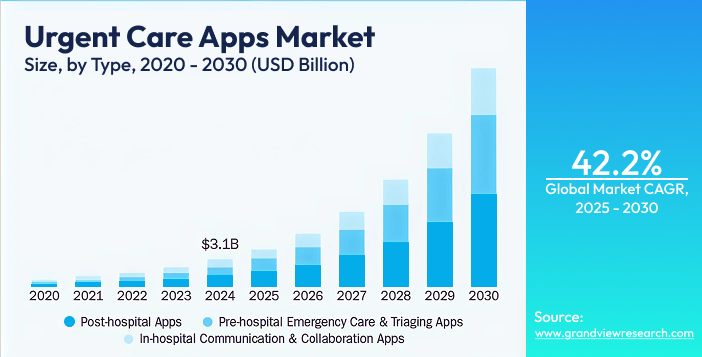
Source: Grand View Research
But there are structural changes in healthcare making urgent care apps even more essential:
According to McKinsey’s 2025 US Healthcare Outlook, hospitals are moving patients to lower-cost settings like outpatient clinics, home health, and virtual care models. This increases the need for apps that can handle urgent care digitally.
In the US alone, urgent care visits grew by 12% annually between 2021–2024 (Beckers Hospital Review). Many patients visit the ER for conditions that could be handled by urgent care apps, creating opportunities to reduce costs and improve patient flow.
While telehealth was initially popular with younger users, a 2024 Pew Research survey found that over 45% of adults aged 50+ now use health apps regularly. This means urgent care apps can reach a wider demographic than ever before.
Clinics integrating urgent care apps report 20–30% higher patient retention and significant reduction in no-shows, since apps allow reminders, easy rescheduling, and video visits.
For healthcare providers and investors, this is a perfect moment to act. Building an urgent care app today doesn’t just meet patient expectations; it reduces hospital strain, opens new revenue streams, and future-proofs operations. With patient demand, technology adoption, and market growth all aligning, digital urgent care is one of the smartest investments in modern healthcare.
An urgent care app is a tool that connects patients with healthcare professionals quickly. It is efficient and secure. Its main purpose is to provide timely medical care for non-emergency situations, anytime and anywhere. These types of apps give patients instant access to doctors, nurses, and medical specialists as well. They can schedule consultations. They can get prescriptions and even manage follow-ups.
An urgent care app usually serves three main user groups:
1. Patients
2. Doctors
3. Clinics and healthcare providers
Patients use the app to book appointments, consult doctors, upload medical reports, and receive prescriptions. For them, the app means faster care, less waiting, and easier access to medical help.
Doctors use the app to view patient details, conduct video consultations, issue e-prescriptions, and manage their schedules. It helps them treat more patients efficiently without being tied to a physical location.
Clinics use the app to manage appointments, patient records, billing, and staff availability. It also helps them reduce walk-in overload, improve patient experience, and increase operational efficiency.
Key insights about urgent care apps that make them unique:
Studies show that the faster patients can reach a healthcare professional, the higher the satisfaction and compliance rates. Apps reduce wait times from hours to minutes.
Many urgent care apps now combine in-person and virtual visits, allowing clinics to optimize resources while patients receive the right care at the right time.
Advanced apps integrate patient histories, lab results, and AI-powered triage tools, helping clinicians make faster and more accurate decisions.
Rural and suburban communities often have limited urgent care options. Mobile apps can bridge this gap, providing access to specialists remotely.
Clinics using urgent care apps report higher retention rates, more efficient scheduling, and reduced no-shows, directly impacting revenue.
Urgent care apps can be built in different ways, depending on who they serve and how care is delivered. The most common types include:
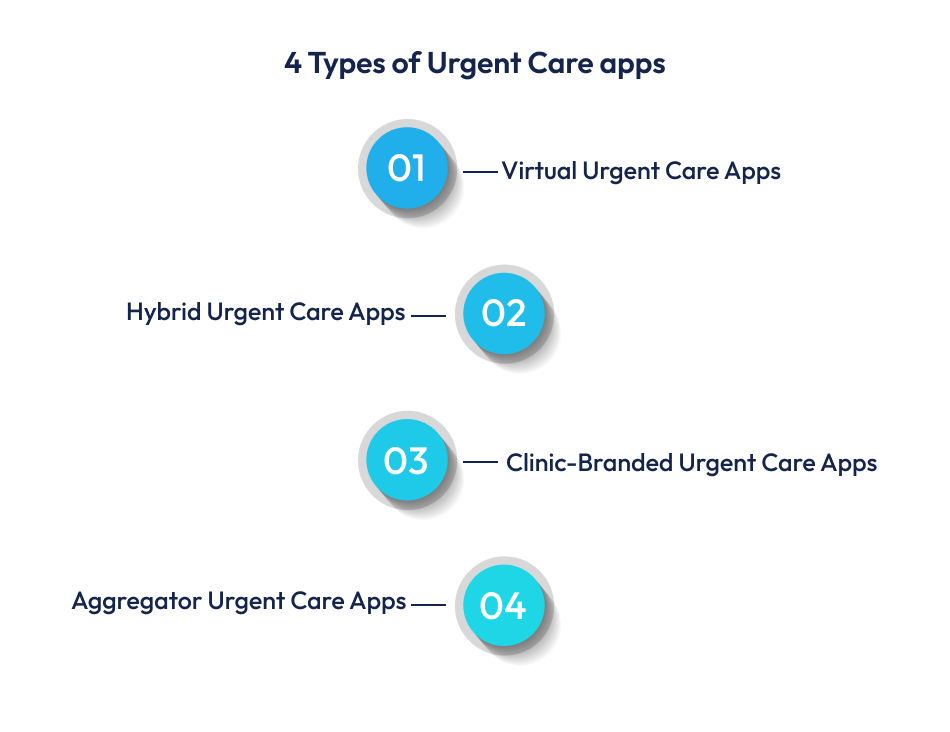
These apps offer medical consultations fully online. Patients can talk to doctors through chat or video calls, share symptoms, and receive e-prescriptions. They are useful for minor illnesses, skin issues, infections, and follow-ups.
Hybrid apps combine online and in-clinic care. A patient may first consult a doctor through the app, and if needed, book an in-person visit at a nearby clinic. This model helps clinics reduce crowding and manage patient flow better.
These apps are built for a specific hospital or urgent care center. They focus on appointment booking, patient records, billing, and communication between staff and patients. They help clinics improve service quality and brand loyalty.
These apps list multiple urgent care providers on one platform. Patients can compare doctors, check availability, and choose where to book an appointment. This model works well in large cities with many clinics.
Urgent care apps and regular healthcare apps both fall under healthcare app development, but they are built for different purposes and patient needs.
Urgent care apps are designed for quick treatment of non-emergency problems like fever, infections, minor injuries, or sudden pain. Their main goal is to connect patients with a doctor as fast as possible.
Regular healthcare apps usually focus on long-term care, such as managing chronic conditions, booking routine check-ups, or tracking health data over time.
Urgent care apps support instant services like video consultations, fast appointment booking, and quick e-prescriptions.
Regular healthcare apps may include features like fitness tracking, medication reminders, or detailed health reports, which are not time-sensitive.
With urgent care apps, patients often use the app when they need help right away but do not want to visit the ER.
With regular healthcare apps, patients plan visits in advance for check-ups, specialist appointments, or ongoing treatments.
Urgent care apps help clinics manage walk-ins, reduce waiting time, and route patients to the right doctor quickly.
Regular healthcare apps focus more on managing patient history, follow-ups, and long-term doctor–patient relationships.
Urgent care apps are built for high-volume, fast-moving use cases and are often linked to instant consultations and pay-per-visit models.
Regular healthcare apps usually support subscription models, wellness programs, or long-term treatment plans.
In simple words, urgent care apps are built for speed and immediate medical needs, while regular healthcare apps focus on routine care and long-term health management.
Patient-facing features decide how easy and helpful the app feels for users. Since urgent care is all about speed and comfort, the app must be simple, fast, and reliable.
Patients should be able to sign up using their phone number, email, or social accounts. A smooth login process reduces drop-offs and helps users get care quickly.
The app should allow users to book appointments at nearby urgent care centers or schedule a video visit with a doctor. Real-time availability helps patients avoid long waiting times.
A built-in video consultation app feature lets patients talk to doctors from home. Chat options are useful for quick questions or follow-ups.
A simple symptom input tool helps patients describe their problem and directs them to the right type of care such as self-care tips, a doctor consultation, or a clinic visit.
Doctors should be able to send prescriptions directly through the app. Patients can view, download, or share them with pharmacies easily using the e-prescription app feature.
Patients should be able to upload and access their medical reports, past prescriptions, and visit history. A built-in medical record management app feature improves treatment accuracy and saves time.
The app should send alerts for appointment confirmations, upcoming visits, and prescription updates. This reduces missed appointments and keeps patients informed.
Patients should be able to pay consultation fees through the app using cards, UPI, or wallets. Secure payments also improve trust and convenience.
The app should help users find the nearest urgent care clinic based on their location and check wait times or availability.
Support for multiple languages and simple navigation makes the app usable for a wider group of patients, including older users.
Doctor and clinic features are built to make daily operations easier and faster. These tools help healthcare providers deliver quick care while managing patients efficiently.
Doctors should be able to set their working hours, update availability, and manage on-call schedules. This helps avoid overbooking and reduces patient waiting time.
A built-in patient management system lets doctors and clinic staff view patient profiles, medical history, and previous consultations in one place. This supports faster and better diagnosis.
3. Appointment and Queue Management
Clinics can manage both walk-in and online appointments using a single dashboard. Real-time queue updates help balance patient load and improve clinic flow.
4. Video Consultation Dashboard
Doctors need a simple interface to start video calls, view patient notes, and write prescriptions during consultations. This improves efficiency and reduces paperwork.
5. E-Prescription and Treatment Notes
Doctors can issue digital prescriptions and save treatment details directly in the system. This avoids manual errors and makes follow-ups easier.
6. Access to Medical Records
Healthcare providers can securely view patient reports, lab results, and past visit history using the medical record management app feature.
7. Billing and Payment Tracking
Clinics can track consultation fees, pending payments, and daily earnings. This improves financial transparency and reduces manual billing work.
8. Internal Communication Tools
Doctors and staff can communicate through internal chat or notifications for referrals, urgent cases, or schedule changes.
9. Analytics and Performance Reports
Clinics can view basic reports on patient volume, peak hours, and consultation types. These insights help improve staffing and service planning.
10. Compliance and Data Security Controls
The system should support HIPAA compliance with secure logins, data encryption, and controlled access to patient information.
The admin panel is the control center of an urgent care app. It helps the business manage users, monitor operations, and keep everything running smoothly.
Admins can add, edit, or remove patients, doctors, and clinic accounts. They can also verify profiles and control access levels.
Admins can approve new doctors or clinics, manage their profiles, and track their activity on the platform.
The admin can view all booked appointments and completed consultations. This helps in handling disputes, cancellations, and system issues quickly.
Admins can track transactions, consultation fees, refunds, and overall revenue. This supports better financial planning and reporting.
Admins can manage in-app messages, health tips, push notifications, and important updates for users.
The admin panel shows data such as total users, daily consultations, peak usage hours, and popular services. These insights help improve app performance and business decisions.
Admins can set role-based access, monitor login activity, and ensure only authorized users can view sensitive data.
The system should help maintain HIPAA compliance by logging data access, managing consent, and supporting secure data storage.
Admins can handle user complaints, technical issues, and service requests from a single dashboard.
Admins can manage app settings, feature updates, and integrations with third-party tools like payment gateways or EHR systems.
Building an urgent care app requires both technical planning and healthcare knowledge. Here are the main steps that Techugo team follows as a leading healthcare app development company to build an urgent care app.
This is where most projects succeed or fail.
You must clearly define:
An urgent care app built for urban clinics will look very different from one built for rural users or employer-based healthcare.
At this stage, you should also decide your business model such as pay per visit, subscription, or clinic licensing.
Expert insight:
Many failed healthcare apps try to serve everyone. Successful urgent care apps are built for a specific patient flow and care scenario.
Next, decide how the app will be delivered. You need to choose:
If your users are patients, mobile apps are essential. If clinics are your main users, a web dashboard is equally important.
Expert insight:
Most healthcare startups start with a cross-platform mobile app plus a web-based clinic panel to control costs and launch faster.
Now you decide what the app will actually do. Core features usually include:
You should build only the features needed for safe and effective care in the first version (MVP). Advanced tools like AI triage or analytics can come later.
Expert insight:
In healthcare, more features do not mean better care. Clarity and speed matter more than complexity.
Urgent care users are often stressed, sick, or in pain. The design must reflect that. Key design priorities:
The design must also support older users and low-tech users.
Expert insight:
Healthcare UX is not about beauty. It is about reducing thinking time when someone needs help quickly.
This is where the real system is created. The backend handles user accounts, appointment logic, video calls, payment processing, and data storage.
You will also integrate payment gateways, video calling tools EHR or clinic systems, and notification services
Expert insight:
Scalability matters early. Even small urgent care apps can grow fast once clinics join the platform.
This step is non-negotiable. Your system must follow HIPAA compliance, encrypt patient data, control who can access what, and log every medical action.
Security is not just technical. It also includes consent management, data retention rules, and secure backups.
Expert insight:
In healthcare app development, trust is your product. A single data leak can destroy both legal standing and brand value.
Healthcare apps cannot be tested like normal consumer apps. You must test:
You should also run pilot testing with real clinics before public launch.
Expert insight:
Most healthcare bugs come from workflow gaps, not code errors.
After launch, real-world usage begins. You must track consultation success rate, drop-off points, app crashes, payment failures, and user feedback.
This phase tells you:
Expert insight:
The first 90 days after launch decide whether your urgent care app survives or scales.
Healthcare does not stay the same. You will need to update security regularly and improve speed and stability. You will also need to add new features based on demand, adjust workflows for clinics, and stay compliant with regulations
Expert insight:
Urgent care apps are not “build once and forget” products. They are living systems that must grow with medical practice and user behavior.
The urgent care app space is crowded with platforms that have proven real traction. These apps are not only widely used but have shaped how patients and providers think about urgent care app development today.
Following apps lead the market because they prioritize speed and accessibility over traditional clinic models. Many of them blend video consultation, symptom analysis, and appointment booking in one place. Some include AI to guide patients before they see a clinician to enhance efficiency and user trust.
One of the most established names in virtual healthcare, Teladoc connects patients with licensed clinicians for urgent, primary, and follow-up care. It supports video consultations, prescription handling, and ongoing care. It is a go-to choice for many seeking immediate medical help without a clinic visit.
MDLive’s mobile platform focuses on urgent care and telemedicine alike. Patients can consult doctors 24/7 via video or phone for a range of non-emergency conditions, bridging the gap between traditional clinics and digital access.
Originally known for appointment scheduling, Zocdoc has expanded into urgent care by helping users quickly find and book same-day appointments with urgent care providers. Its ease of use has made it a favorite for patients needing fast in-person or virtual access.
These examples show that successful urgent care platforms are those that balance usability, medical reliability, and integrated workflows which are the key lessons for anyone considering urgent care mobile app development.
When someone asks, “What does it cost to build an urgent care app?” the realistic answer isn’t a single number. The cost varies widely depending on your goals, features, platforms, compliance requirements, and where the development team is located. But we can break it down in a way that makes sense for investors and decision-makers.
| Development Phase | Cost Range (USD) | Explanation |
| MVP (Minimum Viable Product) | $60,000 – $120,000 | Basic urgent care app with core patient + doctor features |
| Mid-Level App | $120,000 – $250,000 | Adds more integrations, optimized workflows, clinic dashboards |
| Full-Featured App | $250,000 – $500,000+ | Advanced security, analytics, AI triage tools, hybrid care workflows |
If you are a startup, for example, and want to launch an urgent care app with patient app, doctor app, clinic admin panel, video calls, e-prescriptions, and most importantly, secure payments, a realistic cost range would be $150,000 – $280,000 for the first version. This covers design, development, testing, and compliance readiness.
To estimate the cost, you must understand the main parts of urgent care app development, such as – platform, design, backend, integrations, compliance, testing and QA, and support. Like iOS and Android mobile apps cost more than a single platform. Also a web dashboard for clinics adds to the total. So the best option is to start with cross-platform development (e.g., Flutter, React Native) to reduce costs.
UX/UI design that is easy and clear (especially for patients under stress) improves engagement but takes effort and time. However, simple screens cost less; polished, tested flows cost more. The core thing is features that are the biggest cost driver. Core features include appointment booking, video consultation, patient profile and records, doctor dashboards, and secure payments. Complex features like AI symptom checkers, advanced analytics, or real-time triage will raise the price.
Now comes the backend & integrations. The backend includes data storage, appointment logic, video and chat infrastructure, and payment systems as well. Integrations with third-party tools (EHR, video APIs, payment gateways) also increase costs.
In addition, healthcare apps must follow standards like HIPAA compliance (or equivalents in your market). This means secure data encryption, role-based access, and secure audit logs. This adds cost, of course, but it is non-negotiable for healthcare trust and legal safety.
Healthcare testing is not basic QA. It must include security tests, performance tests under load, usability tests, and real-world pilot runs. And after launch, ongoing maintenance (bug fixes, updates, server costs) is usually 15–20% of the initial build cost per year.
Feature complexity and extra features increase the budget, such as real-time triage and AI symptom checkers, lab integration, and offline mode. Each feature can add 10% or more to the base cost. Also, if you operate in markets with strong privacy laws (HIPAA in the US, GDPR in Europe), you must invest more in encryption, audits, and compliance checks.
The cost is also impacted highly by third-party integrations and design quality. Healthcare UX costs more than regular app UX because errors can directly affect care and trust.
Urgent care apps will no longer remain simple tools for booking visits. In the coming years, they will redefine how clinics operate, manage patients, and generate revenue. The future of urgent care app development is not just about convenience. It is about turning urgent care centers into digitally driven healthcare businesses with better control over demand, costs, and patient relationships.
Most urgent care centers still rely on phone calls for appointment scheduling, patient updates, and follow-ups. This process is slow, difficult, and heavily dependent on staff availability. In the future, the urgent care app will become the main entry point for patients. People will describe symptoms, upload basic details, and choose visit types directly inside the app. Clinics that continue to depend on phone-first workflows will face higher operating costs and slower patient flow compared to those using digital urgent care platforms. An app-based intake system improves speed, reduces staff burden, and allows clinics to handle more patients with the same resources.
Urgent care will move away from being only walk-in based or only virtual. The dominant model will be hybrid. Patients will begin their journey digitally through an urgent care app, receive virtual care when suitable, and visit the clinic only when physical examination is necessary. This approach reduces overcrowding, avoids unnecessary in-person visits, and improves patient satisfaction. For healthcare providers, hybrid care increases daily capacity without opening new facilities. This shift makes urgent care software a central part of service delivery rather than an optional add-on.
Artificial intelligence will not function as an independent medical decision-maker. Instead, it will become an operational tool inside urgent care apps. AI will help classify patient symptoms, estimate visit duration, and route patients to available clinicians based on workload. This reduces peak-hour congestion and prevents doctors from being idle during slow periods. The real value of AI in urgent care app development lies in managing demand and improving workflow efficiency, not replacing clinical judgment. Clinics that use AI for patient flow management will achieve shorter wait times and better use of staff hours.
Today, many urgent care centers depend mainly on one-time visits for revenue. In the future, urgent care apps will support recurring care models such as follow-ups, prescription refills, recovery monitoring, and preventive check-ins. This creates repeat engagement instead of isolated visits. Over time, this raises patient lifetime value and makes monthly income more predictable. Digital urgent care platforms will allow providers to build structured care programs rather than relying only on walk-in volume, which is often unstable and seasonal.
Urgent care has traditionally competed on how fast patients can be seen. While speed will still matter, the stronger differentiator will be continuity of care. Clinics that stay connected with patients after the visit through reminders, health updates, and progress tracking will build stronger trust. Urgent care apps will enable clinics to remain part of the patient’s health journey instead of being used only during emergencies. Continuous engagement will become more valuable than quick check-ins alone.
Clinics that depend entirely on third-party platforms and aggregators do not truly own their patient relationships. Over time, this weakens loyalty and reduces profit margins. Organizations that invest in their own urgent care app will control patient data, communication, and long-term engagement. Owning the patient relationship will become a major competitive advantage. In urgent care app development strategies, direct digital access to patients will matter more than being listed on external marketplaces.
Urgent care apps will generate detailed data about visit patterns, peak hours, seasonal demand, and treatment types. This information will not be limited to medical records. It will guide management decisions such as staffing levels, pricing adjustments, clinic expansion, and employer partnerships. Urgent care software will evolve into an operational intelligence system that helps leadership plan growth and control costs. Data will become a business asset, not just a clinical requirement.
With over 10+ years of experience in web and mobile app development across different industries for different markets, Techugo helps businesses and startups build fast, secure digital platforms. We design urgent care apps that improve patient access, reduce wait times, and simplify clinical workflows.
Our team, as a part of leading mobile app development company, has delivered multiple app development projects across different niches. Our team of 200+ skilled experts is also well-versed in healthcare workflows. And being a trusted software development company, Techugo follows strict security practices and aligns solutions with HIPAA compliance standards. Be it medical record management apps or e-prescription platforms, our solutions are designed to protect users’ data while remaining easy to use.
If you plan to build an urgent care app, Techugo offers the right mix of technology, compliance, and product strategy to support your growth.
An urgent care mobile app usually takes 3 to 6 months to develop for a basic version. Medium to advanced apps with telemedicine, payment systems, and healthcare integrations may take 6 to 12 months. The timeline depends on app complexity, design requirements, and regulatory testing.
An urgent care app should include patient registration, appointment booking, video consultation, secure chat, e-prescriptions, and medical record access. On the clinic side, it should support doctor dashboards, patient management, and admin controls. These features help deliver fast care while keeping workflows organized.
An urgent care app focuses on fast treatment for non-emergency conditions and supports both virtual and in-clinic visits. A telemedicine app mainly provides remote consultations and ongoing care. Urgent care apps are built for speed, triage, and short-term treatment, while telemedicine apps support long-term care and follow-ups.

Mobile apps in Saudi Arabia are not just digital tools anymore, and they are no longer limited to simple tasks either. Rather, they are becoming the m..

Each package that goes out in Saudi Arabia or Dubai carries more than just goods. It carries expectations of speed, of accuracy, of a smooth digital e..



Write Us
sales@techugo.comOr fill this form












