


 SA
SA  KW
KW  IE
IE AU
AU UAE
UAE UK
UK USA
USA  CA
CA DE
DE  QA
QA ZA
ZA  BH
BH NL
NL  MU
MU FR
FR [ LET’S TALK AI ]
X
Discover AI-
Powered Solutions
Get ready to explore cutting-edge AI technologies that can transform your workflow!



Get ready to explore cutting-edge AI technologies that can transform your workflow!






Every time you hear about a successful AI app, there are many developers and project owners quietly thinking about the ones that didn’t make it. Because for every polished AI product, there are several others that fail long before launch.
If you’re building an AI app or managing a team, you probably know the pain. The model misbehaves, the data doesn’t fit, the workflow drags, or the entire AI app development process loses direction, and most of the time, it happens because of small but common mistakes.
It hurts to see a good idea slip away like that, especially when the market is tough and expectations are high. But here’s the good news: these failures usually follow a pattern. Teams repeat the same AI app development mistakes, often without realizing it.
So this blog keeps things simple.
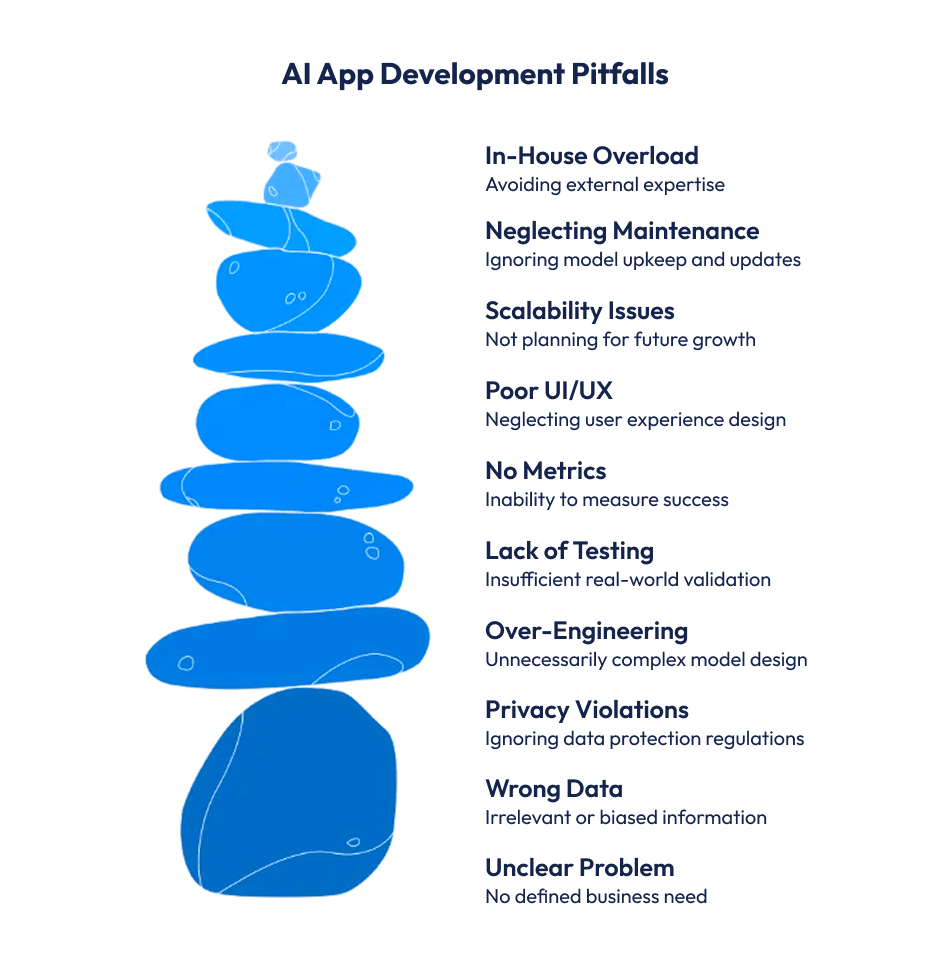
We’ll talk about the 10 biggest mistakes that we all usually make when building AI apps, as well as how to avoid them.
And yes, if planning for AI app development for your business, this guide will give you clarity. And hopefully save you from the usual trouble spots.
Suggested Read: Common Ionic Development Mistakes Developers Tend To Make!
AI looks powerful from the outside. But behind the scenes, most AI projects struggle. Some never even reach a working prototype. And it’s not because companies don’t try. It’s because building AI apps is harder than it looks.
Industry reports show that a large percentage of AI projects never make it to production. Many teams get stuck during data preparation. Some fail during testing. Others launch, but the model doesn’t perform in real-world conditions. And once things start to break, it becomes expensive to fix them.
The root problem?
People underestimate the process.
Teams jump in without thinking about data quality, privacy issues, architecture planning, or long-term maintenance. All of these are part of AI app development, yet they’re also the most ignored. That’s why common AI app development mistakes show up in almost every failed project.
Another reason: unrealistic expectations.
Everyone wants instant results. But AI needs time. Training, testing, re-training, validating – it’s a proper workflow. And skipping steps leads to unstable outputs, AI app performance issues, or apps that simply don’t work when real users interact with them.
Many teams also fail because they treat AI like normal software. But it isn’t.
AI behaves differently. Models change with data. Small variations affect accuracy. And without a strong plan, these challenges pile up quickly.
So yes, AI app development fails more often than people think. Not because the technology is unreliable, but because the approach is. Avoid the usual AI app development mistakes, and you’re already ahead of most teams trying to build AI apps today.
Suggested Read: Major Mistakes Of App Design
This is the biggest reason AI projects fall apart.
Teams jump in because “AI sounds cool” or because competitors are doing it. But they never define the real problem the AI app should solve.
Without clarity, everything goes wrong.
The data doesn’t match the goal.
The model performs poorly.
The features feel random.
And the whole AI app development process becomes messy.
AI only works when you give it a specific direction, so before you even think about building an AI model, you first need to answer a few simple questions, like:
See, if you ignore answering to these questions, you may make common Agentic AI app development mistakes, and these could be wrong use cases, wrong data, wrong expectations, etc.
That is the only reason because of which many teams struggle to build AI apps that actually work in actual world.
A clear problem statement helps keep the project focused and directed.
It helps you avoid AI app development mistakes later.
It shapes your data strategy.
It also guides every decision, from start to end.
Ankit Singh, COO at Techugo, says – “If you are not able to define the problem, AI will never be able to solve it. That’s the hard truth.”
Let’s avoid this mistake –
AI is only as good as the data you feed it.
And this is where many projects slip. Teams collect too little data, the wrong type of data, or inconsistent data that doesn’t match the actual problem.
When the data is weak, the model becomes weak.
It gives inaccurate predictions.
It behaves differently in real-world use.
And you end up with serious AI app performance issues that are hard to fix later.
This is one of the most common AI app development mistakes, especially for teams building their first model. They focus on algorithms, frameworks, or architecture, but forget that the foundation is always data.
Wrong data leads to:
And once errors get into the data, they spread everywhere. The app’s functionality drops. The user experience suffers. Even the business logic collapses.
A better approach?
Start with a data checklist.
Define what data you need.
Clean it. Label it correctly.
Make sure it fits the real problem you’re solving.
Good data saves time.
Good data reduces rework.
Good data helps you avoid unnecessary AI app development mistakes that drain your budget and slow down your launch.
Collecting the right data isn’t just a task.
It’s the backbone of every AI app that actually works.
Let’s avoid this mistake –
This mistake can sink an AI app fast. Teams, most of the time, forget about data privacy, but as we know, AI apps live on data, and mishandling the data can lead to big problems.
Users are very protective and serious towards their personal data, hence, governments put strict rules (GDPR or CCPA), and if you ignore them, you’ll have to face fines, bans, or maybe loss of trust
AI app development challenges often start here, as the model might work perfectly, but if privacy is compromised, the app fails.
So, before collecting or using any type of data, ask yourself:
If you answer these questions for yourself, you may not repeat the common AI app development mistakes (legal issues, angry users, and damaged reputation).
When you respect data privacy, you keep AI app safe, build trust, and ensure that compliance requirements are met and there will be no headaches later, because AI is not just about smart models; it’s also about responsible data use.
Let’s avoid this mistake –
This is a huge reason AI apps fail, because first teams get excited and say “Let’s make it super smart” or “We need the most complex model possible.” but complexity doesn’t equal success.
When you over-engineer something, it goes wrong.
The app becomes slow.
The model is hard to maintain.
Features feel unnecessary or confusing.
And the whole AI app development process gets messy.
AI isn’t magic. It only works when it’s focused and practical.
Before adding fancy layers or complicated algorithms, ask:
If you skip this step, it leads to common AI app development mistakes like slower performance, higher costs, and more AI app performance issues.
But if your model is simple, well-thought-out, it keeps the project clear. It makes AI app development easier. It guides every decision, from features to testing.
Over-engineering may seem impressive, but in reality, it leads to failure, so don’t get stuck into over-engineering.
Let’s avoid this mistake –
This is one of the easiest ways an AI app fails.
Teams test everything in a clean, controlled environment and think, “Looks good, let’s launch.”
But the real world doesn’t behave like a lab.
When you skip real-world testing, things fall apart quickly.
The model reacts differently to messy, unpredictable user inputs.
The app slows down under actual traffic.
Edge cases start breaking features.
And suddenly, the AI that worked perfectly during development feels unreliable.
AI only works when it’s tested in the same world your users live in.
Before shipping your app, ask:
If you skip this, it leads to common AI app development mistakes like bad predictions, frustrated users, and major AI app performance issues.
Real-world testing keeps your app honest.
It shows what’s actually happening, not what you wish would happen.
It exposes problems early and gives you the chance to fix them before the launch.
Lab testing helps you build the app.
Real-world testing makes sure it survives.
Let’s avoid this mistake –

A lot of AI app development mistakes happen because teams don’t define success.
They build the app, launch it, and then wonder, “Did it work?”
Without clear metrics, it’s impossible to measure performance. The model might give results, but are they useful? Are users happy? Is the app solving the problem it was meant to?
AI app development best practices stress setting measurable goals early. Ask questions like:
Skipping this step leads to AI app performance issues. You might invest heavily in features that don’t matter. Or worse, your model may be “accurate” but useless in real life.
Clear success metrics guide every decision, from model design to feature selection.
They keep the AI development workflow focused and help avoid common pitfalls in AI app development.
Without metrics, even a working AI app can fail to deliver real results.
Let’s avoid this mistake –
Even the smartest AI app can fail if users hate using it.
A common AI app development mistake is focusing only on the model and ignoring the user experience.
Complex algorithms don’t impress users if the app is confusing, slow, or clunky. Bad UI/UX leads to frustration, low engagement, and high uninstall rates.
AI app development best practices emphasize designing with users in mind. Ask:
Suggested Read: AI in UX/UI Design: 10 Ways to Transform User Experience
Neglecting UI/UX creates AI app performance issues, even if the backend works perfectly.
Good design guides users naturally and makes AI features useful.
It’s not just about technology; it’s about delivering a seamless experience.
Remember, an AI mobile app development project isn’t complete until it’s easy and enjoyable to use.
Let’s avoid this mistake –
This is a major reason AI apps fail.
Teams build an app that works fine at first. But when users grow, data grows, or features expand, everything starts breaking.
When scalability isn’t planned, things go wrong fast.
The app slows down.
The model struggles with more data.
New features can’t be added easily.
And the whole AI app development workflow becomes messy.
AI isn’t magic.
It only works well when it’s designed to grow.
Before launching, ask:
Skipping this step leads to common AI app development mistakes (performance drops, higher costs, and frustrated users).
Planning for scalability keeps your project flexible.
It makes AI app development smoother.
It guides every decision, from architecture to testing.
Scalable apps survive growth. Non-scalable apps struggle. Keep it smart, build for the future.
Let’s avoid this mistake –
This is a silent killer for AI apps.
Many teams launch the app, celebrate, and then forget about the model. But AI models aren’t “set and forget.”
Over time, data changes, user behavior shifts, and performance can drop. Ignoring maintenance leads to AI app performance issues. Predictions get inaccurate. Features start failing. Users lose trust.
AI app development best practices stress ongoing monitoring and updates. Ask:
Skipping maintenance is one of the most common AI app development mistakes. Even a well-built model can fail without care.
Regular maintenance keeps the AI app reliable, accurate, and useful.
It ensures your AI software development investment continues to pay off.
Let’s avoid this mistake –
This mistake can slow your AI app down fast.
Teams often think, “We can handle everything ourselves.” But AI app development is complex. Handling data, models, testing, deployment, and maintenance alone can cause big problems.
Projects get delayed. Costs go up. Common AI app development mistakes multiply.
Before trying to do it all in-house, ask:
Skipping this step leads to AI app development challenges like wasted time, frustrated teams, and slower results.
Let’s avoid this mistake –
Partnering with an AI app development company like Techugo helps as their team brings experience in AI models, frameworks, mobile app development, and scaling.
Doing it smartly keeps your AI app on track. It saves money, avoids mistakes, and ensures the app actually works.
AI app development is about building as well as about building wisely.

The most common AI app development mistakes include starting without a clear problem, collecting wrong data, ignoring privacy rules, over-engineering the model, and skipping real-world testing. Other mistakes are not defining success metrics, neglecting UI/UX, ignoring scalability, skipping model maintenance, or doing everything in-house. Avoiding these helps your AI app succeed.
2.How can I avoid failure when building an AI app?
To avoid failure, follow AI app development best practices. Define a clear problem, use the right data, follow privacy rules, keep the model simple, test in real-world conditions, and track success metrics. Plan for scalability, maintain the model regularly, and know when to hire an AI app development company. These steps reduce AI app development mistakes.
3.Why do AI apps fail even if the model is good?
Even a smart model can fail if the AI app ignores real-world testing, UI/UX, scalability, or maintenance. AI app development challenges are not just technical. They also include data quality, user experience, and proper workflow. Following AI development best practices ensures the app performs well, not just the model.
4.Should I handle all AI app development in-house or hire experts?
Doing everything in-house is risky. Many AI app development mistakes happen because teams lack skills or resources. Partnering with an AI app development company, like Techugo, brings expertise, avoids common pitfalls, and keeps your project on track. It helps deliver reliable, scalable, and high-performing AI apps.

Do all the old as well as new ride-hailing apps make the market feel overcrowded? It’s a common doubt. Many founders wonder whether it still makes sen..

Over the last few years, the software market in Saudi Arabia has moved from a support function to a growth engine. Businesses, government bodies, as w..


Write Us
sales@techugo.comOr fill this form












