


 SA
SA  KW
KW  IE
IE AU
AU UAE
UAE UK
UK USA
USA  CA
CA DE
DE  QA
QA ZA
ZA  BH
BH NL
NL  MU
MU FR
FR [ LET’S TALK AI ]
X
Discover AI-
Powered Solutions
Get ready to explore cutting-edge AI technologies that can transform your workflow!



Get ready to explore cutting-edge AI technologies that can transform your workflow!






Product scanner apps, like Yuka, help people like you and me make better buying decisions.
Just scan a product’s barcode, and you instantly see easy-to-understand information about what’s in it: ingredients, nutrition, additives, and possible health risks.
With confusing labels all around us, these apps are like a friend giving you advice.
Yuka is a leader of product scanning apps because it’s easy to use, gives fair scores, and puts users first.
Its popularity shows that people want clear, honest, and easy tools when they shop.
In this blog, we take you through how a product scanner app like Yuka can be developed.
Product scanner apps are getting popular because people these days care a lot more about health and making smart choices.
The key reasons why people choose these apps are:
People now want clean products. They’re searching for food with fewer additives, honest sources, and good ingredients.
Product scanner apps help with this by pointing out bad ingredients and hidden allergens.
You can compare items right in the store. Your phone turns into your own health advisor.
Ads aren’t as believable as they used to be. People now trust unbiased product information.
Apps that offer independent reviews, not paid ads, earn loyalty.
This move from trusting brands to trusting solid data is a big reason why more and more people around the world are using product scanner apps.
Yuka is great because it takes all that confusing product information and makes it easy to understand.
Its core value proposition includes:
What makes Yuka special is that it’s transparent. The app doesn’t have ads or get paid to promote stuff.
So users can be sure the ratings are fair and based on facts.
Yuka explains why a product got its score, both good and bad. This openness helps people trust the app and make smart choices.
Yuka does more than just rate products. If something gets a bad score, it suggests healthier options.
This helps users feel supported, not like they’re being judged.
That’s why people use Yuka every day to help them shop smarter and healthier.
Product scanner apps like Yuka attract many users because everyone wants to make good, healthy choices.
Some of the core target audiences of Yuka are:
Parents are one of the biggest audience segments of these apps.
They quickly check food and make sure there aren’t any allergens or ingredients that could hurt their children.
It makes shopping easier and gives them confidence that they’re buying healthy food.
People who use personal care items use these scanners a lot more.
They want to stay away from risky chemicals, so these apps are great for looking at skin care, makeup, and other items.
For a product scanner app to do well, its main features need to work together smoothly, giving results that are quick, correct, and easy to get.
Some of those features are:
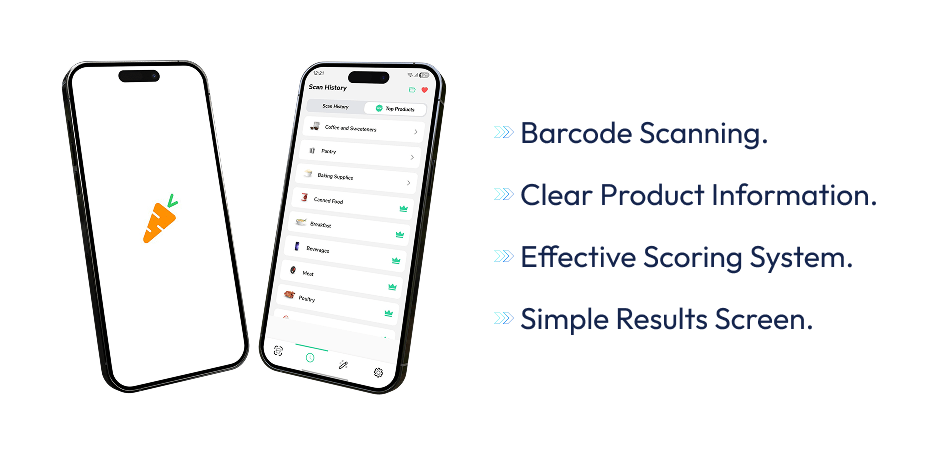
People expect the app to instantly spot product barcodes with their phone’s camera, even if it’s dark or the store is busy.
How fast and correct the app is at this really changes how happy people are with it.
After scanning, the app needs to show clear product information.
This usually means things like ingredients, nutrition facts, allergy info, and what kind of product it is.
Putting this information in order and making it easy to read is important because people often decide quickly when shopping.
The scoring system turns basic data into useful advice.
Instead of making people read numbers or long lists of ingredients, the app gives a simple score or rating based on health or safety rules.
This lets people quickly see if a product fits what they want.
In the end, the results screen should be easy to use and help people take action.
Besides the score, users should see why the product got that rating and maybe get suggestions for better choices.
What makes an app stand out is its features, and together, these important features make things easy, so people will use the app again and trust it over time.
Connect with a leading mobile app development company in France to not miss any chance to attract and retain users.

AI brings some really great features into the product scanner apps that can improve the user experience.
Some of these are:
One great feature is ingredient analysis. Instead of just using basic rules, AI looks at ingredient combos, spots possible problems, and keeps up with the latest science.
This means the app’s advice gets better as it learns.
If a product doesn’t score well, the AI can find better options based on what you like, your diet, or what you’ve scanned before.
It’s like having a helper that guides you to pick healthier stuff.
These apps also get to know you. By remembering your scans, likes, and health goals, they can change warnings and suggestions just for you.
If you have allergies, you’ll get extra alerts for those ingredients.
Plus, Artificial Intelligence can send you real-time alerts about bad stuff in products, ingredients to watch out for, or new research.
At first glance, scanning a product with an app like Yuka seems easy, but there’s a lot happening in the background.
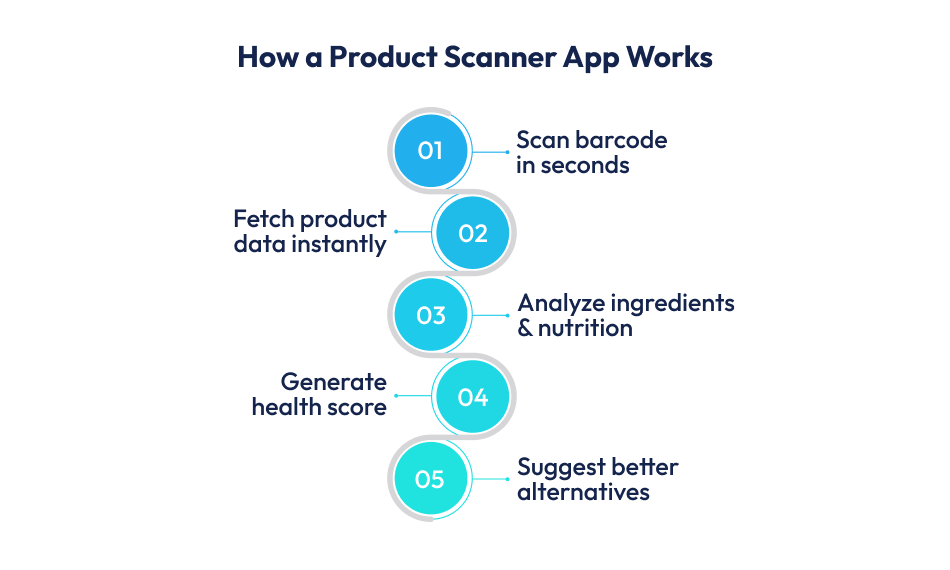
It starts when you scan a product’s barcode with your phone. The app quickly grabs and decodes the barcode number.
That number goes to a server and is checked against a product list. This list has details like ingredients, nutrition information, cosmetic parts, and regulation details.
If the product is already there, the system pulls up the information. If not, the app might ask you to add the missing details or put it in line to be checked.
Then, a scoring tool looks at the product using set rules and smart logic. It checks ingredients, risks, and nutrition to come up with a final score.
Lastly, the app shows you the results in an easy way, including the score, health info, and advice.
A solid product database is key for any product scanner app that’s like Yuka.
What users see, whether it’s scores, warnings, and advice, hinges on how correct, recent, and adaptable this data source is.
The trick is not just data collection, but keeping it the same across areas and product types.
Here’s how data is managed in these apps:
Keeping data recent is super important. Brands tweak recipes, rules change, and new products pop up all the time.
A good setup includes automatic updates, checks, and version control to stop old or wrong info.
Being correct is also crucial. Many apps use checks and human reviews to confirm user data before it’s live.
This makes the app more trustworthy and cuts down on wrong info.
As the app gets bigger, being able to grow is a must. The database needs to handle lots of products, quick searches, and heavy traffic without slowing down.
Cloud setups and smart indexing help keep scan results fast, even as more people use the app worldwide.
For a product scanner app to gain user trust, a health scoring system that’s both clear and open is essential.
People depend on these scores to inform their choices quickly, so it’s important that the reasons behind the scores are fair, easy to understand, and believable.
Most apps use a scoring method based on rules, looking at things like how balanced the nutrition is, what additives are included, if there are allergen risks, and how safe the ingredients are.
Each product is checked against specific standards, and the final score is worked out using set values instead of unclear opinions.
This way, the system stays consistent for all types of products.
Being open about the process is vital. Users should be able to see the reasons behind a product’s good or bad score, not just a number or color.
Simple explanations, ingredient lists, and reference points help users get what is going on without confusing them.
Some of the better apps also link their scores to well-known health advice or scientific studies, which makes them more trustworthy.
When users know how the scores are put together, they’re more likely to trust the app, use it often, and suggest it to others.
UI/UX design is crucial for scanner apps. People want them to be clear and trustworthy right away.
The app should be easy to use, quick, and not distracting.
A lot of times, people are using these apps while they’re out shopping, so it needs to be fast and easy to get the information they need.
Some of the key elements of a good UI/UX design are:
The scanning part needs to be smooth. The camera should pop up right away with clear instructions on how to scan a barcode.
Use color codes, big text, and simple icons so people can quickly see what’s what without having to search around.
The design needs to be open, show where the data comes from, and be consistent.
Try to stay away from clutter, annoying ads, or really technical terms.
Small animations, smooth transitions, and good design choices can really help the app be more user-friendly.
Product scanner apps like Yuka are built on a solid tech setup that includes:
For what users see, that is the frontend, popular choices include Flutter or React Native if you want the app to work on different kinds of phones.
If you’re making separate apps for iPhones and Androids, Swift and Kotlin are good.
These help with using the camera, making the app feel responsive, and adding cool animations.
For backend development, Node.js, Django, or Spring Boot can handle scan requests, user info, and how the app scores products.
The backend talks to big product databases and manages communication between the app, database, and scoring system safely and fast.
Cloud services like AWS, Google Cloud, or Azure are important for keeping things running smoothly.
They host the servers, databases, images and backups.
Plus, they let the app automatically adjust its resources to handle more users without slowing down.
The development cost of a product scanner app like Yuka depends on its features and complexity.
There are generally two options: a basic version (MVP) and a more advanced, complete version.
A basic version includes barcode scanning, simple product info, a score, and a user-friendly design.
This is suited for startups testing their idea and can range from $40,000 to $80,000.
The price varies based on design, platform (iOS, Android, or both), and database size.
Advanced apps offer more:
AI ingredient analysis, personalized advice, detailed scores, profiles, alerts, language options, and admin tools.
They require large, updated databases and a strong back-end system.
These apps typically cost from $120,000 to $250,000 or higher.
* App complexity and features
* Database size and accuracy
* AI and machine learning integration
* Platform choice
* Design efforts
* Development team location and expertise
A smarter, more data-intensive app will cost more but offers greater trust and usefulness to users.

For a product scanner app to do well, testing and quality checks are very important.
This is because people must be able to trust that the app is giving them the right information.
People use these apps to make choices that affect their health, so even tiny mistakes in the product details or scores can make the app seem unreliable.
Quality checks usually include making sure the barcode scanner works on different devices, in different lighting, and with different camera qualities.
It also means checking that the product information, ingredients, and health scores match what’s in the database.
App speed and response times need to be checked, especially when there’s a lot of product data or many people using the app at once.
It’s also important to check if the app works on different operating systems, screen sizes, and OS versions.
Security and user privacy testing are crucial to keep user data safe and prevent any misuse.
Good quality checks mean fewer problems after the app is released, lower costs for upkeep, and assurance that users can always rely on the app’s results when they scan a product.
Security and privacy are essential for product scanner apps, especially when handling user profiles, scan history, and health-related preferences.
Users expect their data to be protected, even if the app does not collect highly sensitive personal information.
Strong security starts with encrypted data transmission, secure APIs, and protected cloud infrastructure.
Access controls and regular security audits help prevent unauthorized access to product databases and backend systems.
If the app allows user accounts, secure authentication and session management become critical.
Compliance is equally important. Depending on the target market, apps may need to follow regulations such as GDPR in Europe or similar data protection laws elsewhere.
This includes clear consent, transparent privacy policies, and options for users to manage or delete their data.
Investing in security and compliance builds long-term trust, reduces legal risk, and strengthens the app’s reputation as a reliable and responsible platform.
Also Read – Top Application Security Risks Startups Overlook (And How to Fix Them)
Product scanner apps such as Yuka often prioritize user trust when figuring out how to make money, ensuring that earning revenue doesn’t compromise the app’s reliability.
Some of the popular subscription models are as follows:
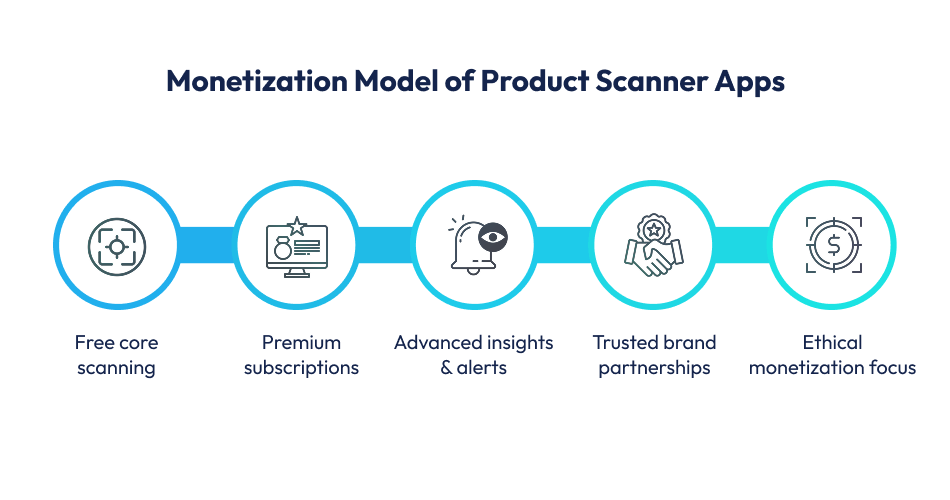
One popular approach is using subscriptions. Users pay a monthly or yearly fee to receive enhanced features.
These benefits may include extra product details, personalized health guidance, or an ad-free experience.
Offering some features for free is also a smart move. The basic scanning ability and standard product ratings remain accessible to everyone.
For those who desire a more in-depth look, with features like ingredient alerts or specialized diet filters, users can opt to pay for the upgrade.
This draws users in and converts satisfied users into paying subscribers over time.
Partnerships present another avenue for income.
Brands with a focus on things such as clean ingredients, environmental friendliness, or health can join forces for listings or data sharing, but without influencing product scores.
Also, some apps generate revenue through affiliate links. They suggest better product choices or reliable stores.
After launching a product scanner app, consistent maintenance is key to its reliability.
Updates are needed for compatibility with new devices and to maintain a smooth scanning experience.
For apps offering smart suggestions or ingredient analysis, machine learning models should be retrained with fresh product info to improve accuracy.
As more people use the app, managing the database becomes very important.
This means adding items, confirming user information, and keeping data consistent so people trust the app.
The cloud setup needs to expand to handle more users, data, and faster scanning.
Ongoing costs include server upkeep, bug fixes, and AI maintenance. These expenses ensure the app stays reliable, supports a lot of users, and builds trust over time.
 Conclusion
Building a product scanner app like Yuka goes far beyond barcode scanning. It requires a thoughtful balance of accurate data, transparent health scoring, intuitive design, and scalable technology.
From defining the right features and AI capabilities to managing databases, ensuring compliance, and planning long-term maintenance, every decision directly impacts user trust and adoption.
To discuss your app idea directly with experts, contact Techugo, a top and trusted mobile application development company.

The auto industry, at its core, was all about horsepower; the new way is "app-power." With worldwide revenues of the car rental industry expected to b..

The shift from roaring engines to silent electric motors is transforming Saudi roads. As Saudi Vision 2030 accelerates technological growth, the tradi..


Write Us
sales@techugo.comOr fill this form












