SA
SA  KW
KW  IE
IE AU
AU UAE
UAE UK
UK USA
USA  CA
CA DE
DE  QA
QA ZA
ZA  BH
BH NL
NL  MU
MU FR
FR 



















📌 Key Takeaways
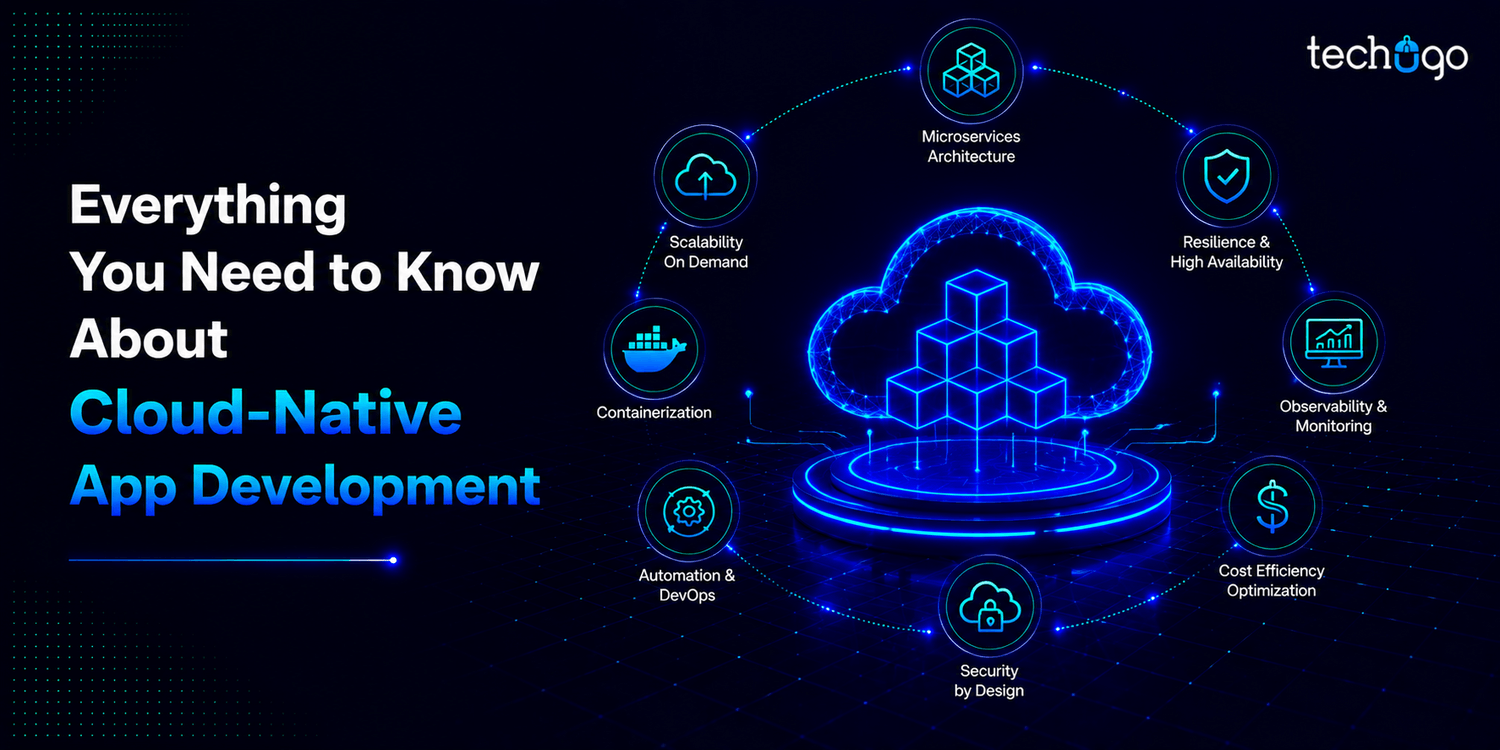
- Cloud-native app development has become the default architecture in 2026.
- Microservices architecture breaks apps into smaller independent services, making updates faster, safer, and less disruptive.
- APIs act as the communication layer, ensuring all services stay connected without dependency chaos.
- AI is now deeply embedded in cloud-native systems, making apps feel “AI-first” by design.
Something has quietly changed in the way modern apps are being built, and it’s not really loud – but it’s everywhere now.
They’re no longer just “built to run”, they are built to adapt, scale, and kind of think with usage patterns in real time, and behind all of this shift is cloud-native app development, which has become the backbone of how modern digital products are engineered today.
And the momentum, it is only growing. The U.S. public cloud market generated $292 billion in 2025 and is projected to reach around $476 billion by 2028 (Source: Statista), which basically highlights just how fast cloud adoption has been scaling across industries, and it’s not slowing down either.
From startups launching MVPs, to enterprises running massive global platforms – cloud-native is no longer optional, it has become the default architecture, the one that powers scalable, resilient, future-ready applications… because businesses today don’t really have the luxury to build slow systems anymore.
Let’s break down how cloud-native development works and why it powers modern app architecture.
Why businesses prefer cloud-native app development in 2026
In 2026, most modern apps don’t really “start small and hope to scale” anymore. They’re built with the assumption that growth will come fast, users won’t wait, and systems won’t get a second chance if they break. And this is exactly where cloud-native app development quietly takes over the story.
Think of it like this: a business launches an app on Monday. By Friday, traffic doubles. In a traditional setup, that would usually mean panic, patchwork fixes, maybe even downtime. But with cloud consulting services, the system doesn’t panic. It adjusts. It scales. It redistributes. Almost like it was expecting things to grow all along.
Key benefits of cloud-native systems
Demand-based scaling
It grows when users show up, not when someone predicts it.
cloud-based app development is built around real demand. If users increase, the system expands. If they drop, it scales back. No wasted resources sitting idle “just in case.”
Safer updates without system disruption
Updates stop feeling like risky surgery. Changes are no longer system-wide events that can break everything – instead, they are controlled, smaller updates that don’t interrupt the entire application.
Built-in fault tolerance and system stability
Even failures don’t tell the whole story anymore. If one service struggles, it doesn’t take the entire app down with it. The rest keeps running, quietly handling users while the issue gets fixed in the background.
Consistent performance under changing load
Performance becomes something you don’t constantly chase. Because everything is distributed and managed dynamically, apps stay responsive even when usage patterns change suddenly.
Access to specialized cloud-native expertise
And behind it all, people still matter. That’s why companies increasingly choose to hire cloud-native developers who understand how all these moving parts work together — microservices, containers, orchestration, the whole-system thinking approach.
Because of these benefits businesses prefer cloud-native app development in 2026 because it feels less like “maintaining an app” and more like building something that can breathe, adjust, and grow on its own (without breaking every time the world gets a little busier).
Cloud-native architecture: how apps are really built today
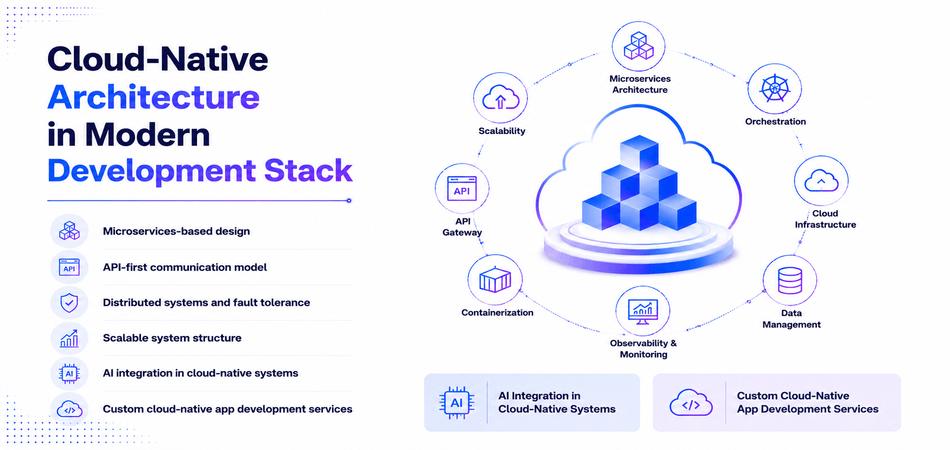
Microservices-based design
Think of it like this: instead of one giant machine doing everything, each feature becomes its own small machine. That’s microservices app development. One handles payments, another handles users, another handles notifications. If one needs an update, you fix it without touching the rest. No chaos, no system-wide breakdowns.
API-first communication model
Now the question is – how do all these pieces talk to each other? Through APIs. Clean, structured communication lines that keep everything connected. It’s like each service knows exactly how to speak without confusion, whether it’s internal features or external tools.
Distributed systems and fault tolerance
Here’s where it gets interesting. Nothing is sitting in one place anymore. Everything is spread out. So if one part fails, the app doesn’t collapse. It just reroutes and keeps going. Users usually don’t even notice that something went wrong.
Scalable system structure
And then comes scale. Traffic spikes? The system expands. Traffic slows? It scales back. No overthinking, no wasted infrastructure. It just adjusts in real time to what’s actually happening.
AI integration in cloud-native systems
Now layer AI into this – chatbots answering users instantly, systems predicting behavior, automation running quietly in the background. The best part is, these AI pieces live independently, so they can be updated or improved without breaking anything else.
Custom cloud-native app development services
This is exactly why businesses are moving toward custom cloud-native app development services. Because they don’t just want a ready-made system anymore – they want something shaped around their product, their users, and their scale. A setup where cloud-native architecture, microservices app development, DevOps, and AI all come together to build something that actually grows with them, not against them.
Migrating existing applications to cloud-native architecture
Migrating existing applications to cloud-native architecture is basically the process of taking old legacy systems and modernizing them so they can actually work with cloud-native technologies. Now instead of rebuilding everything from scratch – organizations gradually transform monolithic systems into something more scalable, flexible and cloud-ready. And this approach helps improve performance, reduce operational limits – therefore allows faster delivery cycles… because the system just becomes easier to manage over time.
Step-by-step migration process
A structured migration usually follows a phased approach, but in real-world scenarios it doesn’t always feel perfectly linear.
Step 1: assess the existing application
First, you evaluate the current architecture, dependencies, infrastructure, and performance issues. This step is important because you need to understand what was working, what wasn’t, and what needs to change before anything else moves forward.
Step 2: identify modernization opportunities
Here you break the system down and look for components that can be improved or separated without breaking core functionality. Some parts are easier to modernize… some are not, and that’s where decisions start getting tricky.
Step 3: prioritize modules for migration
Not everything can be moved at once, so you decide what comes first. High-impact or low-risk modules are usually chosen so that progress is visible early and risks are kept under control.
Step 4: refactor into microservices
At this stage, monolithic components are gradually converted into independent services. It’s not always clean or simple, but it allows each service to scale and deploy separately, which is the real advantage here.
Step 5: containerize the application
The services are then packaged into containers so they can run consistently across different environments. It reduces “it works on my system” problems and makes deployment much more predictable.
Step 6: deploy using cloud infrastructure
Now the workloads are moved to cloud platforms and orchestration tools are set up for scaling and management. This is where the system starts behaving like a real cloud-native setup.
Technologies used in cloud-native app development
Modern cloud-native app development is not really powered by one single tool. It is more like a stack of technologies working together behind the scenes, keeping apps fast, scalable and reliable. And once you start seeing how these pieces fit, the whole system kind of starts making more sense or at least it feels like it does.
Here are the core technologies used in modern application development.
Kubernetes app development
Think of Kubernetes as the system that basically “runs the show” in the background. It automatically manages where your app runs, how it scales, and what happens when traffic suddenly spikes. So instead of you manually handling servers, it just adjusts itself – and that is kind of the point.
Tech stack:
- Kubernetes (container orchestration)
- Helm (package management)
- Docker containers (runtime units)
- Prometheus (monitoring, optional but often used)
Containerized application development (Docker)
Before anything runs, it needs to be packaged properly, and that’s where containerized application development comes in. With Docker, everything your app needs (code, libraries, settings) gets bundled into one container so it runs the same everywhere, whether it is dev, testing, or production – no surprises, no “works on my machine” issues, therefore teams rely on it heavily.
Tech stack:
- Docker (containerization platform)
- Docker Compose (multi-container setup)
- Container Registry (Docker Hub or private registries)
Serverless application development
Then there is serverless application development, which takes things even further. Here, you don’t really manage servers at all – you just write the code and it runs. The cloud handles scaling and infrastructure automatically, and yes it was built exactly for those unpredictable traffic moments where things suddenly spike and drop because that is just how real usage works.
Tech stack:
- AWS Lambda / Azure Functions / Google Cloud Functions
- API Gateway (request handling layer)
- Event-driven services (queues, triggers)
- Cloud storage (S3 and equivalents)
Modern cloud-native technologies stack
When you put all of this together – Kubernetes, containers, serverless – you get the modern cloud-native technologies stack. And this is what actually powers today’s applications behind the scenes, making them flexible, scalable, and efficient. It was not always like this but now it is. Therefore reducing a lot of manual effort that used to exist.
Tech stack:
- Kubernetes + Docker (core infrastructure layer)
- Serverless platforms (on-demand compute)
- CI/CD tools (GitHub Actions, Jenkins, GitLab CI)
- Cloud providers (AWS, Azure, GCP)
Our experts believe cloud-native application development isn’t really a “trend” anymore – it’s just how modern apps are built now. It’s what keeps systems stable when traffic jumps, flexible when things need to change, and scalable without turning everything into a mess. And honestly, at this point, what really matters isn’t just using cloud-native: it’s how well it’s done, and that’s what quietly separates the best cloud-native app development company from everyone else.
DevOps and scalability in cloud-native systems
DevOps is what keeps modern systems stable while also helping teams ship updates faster with fewer risks. It connects development and operations in a way that makes delivery smoother, more automated, and easier to manage at scale – this is the core idea behind DevOps for cloud-native apps.
Core DevOps practices
| Area | What it means | Why it matters |
| CI/CD pipelines | Automated build, test, deployment flow | Enables faster and safer releases |
| Automation | Removes manual effort from deployment and testing | Improves consistency and reduces errors |
| Infrastructure as Code (IaC) | Infrastructure is defined and managed through code | Makes setup and scaling repeatable |
| Scalability | Systems adjust automatically based on demand | Essential for building scalable cloud applications |
In real-world setups, DevOps for cloud-native apps is basically what teams lean on to push updates quickly without messing up what’s already running, and it also helps keep scalable cloud applications stable even when traffic starts picking up.
Top use cases of cloud-native application development
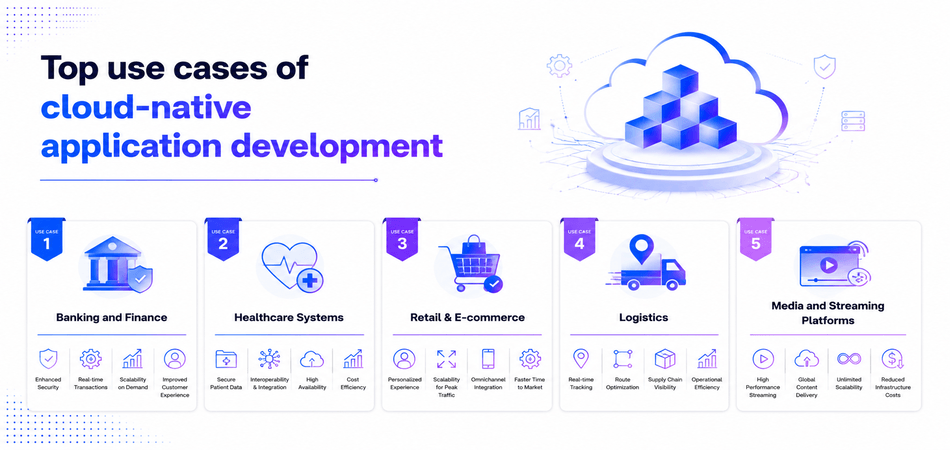
Use case 1: banking and finance
Banks and fintech app development companies use enterprise cloud app development for things like digital banking apps, payment systems, and fraud detection dashboards. These are high-pressure systems – constant transactions, strict security, and zero downtime expectations and because of that, everything has to stay stable all the time.
That’s exactly where enterprise cloud-native solutions come in, because they keep systems running even when usage suddenly goes up, or when traffic was not really expected in the first place.
Use case 2: healthcare systems
In healthcare app development, cloud-native app development is used for patient records, hospital management systems, and telemedicine apps platforms. It helps different systems talk to each other better, so patient data is updated in real time, but also without things getting delayed or disconnected because in healthcare, even small delays were never acceptable.
Use case 3: retail & e-commerce
Retail and e-commerce app development rely heavily on cloud-based mobile app development for shopping apps, order tracking, and personalized recommendations. The real challenge here is traffic spikes (especially during sales), and cloud-native systems are built so that everything keeps working even when thousands or millions of users are suddenly active at the same time – therefore nothing really breaks or slows down the way it used to.
Use case 4: logistics
Logistics companies use enterprise cloud-native solutions to track deliveries, manage fleets, and coordinate operations across locations. Since everything is time-sensitive, real-time updates are critical, and the system has to respond instantly because if it doesn’t, the entire flow gets affected and it was never designed to work like that.
Use case 5: media and streaming platforms
Streaming platforms rely on cloud-native systems to handle large-scale content delivery. Whether it is live video or on-demand streaming, the key challenge is massive user load – and cloud-native architecture helps keep performance smooth even during peak traffic, so users don’t even notice anything happening in the background.
The role of AI in modern cloud-native applications
In 2026, apps don’t really feel like they have AI anymore. They just feel… aware. Like they’re one step ahead of you most of the time. You open something, and it already knows what you were probably going to do next. That shift isn’t coming from flashy features – it’s happening quietly inside Generative AI integration services in cloud-native systems, where intelligence is no longer something added later, but something built into how modern cloud-native app development actually works.
What is actually changing inside the system
- AI isn’t sitting outside the app anymore. It’s already part of the flow
- Things like recommendations and alerts don’t wait, they happen as data changes
- The system keeps adjusting itself while it’s running, not in fixed updates
- Cloud layers handle AI load in real time, so nothing feels slow or delayed
- Instead of reacting to users, apps are slowly starting to predict what comes next
And this is also where cloud-based mobile app development company quietly changes the game – because mobile apps don’t just “run on the cloud” anymore, they feel like they’re learning from it while you use them.
Cloud-native application development cost
Cloud-native app development doesn’t really come with a fixed price tag. It depends on – what you’re building, how complex your system is and honestly how “legacy” your current setup already is.
Some projects are simple migrations that stay on the lighter side while others turn into full-scale rebuilds with microservices, automation, and cloud infrastructure spread across multiple environments. And naturally the gap between those two is huge.
Here’s a rough idea of what most businesses end up spending in 2026:
| Project Type | What it usually involves | Estimated Cost (2026) |
| Small cloud-native setup | Basic migration or lightweight modernization | $10,000 – $50,000 |
| Mid-scale application | Partial refactoring, integrations, scaling setup | $50,000 – $150,000 |
| Enterprise cloud-native system | Full transformation with microservices, CI/CD, security, multi-cloud | $150,000 – $400,000+ |
At the end of the day it’s less about the “cloud” itself and more about how far you need to take your system from where it is right now.
Common challenges in cloud-native app development
Cloud-native app development sounds smooth on paper – scalable systems, fast deployments, flexible infrastructure. But once you actually start building with it, things get a bit more layered.
It gets complicated fast
The idea of breaking everything into microservices sounds great until you’re dealing with 20+ services talking to each other. One small issue in one service can feel like finding a needle in a moving haystack.
Security isn’t “set and forget”
In cloud-native app development, security isn’t something you tick off once. Every service, every API, every connection becomes another place things can go wrong. It needs constant attention, not just a firewall and hope.
When something breaks, it’s not obvious why
Debugging in cloud-native systems can feel like detective work. Everything is distributed, logs are everywhere, and the actual problem might be hiding in a completely different service than where the error shows up.
Cloud bills can surprise you
One of the quiet shocks of cloud-native app development is cost. It scales beautifully – but if you’re not watching closely, usage can grow (and bill too) without you even noticing until later.
Finding the right talent isn’t easy
This approach needs people who understand DevOps, containers, cloud platforms, and microservices together. Not every team has that mix, and learning it all takes time.
Future trends in cloud-native app development
AI-driven cloud operations
One of the biggest shifts is the rise of AI in cloud operations, and it is changing how systems behave in real time. The systems are being designed to monitor themselves, detect issues early, and sometimes even fix performance problems on their own because manual handling is no longer enough at scale. Therefore everything becomes faster, more stable and it was never this automated before (not like this).
Serverless computing adoption
Serverless computing is becoming more common because it removes the need to manage infrastructure directly. Developers just focus on code, and the rest – scaling, maintenance, resource handling – just happens in the background. It was not always like this, but now it is, and therefore teams move faster, with less operational pressure or so it seems.
Multi-cloud and hybrid strategies
Businesses are not sticking to one cloud anymore, and that shift is pretty obvious now. Instead, they are using multi-cloud and hybrid setups so that flexibility increases and dependency reduces. Because relying on a single provider was always risky, and now organizations are actively avoiding that situation – therefore systems are distributed across environments, sometimes more than needed.
Microservices and container-first development
Modern systems are built using microservices and containers, and each part works independently but still connects to the whole. This makes cloud-native app development more modular, and updates can happen without breaking everything else which used to happen a lot before. So it’s cleaner now, but also more complex in its own way.
DevSecOps and built-in security
Security is no longer something added at the end, it just doesn’t work like that anymore. With DevSecOps, security is built into the pipeline from the start, and therefore issues are caught earlier instead of later. Because fixing problems after deployment was always expensive, and now the idea is to avoid that situation completely… or at least try to.
Why Techugo is the go-to choice for mobile & cloud app development
In a market full of development partners, choosing the right team can make or break your product. Techugo stands out by focusing on building apps that are built to perform, scale, and last in real-world conditions.
Techugo is an award-winning mobile app development company in USA with 10+ years of experience in building digital products that are not just visually strong, but also stable, scalable, and ready for real-world demand.
Why choose us?
- AI-first approach: Solutions designed with AI integration to enable smarter, more adaptive applications
- Scalable architecture: Built with cloud-native systems that support growth without breaking performance
- Modern tech expertise: Strong experience in cloud, Flutter app development, Node.js, APIs, and backend systems built for scalable, real-world applications
- Industry experience: Delivered solutions for startups, SMEs, and enterprise clients, including Sterkala, Truefan, and Nikbakers across multiple industries
- Performance focus: Stability, speed, and user experience are prioritized together
- End-to-end development: From idea validation to launch and scaling, we handle the full product journey
- Continuous support: Ongoing optimization, updates, and scaling support post-launch
Still waiting? Share your app idea with our team and we’ll help you map out the right tech approach, timeline, and build a scalable mobile or web app.
FAQs
Q1.What is cloud-native app development?
It is an approach to building applications specifically designed to run in cloud environments. These apps are built to be scalable, flexible, and able to handle real-time changes in demand.
Q2.What technologies are used in modern app development?
Modern applications often use frameworks like Flutter for mobile apps, Node.js for backend systems, and cloud platforms for scalability and deployment.
Q3.What is the role of AI in cloud-native systems?
AI integration in cloud-native systems allows applications to process data in real time, automate decisions, and adapt dynamically based on user behavior.
Q4.Do I really need cloud for my mobile app?
If your app needs login, data storage, updates, or real-time features, then yes – cloud makes it faster, more stable, and easier to manage.

Get in touch
We'd love to hear from you.