


 SA
SA  KW
KW  IE
IE AU
AU UAE
UAE UK
UK USA
USA  CA
CA DE
DE  QA
QA ZA
ZA  BH
BH NL
NL  MU
MU FR
FR [ LET’S TALK AI ]
X
Discover AI-
Powered Solutions
Get ready to explore cutting-edge AI technologies that can transform your workflow!



Get ready to explore cutting-edge AI technologies that can transform your workflow!






Apps like Kling AI can generate videos in seconds. But do you know the actual cost to build an app like Kling AI that runs technology this advanced?
AI tools are everywhere right now. New models launch every month, new startups appear every week; but only a few tools actually shift the direction of an industry. Kling AI is one of them.
Almost overnight, it changed how people think about video creation. Suddenly, tech founders, investors, and product teams started paying attention to AI video platforms in a serious way. Not just as cool tools, but as real businesses.
Because behind every viral AI product is a much bigger question most people don’t see coming: what does it actually take to build one? More specifically, what does it cost to build a Kling AI-like app?
For companies exploring this space, the numbers matter. Infrastructure, AI model development, cloud GPUs, and product engineering all add up quickly. In a tech-driven market like Germany, the cost to build an app like Kling AI can typically range between €30,000 and €280,000 (around $32,500 to $300,000), depending on the platform’s capabilities.
It’s a serious investment. But for businesses hoping to ride the next wave of AI-powered video creation, it could also be the starting point of something massive.
In this blog, we’ll break down the cost to build apps like Kling AI, the key features such platforms require, the technology stack behind AI video generation, and the major factors that influence development costs in Germany.
Also Read: 10 Common AI App Development Mistakes (And How to Avoid Them)
What used to take hours, even days, of filming, editing, and sound design, now happens in minutes. You just type a few words, and you have a full video ready to go.
That’s what Generative AI video tools like Kling AI do.
In simple terms, they take your ideas like text, scripts, or images, and turn them into fully finished videos in minutes. It’s like having a full video production team in a single platform; but without the cameras, studios, or long editing hours. You give the AI an idea, and it brings it to life automatically.
But here’s the kicker: what feels instant to you is actually the result of complex AI at work.
When you type a prompt, the AI doesn’t just pick random clips. It reads your words and figures out what you mean. Then it decides what visuals, motion, and voiceovers will fit best. Every second of the video is created by layers of AI and cloud computing working together.
All of it happens automatically so you get a polished video in minutes.
If you’re wondering what makes a Kling AI-like video generator app so powerful, here are the key features that set it apart:
It might look effortless, but building this system is not easy. It takes skilled engineers, huge computing power, and careful planning. Every smooth video you see comes from AI that thinks, designs, and assembles your idea automatically.
Startups see massive potential in AI video apps. Video content grabs attention, drives engagement, and even increases sales. But making videos the old-fashioned way? Slow and expensive.
That’s why startups are jumping on Kling AI-style platforms. They let businesses and creators get videos fast, at scale, and without breaking the bank.
With AI doing most of the heavy lifting, videos appear almost instantly. No studios. No long edits. Just type, click, and watch your idea come alive.
Add in the rising demand for high-quality, automated content, and it’s no wonder everyone wants a piece of the AI video market. This explains why the race to build apps like Kling AI is heating up.
The cost to build an app like Kling AI depends on the kind of video experience you want to create.
Want just the basics? It’ll be cheaper. Thinking bigger? More features, smarter AI, and high-quality video generation can push the price way up.
In Germany, you’re usually looking at anywhere from €30,000 to €280,000. That’s a big range, indeed. But it makes sense, building a simple prototype isn’t the same as creating a full Kling AI-style platform that runs smoothly, looks polished, and scales effortlessly.
Also Read: How Much Does It Cost To Build A Super App in 2026
| App Type | Price Range (€) | Features Included |
| Basic AI Video App | €30,000 – €90,000 | Simple video generation functions, basic templates, minimal AI features |
| Mid‑Level AI Platform | €90,000 – €180,000 | Moderate AI features, better video quality, multiple templates, voice options |
| Advanced AI Video Platform | €180,000 – €280,000+ | High‑end AI models, real‑time video rendering, cloud scalability, advanced editing tools |
Understanding these numbers upfront makes planning a lot easier. But how do these costs stack up? Let’s find out!
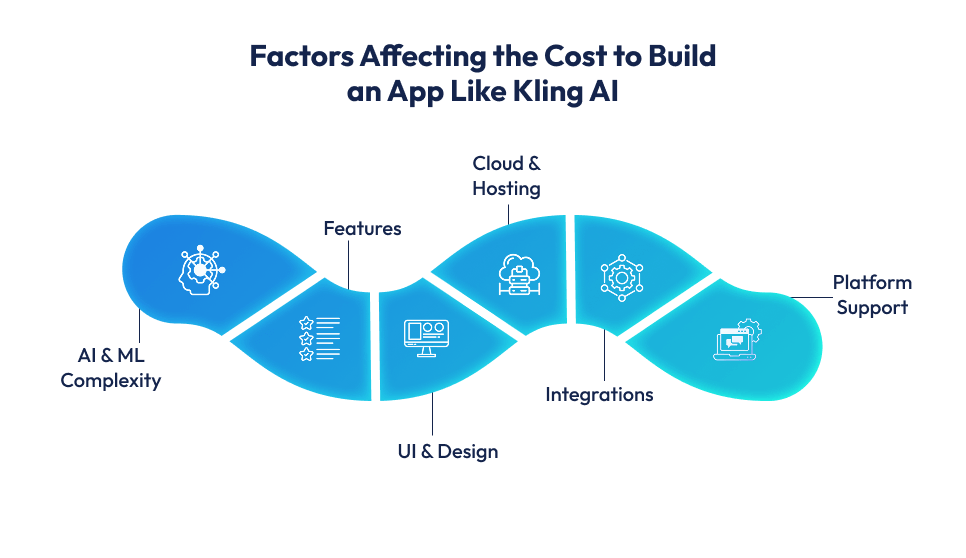
Knowing the overall cost range (€30,000–€280,000) is useful, but it helps even more to understand what drives these numbers. Different factors, from the complexity of your AI to the platforms you support, can push the cost up or down.
Here’s a breakdown of the main factors and how much each can impact your budget:
| Factor | What Drives the Cost | Approx. Cost (€) |
| AI & ML Complexity | Advanced AI that generates videos, adds voiceovers, and understands text requires highly skilled engineers, large datasets, and powerful cloud GPUs. | €50,000 – €200,000+ |
| Features | Text-to-video, AI voiceovers, templates, real-time video generation, multi-language support, and other advanced features increase development time and complexity. | €30,000 – €80,000 |
| UI & Design | Polished, intuitive interfaces, smooth UX, and interactive elements take extra design effort and multiple iterations. | €15,000 – €35,000 |
| Cloud & Hosting | Real-time AI video rendering requires scalable servers, cloud GPUs, and robust architecture to handle multiple users. | €15,000 – €30,000 |
| Integrations | APIs for video editing, AI integrations, social sharing, or payment gateways require additional coding and testing. | €10,000 – €25,000 |
| Platform Support | Supporting web, iOS and Android increases coding, testing, and infrastructure costs. | €5,000 – €10,000 |
Total Estimated Cost Range: €30,000 – €280,000
The table above gives you a quick snapshot of costs, but there’s more to each factor. Let’s break down what goes into each piece and why it matters for your budget.
The smarter your AI, the higher the cost. Building algorithms that can understand text, generate videos, and add voiceovers takes serious engineering work. Advanced AI models and generative algorithms aren’t cheap, they just require skilled developers and powerful computing resources to run smoothly.
The more your app can do, the more it costs. Text-to-video, AI voiceovers, video templates, real-time video generation, and multi-language support all add to development time and complexity. Each feature increases the computing needs and the development effort.
A clean, intuitive interface is key for users. Designing polished layouts, interactive elements, and smooth workflows takes both UX and UI expertise. The better your app feels to the user, the more time and resources it requires to build.
AI video generation is resource-intensive. You’ll need cloud GPUs, video rendering servers, and scalable infrastructure to handle multiple users at once. High-quality, real-time video rendering depends on robust cloud computing, which adds to the overall cost.
Many AI video apps rely on integrations to enhance functionality. Connecting video editing APIs, AI model integrations, social media sharing, or payment gateways takes development time and careful testing. Each integration adds complexity and cost.
Where your app runs matters. Developing for web, iOS, and Android requires separate design and coding efforts. Multi-platform support increases development time and infrastructure costs, but it expands your audience reach.
As you can see, AI complexity and advanced features take the biggest slice of the budget, while design, cloud infrastructure, and platform support add significant – but smaller costs.
Building an app like Kling AI takes time. It takes more than just a few clicks. There’s a clear process, from planning and designing to coding the AI and getting it ready for users.
Here’s a realistic look at how long each stage usually takes.
Before a single line of code is written, you need to define your app goals, understand the AI requirements, identify your target audience, and finalize the tech stack. This phase sets the foundation for everything that follows.
Next comes the UX/UI design. Wireframes, clickable prototypes, and visual layouts help ensure the app is intuitive and user-friendly. This step avoids headaches later in development.
This is where the app comes alive. AI models for text-to-video, voiceovers, and real-time generation are built, while cloud infrastructure and servers are set up to handle the heavy processing.
Here, the app comes to life visually. Developers create web and mobile interfaces, integrate AI features, and make sure everything works smoothly across platforms.
APIs for video editing, AI integrations, social sharing, and payment gateways are connected. Rigorous testing ensures video generation works perfectly and the app performs well on all devices.
Finally, the app is deployed. Performance is monitored, bugs are fixed, and improvements are made based on early user feedback.
Total Timeline:
If you go full throttle with a Kling AI-style app, expect about 5–6 months of work. A simple MVP can be ready in 2–3 months. And if you’re building with advanced AI and multi-platform support, plan for 6–8 months or more.
Most people think building an app like Kling AI is all about coding. It’s not.
What really makes it work is the technology behind it. The tools you choose. The platforms you build on, and the way everything connects together.
Apps like Kling AI look effortless from the outside. You type a prompt, and a video appears in seconds. But getting that kind of experience to work smoothly takes a lot more than just writing code. It comes down to choosing the right mix of technologies, tools, and platforms that can handle AI video creation without slowing things down.
Let’s break down the tech that actually makes Kling AI work.
The frontend is what your users interact with. It basically includes the interface, buttons, and visuals that make your app feel polished and intuitive.
Most developers use React or React Native for web and mobile apps because they’re flexible and fast. For iOS apps, Swift is standard, while Kotlin is the go-to for Android. The goal here is simple: make sure users can easily type their prompts, select templates, and hit “generate” without a hiccup.
The backend is where the heavy lifting happens. Languages like Python, Node.js, or Java are popular because they can handle complex AI tasks and large-scale data processing. This is also where APIs come in (either RESTful or GraphQL) to connect the frontend with the AI models and servers. A good backend ensures that every video request is processed smoothly… even when hundreds of users are generating videos at the same time.
Here’s the most exciting part. Your AI models are what actually turn text into video.
Frameworks like TensorFlow and PyTorch are used to train these models, while libraries from Hugging Face help with natural language understanding and video synthesis. Large datasets are crucial. They teach the AI how visuals, motion, and voiceovers should match the input text. And yes, training these models takes serious computing power.
AI video generation takes a lot of computing power, so a solid cloud setup is a must.
AI video generation eats up a lot of power. That’s where cloud services like AWS, Google Cloud, or Azure come in. They give you the servers and GPUs needed to render videos in real time. One user or a thousand, doesn’t matter. The app stays fast and smooth. And cloud storage? It keeps your templates, user videos, and AI models safe and ready whenever you need them.
To make the app even more functional, integrations are added. These can include video editing APIs to enhance visuals, payment gateways for monetization, social media sharing options, and analytics tools to track user engagement. Each integration adds value but also requires careful coding and testing.
Choosing the right tech stack isn’t just about making the app work, it’s about making it perform, scale, and feel seamless for users.
A solid stack lets your Kling AI-style app deliver high-quality AI videos in minutes, handle thousands of requests, and stay reliable as it grows.
Building an app like Kling AI isn’t a small feat. You need the right tech, the right team, and the experience to make it happen smoothly.
That’s why you need Techugo.
Looking for a mobile app development company in Germany that can deliver results? That’s us. But more than that, we’re also a full-fledged AI app development company, specializing in turning complex AI ideas into apps that actually work for real users.
At Techugo, we focus on apps that scale effortlessly, handle thousands of users at once, and still feel polished. Every feature, from text-to-video generation to multi-platform support, is built to flow naturally and perform reliably.
With Techugo, your AI video app isn’t just built, it’s built to grow and lead the market.
The cost can range from €30,000 to €280,000, depending on features, AI complexity, and platform support.
Typically, it takes 4–8 months for a basic version, while advanced AI video platforms can take 8–12 months or more.
Common features include AI-powered video generation, text-to-video conversion, video editing tools, user profiles, cloud storage, and integration with social media.

The doctor questions, “When was your last test?” and before you can respond, reports from other hospitals you've visited are displayed on the screen. ..


With the influx of AI, the healthcare industry is going through a series of changes. Some of them affect cost and some benefits, but it is fair to say..



Write Us
sales@techugo.comOr fill this form












