SA
SA
 KW
KW
 IE
IE AU
AU UAE
UAE UK
UK USA
USA
 CA
CA DE
DE
 QA
QA ZA
ZA
 BH
BH NL
NL
 MU
MU FR
FR




















📌 Key Takeaways
- Healthcare kiosk software helps hospitals automate patient check-ins, appointment scheduling, billing, and information access, improving overall service efficiency.
- Modern healthcare kiosks reduce waiting times, enhance patient experiences, support contactless interactions, and streamline hospital operations.
- Core features of healthcare kiosk solutions include self-registration, queue management, payment processing, lab report access, and integration with hospital systems.
- The cost of healthcare kiosk software development depends on factors such as functionality, integrations, security requirements, hardware compatibility, and customization needs.
- Partnering with an experienced healthcare software development company like Techugo helps hospitals build secure, scalable, and future-ready kiosk solutions tailored to real-world healthcare environments.
Ever stood in a hospital queue thinking, “There has to be a faster way to do this”?
This is precisely what healthcare kiosk software is doing today: making it possible to find a faster way.
Quick self-check-in to paying bills without waiting in lines, even the simplest tasks, such as drawing your medical records, are becoming a lot easier in hospitals. What once was a matter of waiting around, filling forms, and passing through numerous processes can now be accomplished within only a few taps on a screen.
Now, let’s talk about the part you are apparently curious about: the price.
In terms of healthcare kiosk software development, the costs may vary between $40,000-$400,000+, based on the level of simplicity or sophistication you desire. Many businesses opt to work with a mobile app development company in US to develop solutions that can be scaled, comply, and work in real-life healthcare settings.
In case you are planning to invest in healthcare kiosk software, this guide simplifies all the information you need to know: benefits, use cases, key functionalities, cost variables, and the overall development process.
What Is Healthcare Kiosk Software?
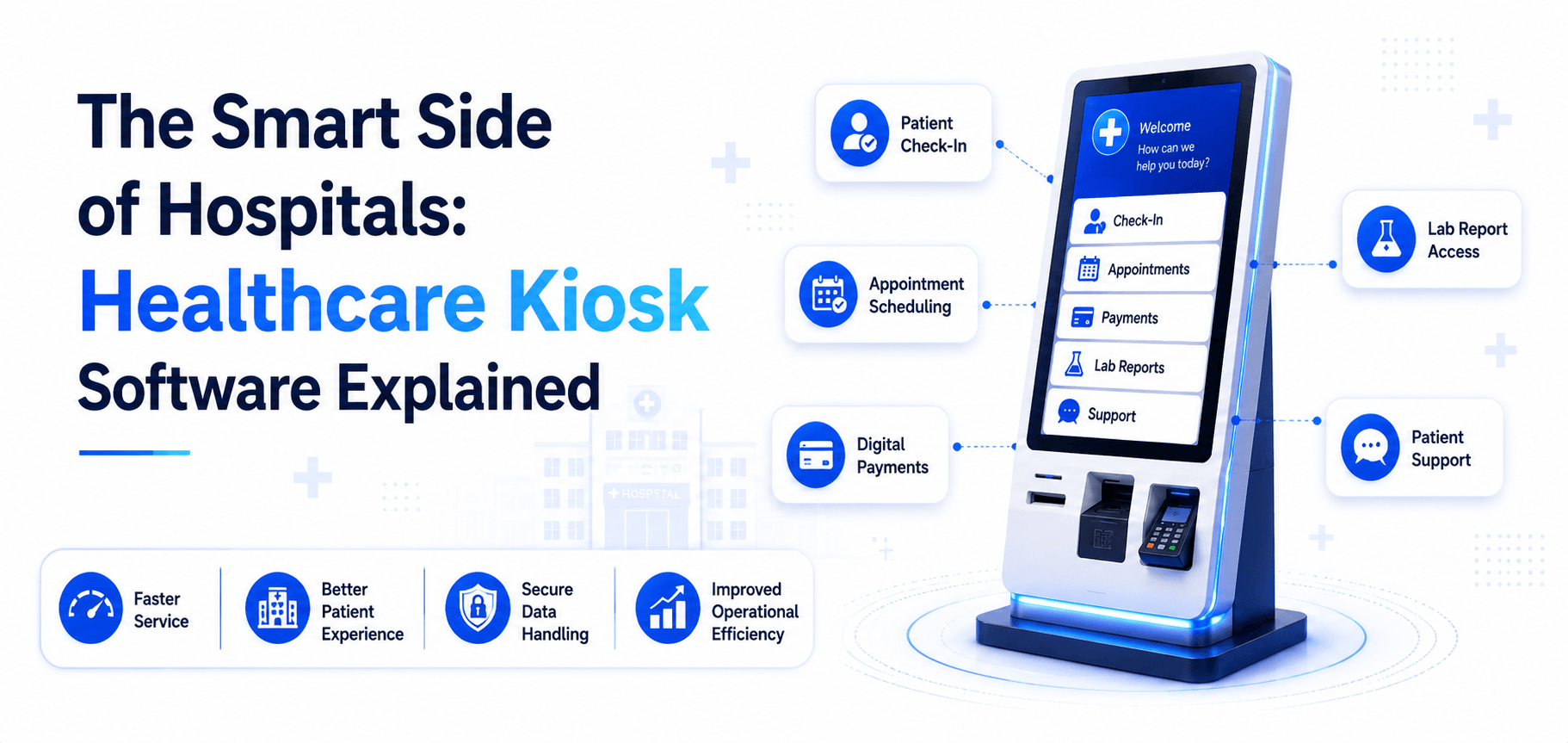
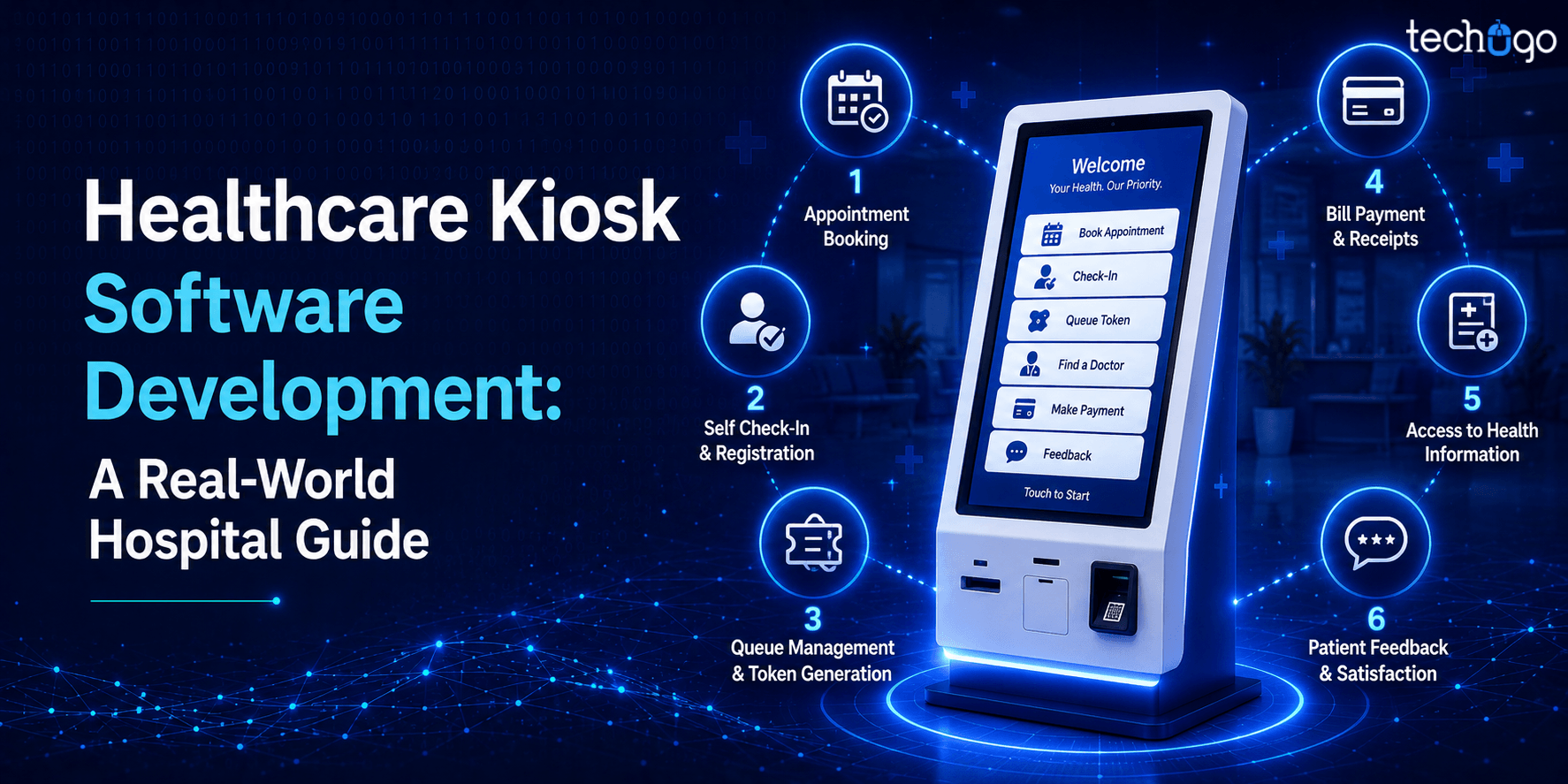
Healthcare kiosk software is a software that drives self-service machines in hospitals, clinics, pharmacies, and diagnostic centers. These kiosks enable patients to handle many tasks on their own (registration, appointment booking, bill payments, and accessing medical records) without the need for staff assistance.
Consider it the healthcare variant of airport self-check-in services, but more secure, controlled, and patient-centered.
Here is How Healthcare Kiosks Work
Understanding how healthcare kiosks work will make you realize their true worth in practice.
A typical workflow looks like this:
- A patient visits the kiosk.
- They can sign in with a mobile number, QR code, or ID.
- The system retrieves data from hospital databases
- The patient selects services (check-in, payment, etc.)
- The system immediately processes the request.
The kiosk software can be connected to hospital systems such as EHRs, billing systems, and appointment reservation systems, among others, to maintain real-time updates.
Breaking Down the Features of Healthcare Kiosk Systems
In order to know why they work so well, one should first take a glimpse at what is actually in them. The following are the main attributes that render healthcare kiosk systems viable, effective, and convenient in the daily healthcare environment.
-
User-friendly interface
Much emphasis is laid on ensuring that the interface is easy enough to operate without instructions. Be it a young adult or an older patient, the principle remains the same: there is no misunderstanding or a complex of actions. All this is provided in a very organized manner to allow the patients to check in, make reservations, or get services without having to be assisted by employees.
-
Secure authentication
Security will be a primary concern since it is sensitive patient information. This is why they tend to have OTP verification, QR code login, or biometric authentication. It makes sure that only the authorized individual can access his/her records without losing or exposing anything to unauthorized individuals.
-
Payment integration
Built-in payment support is one of the most helpful features. The patients will be in a position to settle their bills at the kiosk through UPI, cards, or digital wallets. It eliminates the necessity to wait in billing lines and makes the entire process seem faster and more efficient, particularly in periods of active hospital activity.
-
Touchless healthcare kiosk system
Touchless interaction has emerged as a major characteristic of modern systems. Patients are able to scan a QR code, use a mobile device, or use voice commands without touching the screen. It’s not just about convenience; it also makes the experience more hygienic and comfortable in high-traffic hospital environments.
-
EHR & hospital system integration
The other aspect that is critical is their integration with the hospital systems. They are connected to EHR and hospital management systems in such a way that all is updated in real time. The patient records, billing, and appointments are automatically synchronized, and this saves time and errors for the staff and the patients.
Many healthcare organizations also rely on healthcare AI consulting to identify opportunities for automation, predictive analytics, intelligent patient support, and operational optimization before implementing AI-powered kiosk features.
Key Benefits of Healthcare Kiosk Software Development for Modern Healthcare
Those who are not in the hospital business tend not to consider the system of hospitals until they are required to wait in one. The daily activities of a hospital are simplified by healthcare kiosk software development, and these key benefits show precisely how:
Reduced Waiting Time
One of the most infuriating aspects of a hospital visit is waiting. The patient check-in kiosk system will assist in removing such tension by performing common operations such as registration and payment to avoid delays experienced at the front desk.
Patients can check in more quickly rather than languish in line for as long as 10-20 minutes. And that is what makes the whole experience feel much less stressful and faster.
Improved Operational Efficiency
Improved Operational Efficiency
Healthcare kiosk software relieves the hospital staff of a great burden by automating daily administrative processes silently. Front desks do not need to contend with long queues or paperwork anymore, and that is why the teams do not need to be very much preoccupied with those things.
It also assists in simplifying the process of staffing and minimises small hand errors that can slow down the process. What has been created is a system that seems to be more organized, more responsive and much less chaotic.
Enhanced Patient Experience
To the patients, the distinction is instantaneous. They are not left to wait around or guess at the complex processes but are presented with a simple and easy-to-use one. It is more manageable and less intimidating, be it checking in, navigating options, or entering information privately. Though it is a minor change on the surface, it makes the whole experience easier and much more comfortable.
Cost Savings in the Long Run
The long-run effect is difficult to overlook on the working side. Although investment is required upfront, kiosks are slowly eliminating heavy front-desk staff, resulting in less paperwork and eradicating inefficiencies that will accrue over time. It is not so much about corner-cutting as constructing a system that is smarter, not harder.
Contactless & Safe Interactions
The interaction of people with healthcare spaces has transformed, and so have the expectations. Kiosks simplify the process of performing necessary functions without additional contacts, be it checking in, updating information, or utilizing services. This enhances not only convenience but also a safer, more controlled environment for the patients and staff.
Data Accuracy & Integration
The issue of data handling is one of the largest behind-the-scenes benefits. Small errors may occur when entering information manually, whereas kiosk systems are intertwined with the hospital platforms, ensuring that all information is precise and up to date.
Such fidelity is important. It assists teams in making faster decisions and makes the flow of information across the whole system.
Real-World Use Cases of Healthcare Kiosk Software That Matter
It’s easy to talk about healthcare kiosk software in theory. But the real story is in how it shows up inside hospitals and quietly changes everyday processes. These use cases of healthcare kiosk software show where it actually matters in real life. Let’s break it down.
1. Patient Self Check-In Kiosks
The most obvious one is the check-in, so we should begin with it. This is the place where things normally become congested and disorderly.
The self-check-in kiosk for patients makes that whole experience easier. Patients do not have to wait at the front desk and can register or log in, confirm their appointments, and change personal details independently. It is fast, simple, and eliminates redundant exchanges. The result? Fewer people at the front desk and a far smoother introduction to the visit of the patient.
2. Appointment Scheduling Kiosks
Making a reservation should not be like a procedure. And with kiosks, it doesn’t have to.
Patients are able to search available doctors, select time slots that suit them, and confirm appointments without any assistance. It puts the control right in their hands and at the same time decreases the workload of the hospital staff. Such a little change makes the scheduling process seem much more effective and less reliant on manual coordination.
3. Bill Payment Kiosks
Another area that is prone to the accretion of delays is in billing, particularly during peak times.
Under kiosk-based payments, the patients will be able to clear their bills by the use of cards, UPI, or insurance processing without necessarily having to stand in long queues. All this is done at a single location, at their own speed. This not only accelerates things but also makes the experience in general more structured and less disheartening.
A typical kiosk-driven experience within a hospital looks like this:
Check-in → Appointment Confirmation → Consultation → Billing → Exit
Every step leads in a continuous flow and eliminates time wastage, and makes the whole process feel well-organized rather than fragmented.
4. Telemedicine Kiosks
Not all patients are able to visit a hospital physically, and that is where telemedicine kiosks come in.
These kiosks enable patients to remotely see a doctor via video calls, get digital prescriptions, and even access the simplest health monitoring devices. It’s especially valuable in rural or underserved areas where access to specialists is limited. In a sense, it takes healthcare closer to individuals who would have to travel long distances.
5. Wayfinding & Information Kiosks
Hospitals can be overwhelming, particularly when they are large and have several departments and floors. Wayfinding kiosks serve as a guide. Departments can be found quickly by patients, they can find the doctors, and they can access vital information without asking anyone. It minimizes the disorientation and allows individuals to navigate the space in a more confident manner
It is easy, and it can make a huge difference in the comfort of patients.
6. Pharmacy Kiosks
Another typical bottleneck is waiting at the pharmacy counter. Pharmacy kiosks enable patients to place orders, verify prescriptions, and pay without any queues. There are also more sophisticated ones that automatically dispense medicines, which further reduce the waiting time. It’s all about making the last step of the visit just as smooth as the first.
7. Health Screening Kiosks
These kiosks focus more on prevention than process. Patients may review simple vital signs such as blood pressure, temperature, and BMI, and undergo simple diagnostic tests. It is an easy method of monitoring health without having to visit a doctor for a full appointment.
In the long-term, such accessibility promotes more proactive healthcare instead of reactive visits.
Complete Pricing View: Cost to Build Medical Kiosk Software
The cost to build medical kiosk software can actually be determined by what you would like the system to perform in a real hospital environment. Some of the setups are relatively simple, with just basic patient check-ins and appointment booking, whereas some are constructed to support full hospital operations with more in-depth integrations and intelligent capabilities.
In the majority of situations, cost increases with the sophistication of the system. The inclusion of such features as digital payments, touchless interactions, or hospital records integration, of course, takes more development work. And in bigger markets of healthcare, such as healthcare kiosk software development in USA, compliance standards may be stricter, integrations more advanced, and their needs for scalability are higher, thus more comprehensive but also more robust in their daily use.
Estimated Cost Breakdown
| Level | What It Feels Like in Real Use | Estimated Cost |
| Basic Setup | Simple check-ins and appointment booking, quick and straightforward | $40,000 – $80,000 |
| Mid-Level Setup | Adds payments, EHR integration, and smoother digital flow | $80,000 – $200,000 |
| Advanced Setup | Fully connected system with telemedicine, analytics, and automation | $200,000 – $400,000+ |
Quick Insight
At the end of the day, the cost to build medical kiosk software comes down to how deeply you want it to fit into hospital operations. The more connected and intelligent the system is, the higher the investment, but also the smoother and more efficient the experience becomes for both patients and staff.
What Does the Healthcare Kiosk Development Process Look Like?
It normally begins with a clear vision of what the system should do, but the actual implementation occurs when the vision is refined into something that works within a hospital.
Here is how the healthcare kiosk software development process actually unfolds in real life.
Step 1: Requirement Gathering
It all begins with recognizing what the hospital needs. This involves the establishment of objectives, important features, user flow, and the way patients and staff will interface with the kiosk in actual scenarios. An effective plan in this context forms the basis of the whole system development.
Step 2: UI/UX Design
Once the requirements are clear, the focus shifts to design. The interface is kept simple, intuitive, and easy to navigate so patients of all age groups can use it without confusion. The goal is to make every action (check-ins, payments, or bookings) feel quick and effortless.
Step 3: Development
This is where the actual system is built. Developers work on both the frontend and backend, along with integrations like EHR systems, payment gateways, and hospital management tools. As part of broader healthcare app development services, the focus remains on creating a secure, scalable and user-friendly solution that fits seamlessly into hospital workflows. Strong attention is given to security, speed, and reliability during development to ensure everything works smoothly in real hospital environments.
Step 4: Testing
Before going live, the system is tested thoroughly to ensure everything works smoothly. This includes checking for bugs, performance issues, and usability gaps. Since it’s used in healthcare environments, even small errors are not acceptable.
Step 5: Deployment & Maintenance
After testing, the kiosk system is deployed in the hospital. But the work doesn’t stop there; continuous monitoring, updates, and improvements are done to keep the system efficient and aligned with real-world usage.
Common Roadblocks in Building Healthcare Kiosk Solutions
Challenges You Can’t Ignore in Healthcare Kiosk Solutions
Healthcare kiosk systems sound simple on the surface, but building them comes with a few real-world challenges. One of the biggest is data security and compliance, since these systems handle sensitive patient information that needs to stay fully protected at all times.
Another challenge is system integration. Kiosks need to connect smoothly with existing hospital systems like EHR, billing software, and appointment platforms. If this isn’t done properly, it can lead to delays or data mismatches.
There’s also the issue of user experience across all age groups. Not every patient is comfortable with technology, so the interface needs to be extremely simple and intuitive.
Lastly, hardware-software coordination can get tricky. The software must perform consistently across different kiosk devices without glitches or downtime.
Why Techugo Is the Right Healthcare Kiosk Software Development Partner for Hospitals
Building healthcare kiosk software requires more than just development; it needs experience in healthcare systems, strong technical execution, and a clear understanding of real hospital workflows. That’s where Techugo comes in.
As a mobile app development company, Techugo focuses on creating scalable, secure, and user-friendly healthcare kiosk solutions tailored to specific hospital needs. From designing simple interfaces to handling complex integrations like EHR and payment systems, everything is built with real-world usability in mind.
The goal is not just to build software, but to create a smooth patient experience that actually works inside busy healthcare environments.
So, are you thinking of building your own healthcare software? Connect with Techugo.
FAQs
1. What is healthcare kiosk software used for?
It is used to simplify hospital processes like patient check-ins, appointment booking, billing, and access to medical records through self-service kiosks.
2. How much does it cost to build medical kiosk software?
The cost to build medical kiosk software typically ranges depending on features, integrations, and complexity, starting from basic setups to advanced enterprise-level systems.
3. Is a touchless healthcare kiosk system necessary?
Yes, especially in modern healthcare environments where hygiene, safety, and contactless interactions have become very important.
4. How long does healthcare kiosk software development take?
The timeline usually depends on the complexity of features and integrations, but it can range from a few months to longer for advanced systems.
5. Can kiosks integrate with existing hospital systems?
Yes, most modern kiosk solutions are designed to integrate with EHR, billing, and hospital management systems for real-time data sync.

Get in touch
We'd love to hear from you.