SA
SA  KW
KW  IE
IE AU
AU UAE
UAE UK
UK USA
USA  CA
CA DE
DE  QA
QA ZA
ZA  BH
BH NL
NL  MU
MU FR
FR 



















📌 Key Takeaways
- HMI software connects operators and machines through a centralized control interface.
- Modern HMI systems enable real-time monitoring, automation, and data-driven decision-making.
- Businesses use HMI solutions to improve efficiency, reduce downtime, and lower operational costs.
- HMI software comes in multiple forms, including basic, advanced, web, mobile, and AI-powered systems.
- Choosing the right development partner is key to building reliable and future-ready HMI systems.
If machines are generating all the data, why is decision-making still delayed on the floor?
Industrial systems don’t struggle because machines are weak – they struggle because complexity needs clarity at the interface layer.
The global Human Machine Interface market, which was valued at USD 5.24 billion in 2022, is now estimated to reach around USD 5.82 billion through the period of 2023-2026. This growth has been driven by the rapid adoption of automation. (source: Grand View Research)
The HMI software has been evolving. It was once basic control panels but now it is intelligent systems. These are the systems that power real-time monitoring and machine control, but they have also been enabling data-driven decision-making – so that manufacturing industries are able to benefit from it.
As Industry 4.0 accelerates, businesses are investing in advanced HMI solutions that combine usability, connectivity, and intelligence.
In this guide, we break down HMI software development – its features, cost, AI integration, and what it takes to build such systems.
Business benefits of HMI software development
HMI software development plays a critical role in helping businesses improve operational efficiency, reduce downtime, and gain better control over industrial systems. As industries move toward automation and smart manufacturing, HMI solutions are becoming essential for making processes more connected, responsive, and data-driven. a line to bridge
Let’s look at the key business benefits in detail.
Improved operational efficiency
HMI software allows operators to monitor and control machines in real time, and it reduces delays. The workflow efficiency improves because you can see everything clearly, and teams can make faster decisions so that manual effort is reduced.
Better decision-making with real-time data
Businesses benefit from real-time data visualization that helps them understand machine performance instantly and it is useful in many cases. This leads to faster and more accurate decision-making, because the system shows live data and you are basically reacting to it. And therefore decisions are quicker.
Reduced downtime and faster issue resolution
With integrated alerts and monitoring systems, HMI software helps detect issues early and sometimes before failure happens. This allows maintenance teams to act quickly, and reduce unexpected breakdowns so that production loss is minimized.
Lower operational costs
By automating monitoring and reducing manual intervention – businesses can lower labor costs and improve efficiency and it is seen across industries. Well-built HMI application development services also help reduce errors and optimize resource usage, because systems are more controlled and therefore waste is lower.
Enhanced system control and flexibility
Modern HMI solutions provide centralized control over multiple machines and processes and they give better control overall. Through advanced HMI software development, businesses gain flexibility to manage operations across different locations and production units, and this is important when systems are large and distributed.
Stronger safety and compliance
Industrial HMI software improves workplace safety through continuous monitoring and alert systems because risks are detected early. It also supports compliance by maintaining logs and records, and these are required in industries so that operations remain safe and controlled.
Scalable industrial operations
As businesses grow, HMI software can scale with increasing operational demands and it is designed for expansion. This makes it easier to grow systems without redesigning everything and therefore infrastructure stays stable even when load increases.
Types of HMI software used in industrial automation
HMI software is not a one-size-fits-all solution, because it comes in different forms depending on system complexity, industrial requirements and how users interact with machines.
Here are the main types of HMI software used across modern industrial systems.
Basic HMI software
Basic HMI systems are used for simple machine control and monitoring in small industrial setups. They focus on essential operations. The dashboards are simple and data visualization is limited so that operators can quickly understand what is happening. These systems support basic monitoring systems because it keeps things simple and direct.
Advanced HMI software
Advanced HMI systems are designed for complex environments where multiple machines are running and real-time monitoring systems have to be managed together. They offer richer dashboards, deeper analytics and integration with PLCs and SCADA systems, which makes them powerful but also slightly complicated. Therefore, in most HMI software development projects, these systems are used in industrial setups where accuracy matters or critical control is needed.
PC-based HMI software
PC-based HMI runs on industrial computers or desktop systems and it gives higher processing power and flexibility. It is used in manufacturing environments where large-scale monitoring systems are required for tracking data and control… continuously. Because hardware is stronger – it handles heavy operations better, and it is preferred where performance matters more than simplicity, usually.
Web-based HMI software
Web-based HMI software allows users to access and control industrial operations through a browser and it works remotely. It supports centralized monitoring systems so teams can access it from anywhere, which is useful because industries are spread across locations now. Sometimes delays depend on the network, though.
Mobile-based HMI software
Mobile-based HMI software lets operators monitor and control machines through smartphones and tablets. It gives quick access on the go but small screens limit detailed work sometimes. still used widely because it is flexible, and fast.
AI-powered HMI software
AI-powered HMI software takes industrial automation further by combining intelligence and they don’t just show data but also analyzes it. It predicts failures, detects anomalies, improves decisions so operations become more efficient or at least more optimized. Industries are shifting toward this because traditional monitoring alone is not enough anymore.
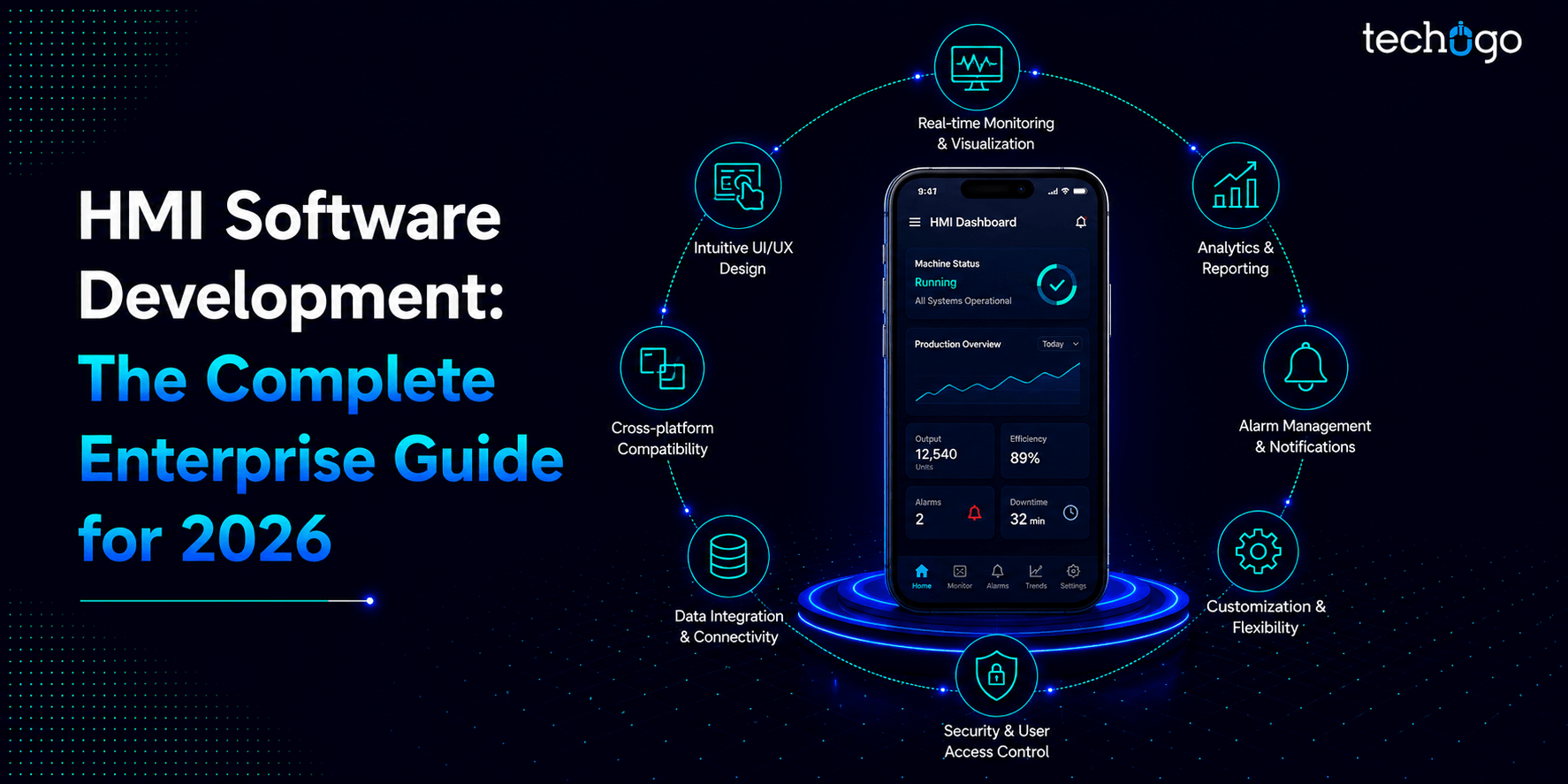
Must-have features in modern HMI software development
HMI software comes with a set of core features that make industrial operations easier to monitor, control, and optimize in real time. These features are designed to improve visibility and reduce manual effort because you need better decision-making across complex systems, so that everything is more efficient overall.
Real-time data visualization
One of the most important feature of HMI software is real-time data display, and it allows operators to see live machine data, system performance, and alerts instantly so you can respond quickly when something goes wrong… or when it looks like it might go wrong.
User-friendly interface
HMI systems are designed with simple and intuitive interfaces so that operators can easily interact with machines. Clear dashboards, icons, and controls reduce complexity, and improve operational efficiency, it is made so that even non-experts are able to use it.
Remote monitoring and control
Modern industrial HMI software allows you to monitor and control systems remotely, and this is especially useful in large facilities where machines are spread across multiple locations. It has been very helpful because you don’t always need to be physically there.
Integration with industrial systems
HMI software integrates smoothly with systems like PLCs, SCADA, and sensors – this ensures seamless data flow between machines and the control interface. This is a key requirement in HMI software development for industrial environments, therefore everything stays connected.
Alarm and alert management
The system continuously tracks machine performance and triggers alerts when abnormalities occur so that issues can be handled before they escalate. It helps prevent downtime but sometimes alerts come too fast, and operators get overwhelmed.
Data logging and reporting
HMI software records operational data over time, which can be used for analysis, reporting, and performance optimization. This helps industries make data-driven decisions, and yes, it is very important for long-term planning.
Security and access control
Since industrial systems involve sensitive operations, HMI software includes security features like user authentication and access control to prevent unauthorized access, and only approved users are able to interact with critical systems.
Technologies used in modern HMI software development
When you’re building HMI software today, you’re really pulling from a pretty wide toolbox – and honestly, getting that stack right makes all the difference between a system that just works and one that actually scales with you.
IoT
You’ve got sensors and machines constantly talking to each other, and your HMI is sitting in the middle pulling all that data in so operators can see what’s actually happening on the floor in real time. Instead of waiting for something to break, you catch it early.
AI and machine learning
These tools are genuinely good at chewing through massive amounts of industrial data and flagging when something looks off before it becomes a real problem. Less downtime, smarter decisions, faster response times.
Cloud Computing
Being able to store and access data remotely, monitor everything from one place, and scale without ripping out your whole infrastructure – that’s huge, especially for businesses running multiple sites. Many businesses leverage cloud consulting services to optimize performance, improve security, and support digital transformation initiatives.
PLC and SCADA integration
These are still the workhorses of industrial automation, and good HMI software needs to talk to them fluently. That integration is what keeps the communication between machines and operators clean and reliable.
Web and mobile technologies
HTML5 and modern JavaScript frameworks have made it way more practical to build interfaces that work on a tablet on the shop floor just as well as on a desktop in the control room. As businesses increasingly adopt mobile-first industrial solutions, many also look for teams with experience as a mobile app development company in USA to build secure, scalable, and user-friendly HMI applications.
Augmented and virtual reality
Still newer, but genuinely useful – especially for training and remote support. Being able to walk someone through a complex process visually, without them having to be physically present, is a real operational advantage.
Stages involved in the HMI software development process
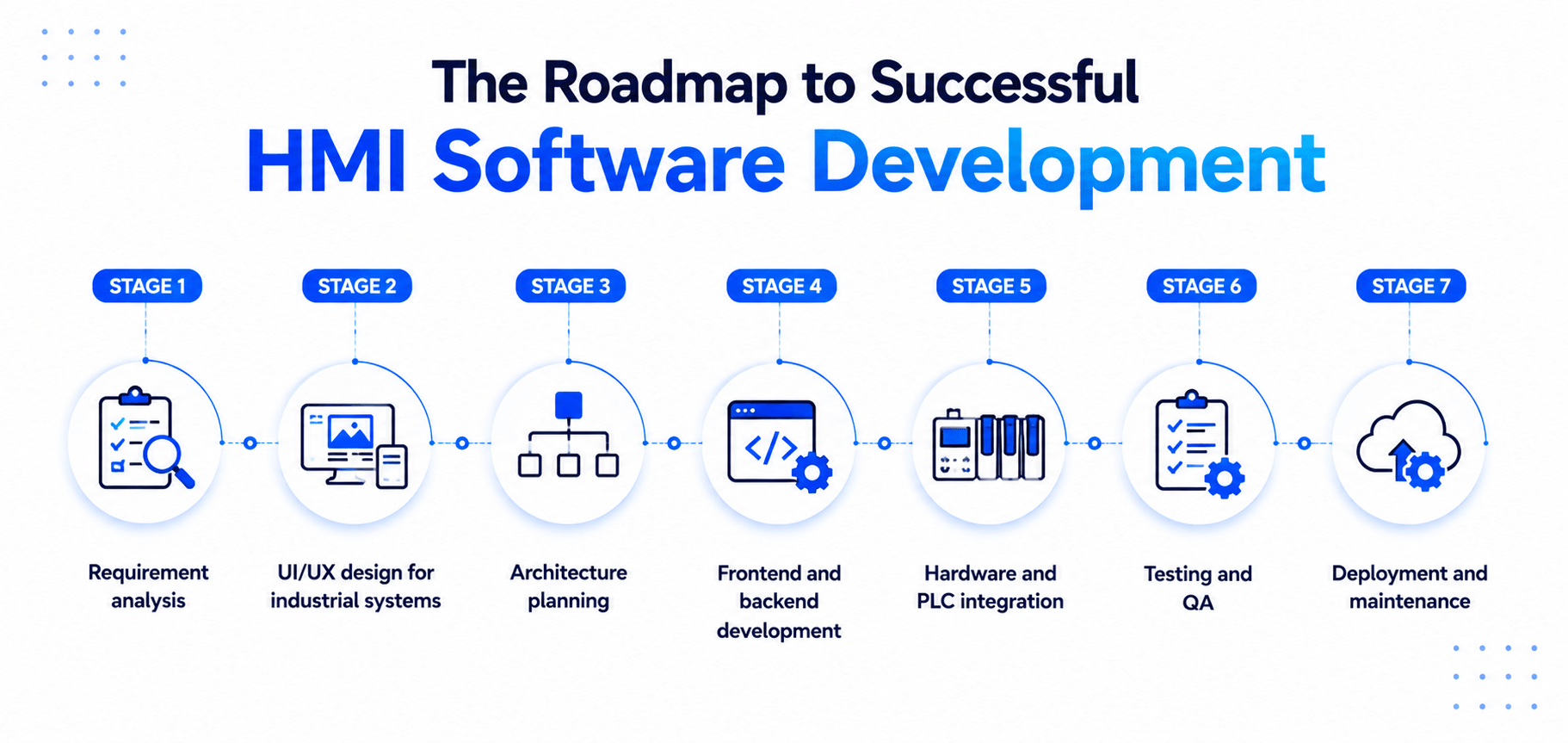
Stage 1. Requirement analysis
This is the foundation stage where business needs, machine behavior, and user expectations are defined and it is very important. Developers identify how real-time monitoring systems will be used, what data needs to be displayed, and how operators will interact with the interface because clarity is needed from start.
Stage 2. UI/UX design for industrial systems
In this stage, intuitive interfaces are designed with a focus on simplicity and speed, and it is done so that operators do not get confused. A well-planned interface is a critical part of a smart software development process. The goal is to ensure operators can easily interpret data and interact with systems without confusion but sometimes requirements change during design.
Stage 3. Architecture planning
Here, the system structure is designed, including data flow between machines, servers, and interfaces and it is a critical step. This stage is especially important in custom HMI software development, where architecture must support specific industrial workflows and scalability needs therefore require detailed planning.
Stage 4. Frontend and backend development
This is the core build phase where the interface and system logic are developed and both work together. The frontend handles user interaction, while the backend manages processing, communication, and system operations so that everything runs smoothly.
Stage 5. Hardware and PLC integration
HMI systems must communicate with industrial hardware like PLCs and sensors and it connects physical systems to software. This ensures smooth data exchange and accurate control, which is essential for effective HMI software development process implementation because without it – the system cannot function properly.
Stage 6. Testing and QA
The system is tested for performance, reliability, and accuracy and bugs are checked here. Any issues in data flow, interface response, or system integration are fixed to ensure smooth operation in real-world industrial environments – therefore this stage is repeated many times.
Stage 7. Deployment and maintenance
Finally after testing, the system is launched into live environments and it goes active. Regular updates and maintenance ensure it continues to perform smoothly in real-world industrial conditions but changes are always needed over time.
Common challenges in HMI software development
Building web-based HMI software isn’t exactly a walk in the park. There are some real hurdles that development teams run into, and knowing what they are upfront saves a lot of headaches down the line.
Real-time data performance
This one trips people up more than you’d think. Web-based interfaces have to keep up with live data coming in constantly – and in an industrial setting, you really can’t afford for that feed to stutter or lag. Operators are making calls based on what they’re seeing on screen, so if the data’s even a little behind, that’s a problem. Getting truly smooth real-time performance out of a browser-based platform takes more work than most people budget for.
Security and access control
The moment you move HMI to the web, you’ve opened a door that didn’t exist before. Now you’re thinking about network vulnerabilities, who has access, how data is being transmitted – all the stuff that closed systems never really had to deal with at the same level. And the tricky part is that locking everything down tight can make the system clunky to use, so finding that middle ground takes real thought.
Cross-device compatibility
Sure, web-based HMI software running on any device sounds great on paper. But getting it to actually look and function properly across a widescreen monitor, a floor tablet, and a phone? That’s a whole separate effort. Layouts break, touch interactions feel off, and suddenly your clean interface is a mess on anything that isn’t a desktop.
Legacy system integration
This is probably the messiest challenge of the bunch. Almost no industrial environment is starting with a blank slate – there are PLCs, old SCADA setups, and hardware that’s been running for years already in place. Getting your modern web-based HMI to communicate with all of that without things falling apart is genuinely difficult, and it’s usually where projects take the longest.
Reliability and uptime
Industrial operations don’t stop, which means your HMI can’t either. Unplanned downtime hits hard – financially and operationally. So web-based systems need to be built with serious reliability in mind, not just as an afterthought. Failovers, error handling, stability under load – all of it matters a lot more here than in your average web application.
Role of AI in modern HMI system development
AI is quietly changing how industrial HMI systems actually work on the ground.
Instead of just showing numbers and machine status, these systems are starting to understand what’s happening in real time, spot patterns, and help operators react faster without overthinking every signal. That shift becomes even more powerful with AI integration in industrial HMI, where data stops being passive and starts becoming useful.
Here’s what AI actually brings into modern HMI systems:
- Predicts machine failures before they occur using historical and live data
- Detects anomalies and unusual machine behavior in real time
- Improves decision-making by analyzing complex industrial data instantly
- Supports smart automation with reduced manual intervention
- Enables real-time analytics and performance forecasting
At the end of the day, it’s pushing HMI systems away from being simple control screens and more into something that actually thinks ahead, responds faster, and reduces the pressure on operators.
Future trends shaping HMI software development
The industry isn’t slowing down anytime soon, and to be honest the next few years are looking pretty interesting. Here’s where things are headed.
AI that actually does more than alert you
Right now most AI in HMI systems is good at flagging problems. Where it’s going though is full predictive decision-making – systems that don’t just tell you something’s wrong but walk you through exactly what to do about it. Less reactive, more proactive. That shift is going to change how operators interact with their environments in a big way.
Mobile-based HMI Software is only getting bigger
This one’s already happening but it’s nowhere near its peak. Mobile-based HMI software is giving operators the freedom to monitor and control systems from wherever they actually are – not just from a fixed control room. As mobile hardware gets more powerful and connectivity gets more reliable, expect businesses to lean into this even harder. The control room is slowly becoming wherever you’re standing.
Edge computing moving to the front
Cloud is great but sending everything to a remote server and waiting on it has its limits in fast-moving industrial environments. Edge computing keeps the processing closer to where the data is actually generated, which means faster response times and less dependency on a stable internet connection. More HMI systems are going to start leaning on edge architecture going forward.
AR getting pulled into everyday operations
Augmented reality used to feel like a future thing. It’s becoming a now thing. We’re starting to see it used for real-time equipment guidance, remote expert support, and hands-on training – and as the hardware becomes more practical to actually wear and use on a floor, adoption is going to climb fast.
Tighter cybersecurity built in from the start
Security used to be something teams bolted on after the fact. That approach doesn’t cut it anymore. As HMI systems get more connected – more cloud, more mobile, more web-based – security is becoming something that gets designed in from day one, not patched in later. Expect to see it treated as a core feature rather than an add-on.
Smarter, more intuitive interfaces
The days of clunky, overcrowded HMI screens are numbered. There’s a real push toward interfaces that are cleaner, more intuitive, and designed around how operators actually think and work – not just what the system needs to display. Better UX in industrial software is long overdue, and it’s finally getting the attention it deserves.
How much does it cost to build HMI software?
The price to develop HMI software depends on system complexity, features, and the level of customization required. A simple system built for basic machine control will cost much less compared to advanced solutions with real-time monitoring, automation, and AI capabilities. Overall, cost to build HMI software typically ranges from $50,000 to over $600,000, depending on project scope and industrial requirements. In many cases, businesses also prefer custom HMI software development to match specific workflows and hardware setups.
Cost breakdown by type of HMI software
| Type of HMI Software | Estimated Cost Range |
| Basic HMI Systems | $50,000 – $120,000 |
| Mid-Level Industrial HMI Systems | $120,000 – $300,000 |
| Advanced HMI Systems with Integration | $300,000 – $450,000 |
| AI-Powered / Custom HMI Solutions | $450,000 – $600,000+ |
Key cost factors
Several factors influence the final development cost:
- Feature complexity (basic dashboards vs advanced industrial systems)
- UI/UX design depth and customization level
- Integration with PLCs, sensors, and industrial hardware
- Platform type (web, mobile, or PC-based systems)
- AI and automation capabilities
- Security, compliance, and data protection requirements
- Choice of a software development company for HMI solutions
In most cases, businesses investing in higher-end HMI solutions are not just paying for software development, but for long-term efficiency, better operational control, and reduced downtime. While upfront costs may be higher, the return comes through improved productivity and smarter industrial operations.
Factors to consider when choosing an HMI software development company
Picking the right development partner is honestly one of the most important calls you’ll make for your project. The wrong choice can cost you time, money, and a whole lot of unnecessary stress.
Here’s what’s actually worth paying attention to.
1. Industry experience
There’s a real difference between a company that builds software and a company that builds software for industrial environments specifically. Every business has unique operational requirements which is why partnering with a custom software development company is important. You want a team that already gets how HMI systems work, what the stakes are, and what kinds of problems tend to pop up. A general software shop can figure it out eventually – but you’ll be footing the bill for that learning curve.
2. Their technical stack
Ask what technologies they actually work with day to day. Are they solid with PLC and SCADA integration? Do they know their way around real-time data handling, cloud platforms, and modern web frameworks? The last thing you want is to be halfway through a build and realize their skill set doesn’t match what your system actually needs.
3. Portfolio and past work
Don’t just take their word for it: look at what they’ve genuinely built. A strong portfolio of real HMI projects tells you way more than any sales pitch ever will. If they’ve tackled problems similar to yours before, that’s a good sign. If everything they’ve done looks totally unrelated to industrial software, that’s worth taking seriously.
4. How they handle security
Given how connected modern HMI systems are, security isn’t something you can treat as optional. A good development company should be able to walk you through their approach clearly and confidently – not stumble through a vague answer. If security feels like an afterthought in those early conversations, consider it a red flag.
5. Communication and transparency
This one gets underestimated all the time. You want a team that keeps you in the loop, explains things without drowning you in jargon, and doesn’t go radio silent for weeks. Industrial projects are complex and things shift – a partner who actually communicates well makes all of that a lot easier to deal with.
6. Support after launch
The project doesn’t end when the software goes live. Bugs come up, integrations need tweaking, updates need rolling out. Make sure the company offers real post-launch support and isn’t going to vanish the moment the final invoice clears. Long-term reliability from your development partner matters just as much as the quality of the initial build.
7. Scalability mindset
What you need today probably isn’t what you’ll need in three years. A good HMI software development company thinks ahead – building systems that can grow with you rather than ones you’ll eventually have to tear out and start over with. Bring up scalability early in the conversation and pay attention to how they respond.
8. Enterprise software expertise
Many HMI platforms need to integrate with ERP systems, manufacturing software, and other business applications. Partnering with a company experienced in enterprise software development helps ensure seamless integration and long-term scalability.
Why Techugo is the right choice for HMI system development
What makes an HMI system truly effective isn’t just the software itself, but the team behind it that understands how industrial environments actually work on the ground.
At Techugo, this understanding is combined with modern innovation, where technologies like AI, AR, and VR are reshaping how industrial operations are designed and managed. Today’s HMI systems are no longer limited to traditional dashboards – they are becoming more immersive, intelligent, and interactive.
Our experience across industries, including automotive app development, enables us to build intelligent, connected solutions that support real-time monitoring, automation, and operational efficiency.
As a mobile app development company, Techugo stands out because it focuses on building scalable, secure, and high-performance solutions designed for complex industrial systems, rather than generic, one-size-fits-all products.
So, do you want to turn your HMI idea into a smart, AI-powered solution? Talk to Techugo and start building today.
FAQs
1. What is HMI software development?
HMI software development refers to the process of building Human-Machine Interface systems that allow operators to monitor, control, and interact with industrial machines through visual dashboards and control panels.
2. What industries use HMI software?
HMI systems are widely used in manufacturing, energy, automotive, oil and gas, pharmaceuticals, and other industrial sectors where real-time machine monitoring and control are required.
3. How much does it cost to build HMI software?
The cost to build HMI software typically ranges from $50,000 to over $600,000, depending on system complexity, features, integration requirements, and customization level.
4. What technologies are used in modern HMI systems?
Modern HMI systems use technologies like AI, IoT, cloud computing, and sometimes AR/VR to improve real-time monitoring, automation, and user experience.
5. How does AI integration in industrial HMI improve operations?
AI integration in industrial HMI improves operations by enabling real-time data analysis, predictive maintenance, and faster decision-making. It helps detect anomalies early, reduces downtime, and enhances automation, making industrial systems more efficient and responsive.

Get in touch
We'd love to hear from you.