SA
SA  KW
KW  IE
IE AU
AU UAE
UAE UK
UK USA
USA  CA
CA DE
DE  QA
QA ZA
ZA  BH
BH NL
NL  MU
MU FR
FR [ LET’S TALK AI ]
X
Discover AI-
Powered Solutions
Get ready to explore cutting-edge AI technologies that can transform your workflow!



Get ready to explore cutting-edge AI technologies that can transform your workflow!


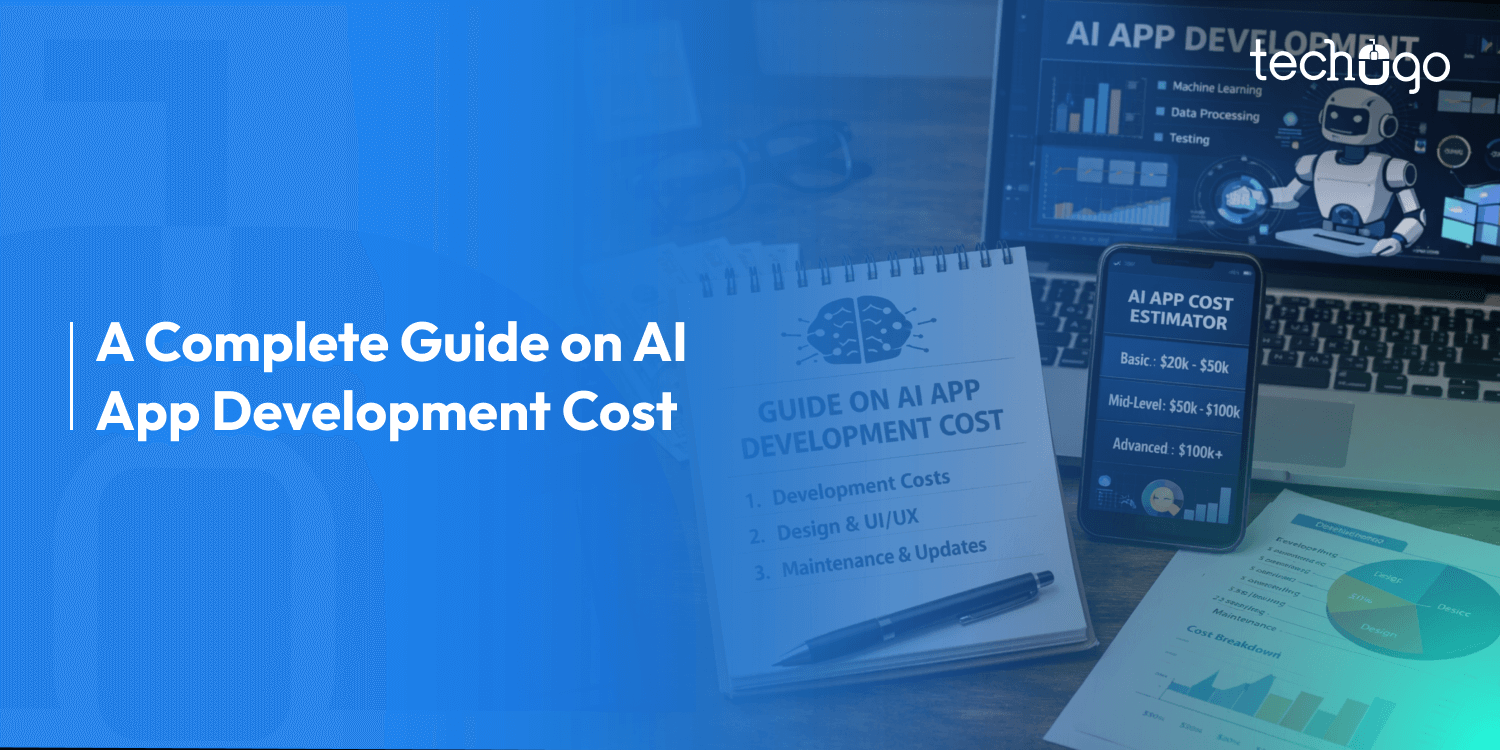
The price to build an AI app?
It’s a big deal for startups and corporations alike. Creating these apps isn’t your typical mobile dev thing. You’ve got data management, machine learning, and cloud stuff to think about. All this means that AI apps often hit your wallet harder than regular ones.
Want something simple, like a chatbot? Set aside $30,000–$60,000.
For smarter AI apps, ones that generate content, suggest products, or give advice you’re looking at $70,000 to $150,000.
And for the really fancy stuff?
Think custom machine learning, real-time data crunching, or computer vision. Those apps can go way past $150,000–$500,000.
The final tab depends on a few things: scale, how well it works, and the rules it follows.
When you build an AI app, you have to consider the usual app stuff, like design and code. But, you also need machine learning, AI integrations, data stuff, and cloud power. Each of these bumps up the cost when building and running everything.
Companies everywhere are grabbing AI solutions. They’re after smoother operations, personalized touches, and better customer experiences.
Healthcare, finance, retail, and shipping are all in. Recommendation engines, predictive tools, and conversational bots are hot ticket items.
In this guide, we’ll break down the costs that go into building an AI app, what drives prices up, and how to plan your budget right. We’ll also go over features, tech, teams, and those sneaky hidden expenses that are often ignored. So, let’s get started…
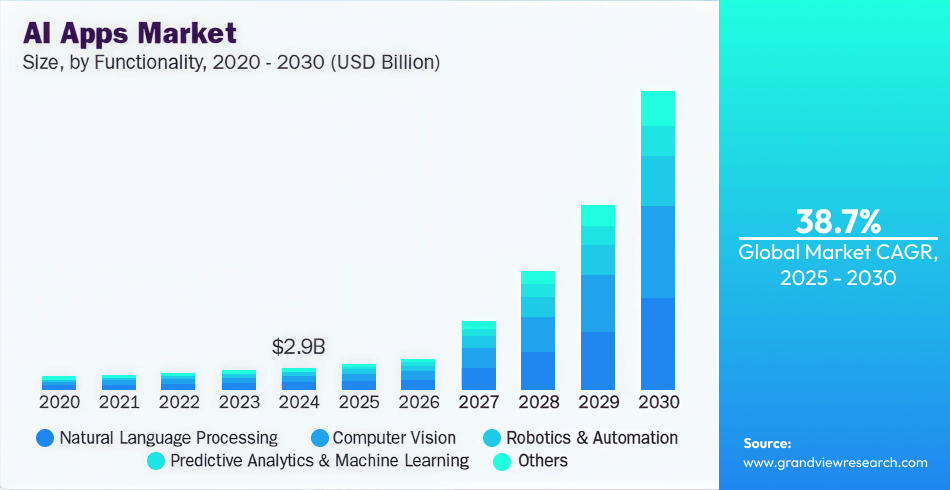
(Source: Grand View Research)
The AI app market is growing fast as more businesses and people start using smart mobile tools.
Market analysts say that in 2024, the market was worth about $2.94 billion. They think it will grow by about 38.7% each year until 2030, hitting over $26 billion. This growth is because we’re adding AI tech like language processing and machine learning to different industries, like healthcare and shopping.
Some forecasts say the AI app market might reach around $43.85 billion by 2032 as more people use edge computing and AI inference. Looking ahead, the market for AI in mobile apps could pass $322 billion by 2034, growing over 30% yearly.
These numbers show that AI is improving what we see and use, like giving better suggestions and making things more personal.
More and more companies are using AI in their apps. Many say that by 2026, over 70% of new mobile apps will have AI built-in, mostly to handle tasks automatically, change things for each user, and make fast decisions.
This increase is from things like faster processing on devices, more software tools for AI on devices, and easier access to ready-made models.
Language processing is the most used AI feature, with machine learning for suggestions and predictions coming in second.
This fast market changes the expense to build an AI app and what the AI app development budget will be in 2026.
Because of higher demand and more competitors, companies have to balance quick money with long-term growth and upkeep, so careful budgeting and tech planning are key.
There are tons of ways to use AI, but keep in mind each type has its own set of costs. Knowing what’s out there guides you when planning your app budget and making sure it does exactly what you need it to.
AI that chats uses natural language processing (NLP) to figure out what people are saying or writing. Think chatbots or helpers. They give quick answers, assist you, and chat like a real person. Google Assistant or some chat tools do this well. NLP helps them understand text, pick up on emotions, and know what people mean.
Features They Have:
* Chat with you by voice or text
* Help out and answer questions without a real person
* Get what you mean
These apps usually need fancy NLP tools and huge language models, so they can be a bit more to build and keep running.
These AI apps use past data to guess what you’ll do next. Like when Netflix or Amazon suggests shows or products.
What they do:
* Suggest things you might like
* Make choices just for you
* Change how things look based on your interest
They need ways to move data and train the models, which can increase the cost, but it keeps people interested and on your app longer.
Generative AI makes new stuff like writing text, making images, or clips based on what it’s seen before. Consider AI tools that assist with design or make content on their own.
Features That Define Them:
* Make text and photos
* Copy styles
* Automate creative tasks
These need big models and strong computers, so they can be a bit expensive.
Computer vision apps get pictures from smartphone cameras or sensors. It’s used to edit photos, find objects in images, or add filters in AR.
Features That Define Them:
* Know what’s in pictures
* Add things to reality using AR
* Know who you are by your face
Vision apps need models and ways to label data, so they cost more
Each AI app differs in how tricky it is to build and how much it’ll set you back. Picking the correct model early on can really help you plan.
So, you’re wondering how much an AI app will set you back?
Let’s break it down. In this era, what you pay really comes down to what you want the app to do, how smart the AI is, and the tech it needs. Think of it like this:
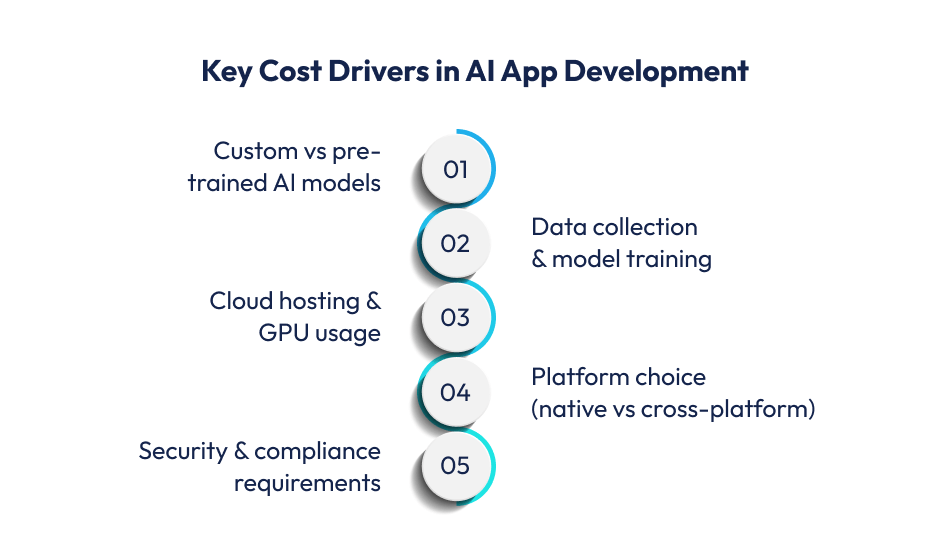
Estimated Cost: $40,000 – $80,000
This is your dip a toe in option. It’s a simple app with some AI, perfect for seeing if your idea has legs. Good for startups or anyone not wanting to break the bank right away.
What you get:
Since you’re using ready-made AI, you skip the costly AI training and fancy hardware.
Estimated Cost: $80,000 – $150,000
Now we’re talking about custom features and better performance.
Want your app to stand out with its own AI spin? This is your sweet spot.
What’s included:
Costs go up since you need folks to handle the data, train the AI, test everything, and keep it all running smoothly.
Estimated Cost: $150,000 – $300,000+
These are for the big players. Think tons of users, tricky AI jobs, and lots of moving parts.
What you get:
These need serious online computers to run the AI, special setups, and non-stop AI monitoring.
Breaking down the AI app development cost into specific components gives a clearer picture of where budget is spent and why.
Unlike standard apps, AI applications require additional layers for model training, data pipelines, and AI logic, which makes detailed cost planning essential for accurate budgeting.
| Cost Component | Estimated Cost Range (USD) |
| Design & Prototyping | $20,000 – $50,000+ |
| Frontend Development | $10,000 – $50,000+ |
| Backend & APIs | $20,000 – $120,000+ |
| AI Models & Integration | $10,000 – $150,000+ |
| Testing & QA | $5,000 – $20,000+ |
| Development & DevOps | $3,000 – $15,000+ |
Good design is more than aesthetic; it sets the stage for user engagement and retention. AI apps often need more sophisticated UI/UX to handle complex interactions like personalized feeds, intelligent recommendations, and real-time responses.
Typical cost ranges:
AI-specific interfaces such as adaptive dashboards or contextual prompts might add 15–25% to design effort compared with standard apps, as they require extra screens, logic flows, and usability testing to ensure frictionless experiences.
Frontend work turns designs into interactive screens. For AI apps, this includes rendering dynamic content from backend models and handling real-time updates or visualization of AI outputs.
Approximate cost ranges:
Frontend complexity often increases when integrating AI features such as semantic search bars, predictive suggestions, or multimedia results from generative AI.
The backend powers your app’s logic, database, APIs, and cloud services. For AI apps, the backend also orchestrates AI model calls, manages data workflows, and ensures secure communication between clients and servers.
Cost estimates:
Backend costs rise with complexity such as multi-tenant support, complex business logic, and data pipelines feeding AI models. Strong backend architectures are crucial for performance and scalability.
This is often the most variable and highest cost component in an AI app budget. Costs depend on whether you use pre-trained models or develop custom models from scratch.
Typical investment ranges:
Custom models require data collection, cleaning, labeling, and extensive training cycles, which significantly increases compute costs and engineering hours.
Pre-trained services (OpenAI, AWS AI, Google AI) reduce development time but introduce ongoing usage fees.
Testing for AI apps needs more than basic functional checks. It must also validate AI accuracy, model behavior, and edge cases.
Typical QA costs:
AI-driven features increase QA effort because models may behave differently based on real user data, requiring iterative testing and validation.
Deployment covers app store submissions, cloud setup, and continuous deployment pipelines.
Costs include:
Cloud infrastructure can also drive ongoing costs based on compute usage, data storage, and AI inference loads, which should be factored into long-term budget planning.
Across these stages, AI capabilities generally add 20–40% or more to typical mobile app costs due to increased development complexity, data requirements, and infrastructure demands.

An AI app’s cost is driven as much by its core features and logic as by the technology underneath. Clearly defining user-panel functionalities and admin features is essential to estimate development effort and technical complexity accurately.
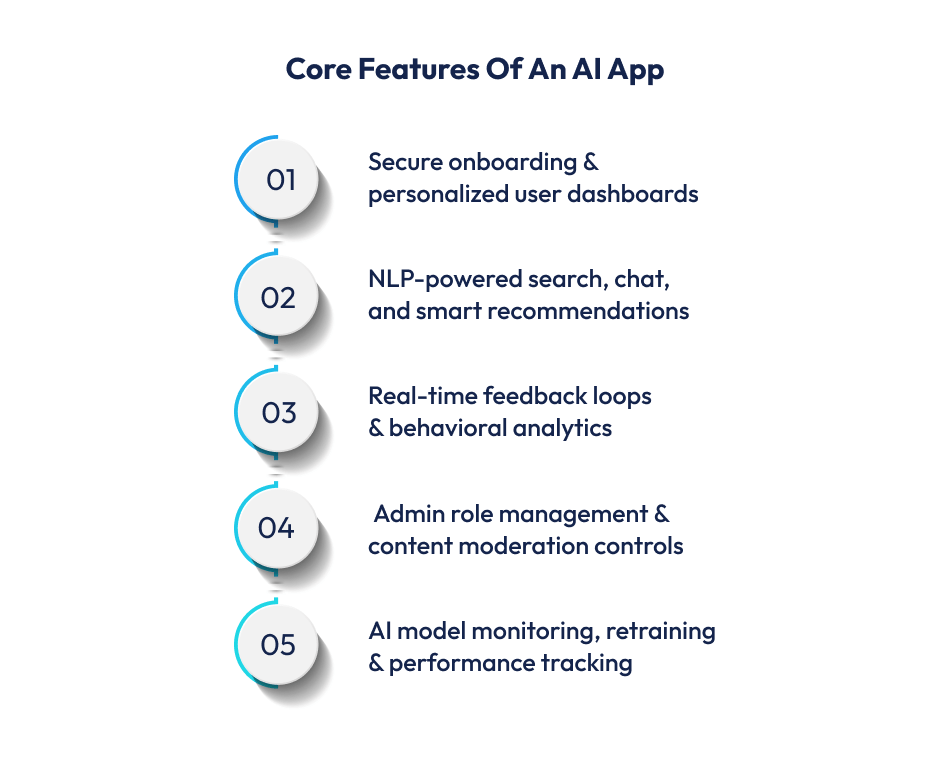
The user panel defines how end users interact with your AI app. These features must be intuitive, responsive, and tightly integrated with the AI logic you choose.
AI apps typically include:
AI-driven onboarding enhances personalization by capturing user needs upfront and feeding data into the recommendation and prediction engines.
This requires backend support and ML-ready data flows, increasing design and development time.
Every AI app benefits from a dynamic home screen that adapts to user behavior, including:
AI models analyze user patterns and surface the most relevant content, creating highly personalized experiences. These dashboards typically involve heavier data pipelines and analytics.
AI-powered search improves relevance by interpreting user intent beyond keyword matching. Features include:
Semantic and intent-based search layers use NLP frameworks, which require additional development and model integration.
AI interactions can include:
These elements make the app feel “smart” but add complexity in model training, intent handling, and continuous testing.
User feedback loops help the AI learn and adapt:
Real-time data ingestion streams and analytics dashboards demand scalable backends and advanced processing layers.
The admin panel controls the platform, manages content, and monitors AI behavior. It is essential for product owners and operations teams.
Admins need tools to manage user accounts, define roles and access, and moderate content and AI outputs as well. This typically requires an RBAC (role-based access control) system and strong security stacks.
AI systems should be transparent and adjustable. Administrative features often include:
These features require ML Ops tools, model logging, and model versioning.
Admin dashboards often include engagement metrics, conversion analysis, and feature usage trends also. Real-time insights rely on analytics engines that integrate with both frontend and backend data.
Admins must regulate feature flags, content publishing and scheduling, and AI response moderation as well. This reduces risk (especially with generative AI) and helps maintain content quality.
Understanding these components demonstrates how feature decisions impact the AI app development cost:
AI feature depth from NLP to predictive analytics requires dedicated data pipelines, model training, and ongoing optimization, each adding roughly 20-40%+ to a standard app budget.
Well-structured user and admin logic not only enhances usability but also lays the foundation for scalable AI infrastructure and long-term value.
A detailed feature blueprint early in the planning phase ensures your mobile app development company can estimate accurately and avoid cost overruns.
AI modules are among the largest contributors to overall development cost of building an AI app for businesses. Understanding what each module does and how it influences the cost to develop an AI app helps businesses allocate budget realistically and prioritize high-impact features.
NLP allows applications to understand and generate human language, powering chatbots, virtual assistants, sentiment analysis, and contextual search.
NLP increases costs due to data preprocessing, model selection or fine-tuning, and integration with application logic. Higher language complexity or domain-specific training also drives data annotation and compute expenses.
Recommendation engines tailor content, offers, or decisions based on data patterns. They are used in everything from personalized browsing to smart suggestion feeds.
These systems depend on user behavior data, historical interactions, and predictive modeling. Building effective recommendation logic requires scalable data pipelines and continuous tracking, which increases backend investment and ongoing maintenance.
Computer vision enables applications to interpret visual data. Typical use cases include image classification, object detection, real-time analysis, and augmented reality overlays.
Computer vision incurs high costs partly because datasets must be labeled and cleaned extensively, models need GPU-optimized training, and ensuring real-time performance requires powerful cloud or on-device processing.
Generative AI modules create new content text, images, code, or other media based on learned patterns. Their costs vary depending on whether you use API-based models or custom-tuned architectures.
Generative capabilities are becoming a key differentiator for modern apps but significantly increase backend complexity and operational costs, especially if real-time, low-latency responses are required.
Predictive analytics uses ML to forecast trends or user behavior based on historical and real-time data. This is common in forecasting tools, financial dashboards, and optimization engines.
These modules often require extensive data engineering, model validation, and ongoing training as data grows, making them more expensive than simpler modules.
AI modules increase app development cost in distinct ways:
In many real builds, AI modules alone can add 25–50% or more to the total project budget compared with a non-AI counterpart.
Planning and prioritizing which AI components deliver the most business value before building ensures better ROI and controllable development spend.
Choosing the right technology stack is a cornerstone of building a robust, scalable, and cost-efficient AI application. With many options available, prioritizing flexibility, developer ecosystem strength, and cloud readiness is key for long-term viability.
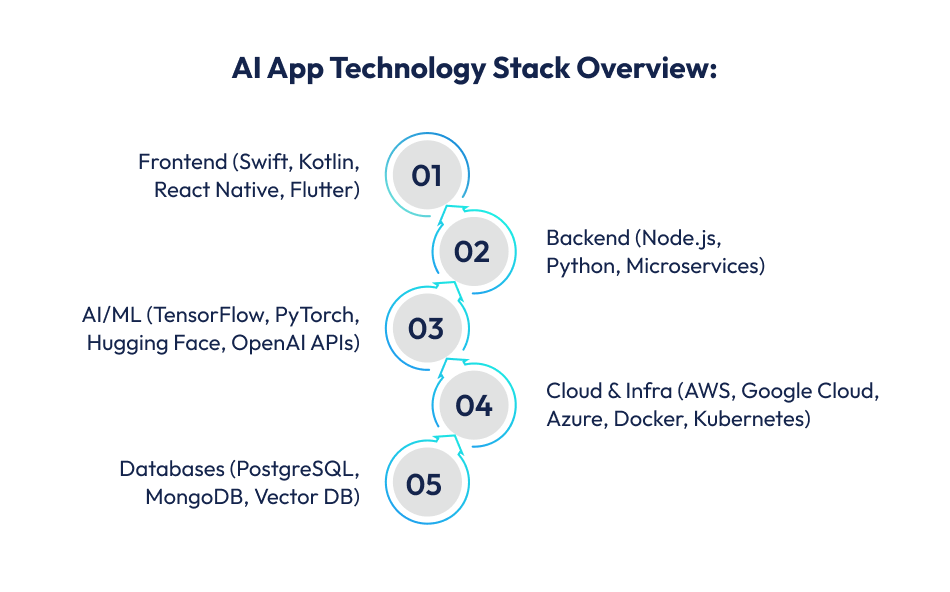
The frontend layer determines how users interact with your AI app across devices.
These frameworks ensure responsive, adaptive UIs that integrate smoothly with backend AI services.
Choosing cross-platform can reduce development and support costs while preserving near-native performance.
The backend is the engine driving business logic, data pipelines, and AI service coordination.
Backend services manage requests, orchestrate AI model calls, and ensure secure, real-time responses.
Modular design allows independent scaling of core app logic and AI workloads.
These tools power intelligent features:
Hugging Face Transformers, OpenAI APIs for text understanding and generation.
Cloud AI platforms like AWS SageMaker, Google Vertex AI, Azure AI provide managed training and deployment services.
Selecting between custom models and managed services impacts both development effort and ongoing operational cost.
AI workloads demand scalable computing and storage.
These platforms support GPU/TPU compute for training and inference, streaming data pipelines, and load-balanced APIs.
A cloud-native stack improves reliability but requires careful cost planning, especially around AI compute time.
Data storage must support both structured app data and unstructured AI datasets.
Choosing the right database influences performance, scalability, and ongoing maintenance cost.
Reliable deployment and operational health are essential:
Choosing the right stack ensures your AI app remains performant, secure, and future-ready while optimizing both initial development costs and long-term maintenance.
Where your development team is based is one of the biggest factors affecting the cost to develop an AI app.
Regional labor costs, talent availability, and market expectations differ significantly, influencing project budgets, delivery speed, and long-term support.
Below is a practical comparison of key regions often considered when planning AI and mobile app development.
| Region | Average Hourly Rate (USD) | Typical Mid-Level AI App Cost |
| USA | $90 – $150+ | $120,000 – $300,000+ |
| UAE & GCC | $60 – $80+ | $25,000 – $65,000+ (AED 90K–240K) |
| India & South Asia | $15 – $50 | $30,000 – $70,000+ |
| Eastern Europe | $35 – $90 | $50,000 – $120,000+ |
| Hybrid Model ( Local + Offshore) | Blended rates | 20–40% lower than fully US-based teams |
In the United States, mobile and AI app development is among the most expensive globally due to high developer wages and strong quality standards.
Agencies and senior engineers typically charge $90–$150+ per hour, with custom enterprise projects reaching $120,000–$300,000+ for mid-level solutions.
Working with US-based teams offers advantages such as:
However, this comes at a premium and often suits complex or compliance-heavy AI apps.
The UAE markets sit between Western and offshore pricing tiers.
Local development rates often range from $60–$80+ per hour, with mid-complexity mobile projects typically quoted in the AED 90,000–240,000 range (USD 25,000–$65,000+).
Benefits of regional teams include:
Yet, many UAE businesses blend regional oversight with offshore execution to reduce costs while maintaining quality.
India is one of the most cost-efficient hubs for mobile and AI app development.
Hourly developer rates typically range $15–$50/hr, with mid-level AI app projects often delivered between USD 30,000–$70,000+ roughly 40–60% lower than US or European counterparts.
Key reasons India remains attractive:
Startups and cost-conscious businesses frequently choose Indian development teams for MVP and scalable builds without compromising quality.
A common strategy for balancing cost and quality is a hybrid model: product leadership and architecture oversight locally (e.g., US/UAE) while executing development offshore (e.g., India/Eastern Europe).
This approach maximizes strategic alignment while containing labor spend, provided communication and project governance are well managed.
When estimating the AI app development cost, choosing between an in-house team and an outsourced development partner significantly impacts your total budget, speed, and scalability.

Building an internal team provides full control but comes with higher long-term financial commitment.
Advantages:
An in-house development team provides full operational control over project direction, priorities, and execution.
It strengthens internal knowledge retention, ensuring technical expertise stays within the organization.
Collaboration across departments becomes more seamless, as teams share the same culture, communication channels, and business objectives, enabling faster decision-making and tighter alignment between product, technology, and strategy.
Challenges:
Maintaining an in-house team involves high fixed costs, including salaries, benefits, and infrastructure, regardless of workload.
Hiring skilled AI talent often requires lengthy recruitment cycles.
Scaling resources up or down is difficult, making it challenging to adjust quickly to changing project demands or budget constraints.
This model is typically suitable for enterprises building long-term AI capabilities.
Outsourcing to an experienced AI app development company reduces upfront hiring costs and accelerates delivery.
Advantages:
Outsourcing reduces operational overhead by eliminating long-term hiring and infrastructure costs. It accelerates time to market through ready-made teams and established workflows.
Businesses gain access to specialized AI expertise across frameworks and industries. Resource scalability is easier, allowing teams to expand or contract based on project scope.
Challenges:
Outsourced models require structured communication and clear documentation to avoid misalignment.
There is less direct day-to-day control over execution, making strong project governance essential for maintaining quality, timelines, and strategic consistency.
For startups and mid-sized businesses, outsourcing can reduce development costs by 40–60% compared to maintaining a full in-house AI team, while still ensuring technical quality when managed correctly.
Beyond the upfront development costs of an AI app, there are several hidden and recurring expenses that founders commonly overlook.
Failing to account for these early can lead to budget overruns and operational challenges as your product scales.
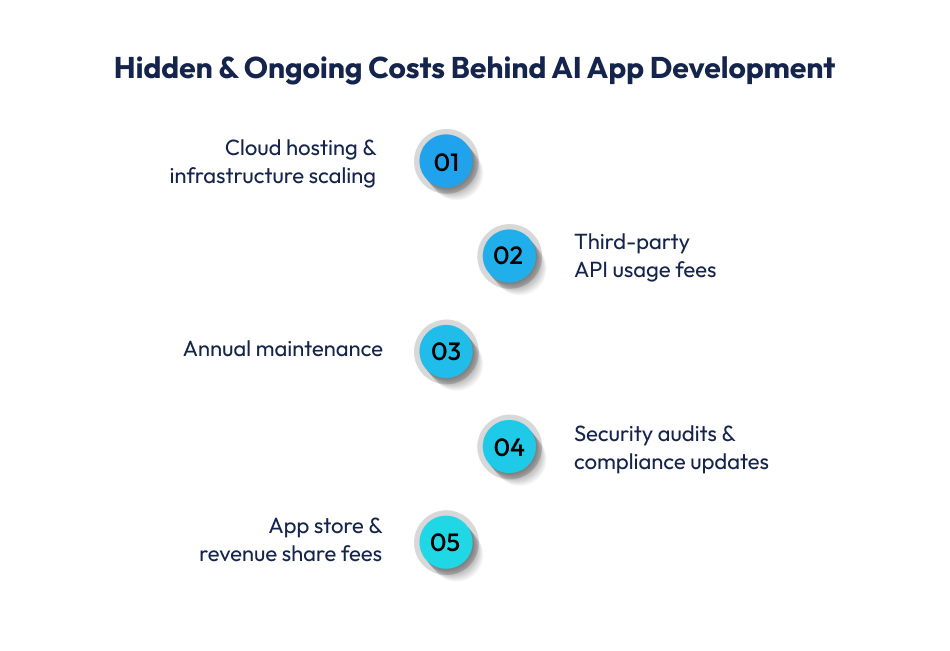
AI apps rely heavily on scalable backend infrastructure. Using cloud platforms like AWS, Google Cloud, or Azure incurs ongoing fees based on usage, data storage, and compute resources especially for AI inference and model serving.
Mid-sized apps may spend $3,000–$12,000+ per year, while large, data-heavy apps can exceed this as usage grows.
Key elements include:
Many AI capabilities plug into external services such as NLP APIs, payment gateways, SMS/OTP providers, maps, analytics, and push notifications. These tools may charge based on usage, making them a recurring cost rather than a one-time expense.
Typical recurring fees:
Once your app is live, the work isn’t over. Hidden costs include bug fixes, OS compatibility updates, performance optimizations, and security patches. Industry benchmarks recommend allocating 15–25% of your initial development cost annually to maintenance.
Maintenance often encompasses:
AI applications that process personal or sensitive data must adhere to GDPR, CCPA, HIPAA (where relevant), and other regional laws. Legal review, compliance planning, and regular audits add to your budget.
Common compliance costs:
Launching on app stores introduces small but recurring fees:
Beyond tech expenses, consider costs related to support staffing, analytics tools, marketing, and customer engagement platforms, which grow as user volume increases.
Planning for these hidden costs early will help you build a comprehensive AI app development budget and avoid unpleasant surprises as your product scales.
Here’s a step-by-step guide that developers follow to develop an AI app. Let’s have a look:
Start by identifying the exact problem your AI app will solve.
Whether it is personalization, automation, predictive analytics, or intelligent search, clarity at this stage prevents feature creep and budget overruns.
Define your target users, expected outcomes, and measurable KPIs. A focused use case ensures development resources are aligned with business impact.
AI systems depend on high-quality, structured data.
Identify relevant data sources, ensure compliance with privacy regulations, and clean and prepare datasets for training.
If proprietary data is limited, consider leveraging pre-trained models or third-party AI APIs for faster deployment.
Establishing scalable data pipelines early reduces rework later.
Select frontend, backend, AI/ML frameworks, and cloud infrastructure based on scalability and performance needs.
Cross-platform frameworks can reduce initial costs, while microservices architecture allows modular AI deployment.
Cloud-native environments support GPU-based workloads and real-time processing, ensuring flexibility as user demand grows.
Depending on the complexity, either train custom models or integrate managed AI services.
Focus on model accuracy, latency, bias testing, and security.
Iterative development and controlled testing environments help refine performance before full-scale deployment.
Post-launch monitoring is critical. Track model performance, user behavior, and infrastructure usage.
Continuous retraining, analytics tracking, and feature optimization ensure long-term scalability and sustained ROI.
Building feedback loops into the system enables consistent improvement over time.
Developing an AI app can be expensive if not planned strategically.
Fortunately, there are proven cost optimization strategies that help you control your AI app development budget without sacrificing quality or performance.
These approaches are widely recommended by industry experts and cost guides.
Launching with an MVP focuses on essential features first, allowing early market validation without heavy upfront investment. An MVP helps you:
Prioritizing essentials keeps your budget lean and improves decision making around future releases.
Using frameworks like Flutter or React Native lets you build once and deploy on both iOS and Android. Benefits include single shared codebase, lower maintenance costs, and faster development timelines as well. Cross-platform builds can reduce development cost by 30–40% compared to separate native apps .
Instead of training complex AI models from scratch:
These choices cut down both development and compute expenses significantly, especially around data preparation and model training.
Avoid “feature bloat” by segmenting your roadmap:
A phased rollout lets you invest only in features that demonstrate real user value, avoiding unnecessary upfront spend.
Outsourcing parts of the project or using a hybrid team structure can optimize labor costs:
Outsourcing to cost-effective regions like India or Eastern Europe can reduce labor costs by 40–60% without compromising quality when managed appropriately.
Agile practices break development into smaller, iterative cycles. This reduces rework, improves alignment with product goals, and also prevents budget overruns.
Smaller sprints also allow faster course corrections if priorities change during development.
Choosing the right monetization model for your AI app impacts both long-term revenue and user engagement. Today’s top mobile apps rarely use a single method.
Instead, they combine multiple approaches to capture value from different user segments and maximize lifetime value (LTV).
Subscriptions are a reliable revenue engine, especially for AI apps that deliver ongoing or evolving value.
Users pay monthly or annually for access to premium features such as advanced analytics, continuous recommendations, or AI-assisted workflows.
Tiered plans (Basic, Pro, Premium) help capture different segments and can increase lifetime value by up to 70% compared to non-subscription models.
IAPs allow users to buy specific features, tokens, or credits within the app. This model is especially effective for compute-intensive actions like image generation, document analysis, or premium content creation. IAP revenue can account for a significant share of total earnings in mobile ecosystems.
Freemium gives basic access for free while gaining advanced functionality. Many successful apps pair freemium with ads or reward-based placements to monetize free users.
Around 60% of top-grossing apps now use hybrid strategies, combining subscriptions, IAPs, and ads for diversified revenue.
A thoughtful blend of these models customized to your app’s audience and value proposition helps future-proof your AI app’s revenue and scale growth efficiently.

Estimating the cost to develop an AI app in 2026 requires more than a simple number.
Your budget should reflect complexity, platform choice, AI depth, data strategy, and long-term operational needs such as cloud infrastructure, model retraining, and compliance.
Clear upfront planning and phased development help avoid overspending and ensure feature priorities are aligned with business goals.
Market data shows that AI apps can range from modest MVP builds to enterprise systems exceeding USD 300,000+ based on scope and technology.
Choosing the right AI app development company influences both product quality and total cost.
Working with an experienced mobile app development partner that understands AI integration and scalable architecture improves predictability and accelerates time to market.
Techugo supports businesses with tailored AI and generative AI development services, strategic planning, and cost-optimized execution to help you build powerful, future-ready applications within your budget.

AI dating apps aren't just about swiping anymore. They're now smart platforms that learn how people act, guess who'll get along, and make things safer..


When people talk about building an app, the conversation almost always starts with one question: how much does it cost to develop a mobile app in 2026..



Write Us
sales@techugo.comOr fill this form