SA
SA
 KW
KW
 IE
IE AU
AU UAE
UAE UK
UK USA
USA
 CA
CA DE
DE
 QA
QA ZA
ZA
 BH
BH NL
NL
 MU
MU FR
FR




















Suppose a world where managing your health is as easy as checking your messages. That’s exactly what apps like MyChart have done. Patients can schedule appointments, check lab results, message their doctors, and even pay bills, all from their phone. No more long waiting rooms, lost paperwork, or endless phone calls.
And now you’re probably thinking, “I want to develop an app like MyChart, but where do I even start? And how much is this going to set me back?” Don’t worry, we’ve got you. In this guide, we’re breaking it all down: the must-have features, the tech behind it, the real costs, and the steps to bring your patient portal to life.
If you’re curious about the MyChart app development cost or just figuring out how to develop an app like MyChart, stick around. Choosing the right mobile app development company is huge here
A smart team knows healthcare, understands compliance rules, and can turn your idea into an app that patients and doctors actually want to use.
Let’s find out…
What is MyChart and How It Works?
There are some apps that work. And then there are some that gets uninstalled within hours. MyChart is the one that sticks.
Why? Because it puts health in your hands.
Would you wait on hold for an hour just to check a lab result? Exactly. MyChart skips all that.
MyChart is basically a health app that connects you directly with your doctor or healthcare provider, all from your phone or computer. Treat it like your personal health dashboard.
There are hundreds of healthcare apps out there. And out of those, how many actually make life easier instead of just cluttering your phone? Not many. That’s exactly why apps like MyChart stand out.
If you want to develop an app like MyChart, it is best to learn how it functions first.
Here’s how the MyChart app works:
- On-Demand Lab Results: View your lab results just as soon as they are ready (no wait, no calls).
- Simple Appointment Booking: Schedule, reschedule, or cancel appointments in a few swipes.
- Fast Response: Ping your doctor with any questions or updates anytime.
- Prescription Tracking: View prescriptions, refills, and reminders in a single location.
- Billing and Payments: Pay bills and pay safely without leaving the clinic.
- Proactive Health Nudges: Reminders, alerts, and tips: stay ahead of your health.
- All-in-One Access to Doctors: Doctors receive organized, safe, and fast access to all patient details.
For patients, it’s a lifesaver. You can view your lab results the second they’re ready, you can make appointments without waiting in line on your phone, and you can send short messages to your doctor when you need guidance. MyChart will allow providers to have all patient information in a single location, making their communication easy and safe.
The magic is as follows: the application could provide users with access to healthcare without all the paperwork and long queues. Not only to test results, but it is a whole lot about taking control of your health.
Here’s the magic: the app connects people to healthcare without the hassle of paperwork or long waiting times. And it’s not just for checking test results, it’s about managing your health proactively.
Must-Know Features of MyChart App Before You Build One
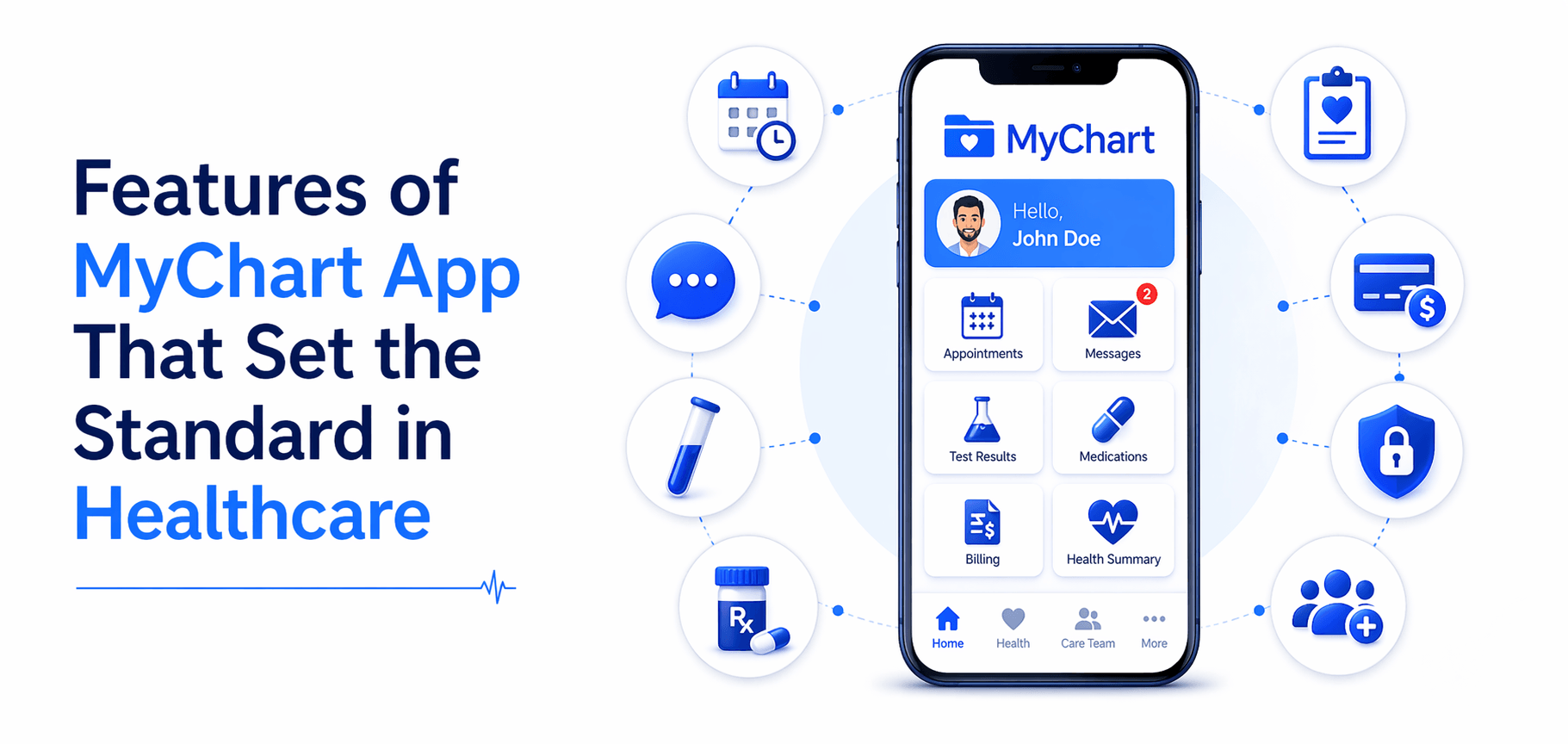
Every great app is defined by its features, and MyChart sets a high bar.
When it comes to building an app like MyChart, it is all about features that actually make life easier. Not just fancy buttons, but things people will actually use every day. Some features solve real problems, like missed appointments or confusing lab results. Others make the experience smarter, like AI symptom checkers or push notifications that actually mean something.
Here’s a breakdown of what really matters:
Core Features:
- Appointment Scheduling & Reminders – Patients never miss a visit.
- Lab Results & Medical History – All info in one place, easy to access.
- Secure Messaging – Quick questions without a phone call.
- Prescription Tracking – See meds, refills, and reminders.
- Billing & Payments – Easy, transparent, and safe.
Advanced Features:
- Telemedicine – Video calls for virtual visits.
- AI Symptom Checkers – Helps patients understand their symptoms.
- Analytics & Reports – Doctors get insights on patient health trends.
- Push Notifications – Keep users engaged and informed.
Some apps just sit on your phone. MyChart is one of the rare ones that actually helps people manage their health. Lab results appear the second they’re ready. Appointments get scheduled in seconds. Quick messages to doctors, prescription reminders, and secure payments, everything just works.
Doctors love it too. All patient info in one place. No missed messages. No digging through files. Smooth, secure, stress-free. That’s what makes MyChart more than an app. It actually helps people take control of their health.
These are the features you’ll want to think about if you want to develop an app like MyChart. The right mix of core and advanced features shapes not only usability but also the MyChart app development cost.
Integrating AI can add a little to the budget, but it makes the app smarter, faster, and more useful for everyone.
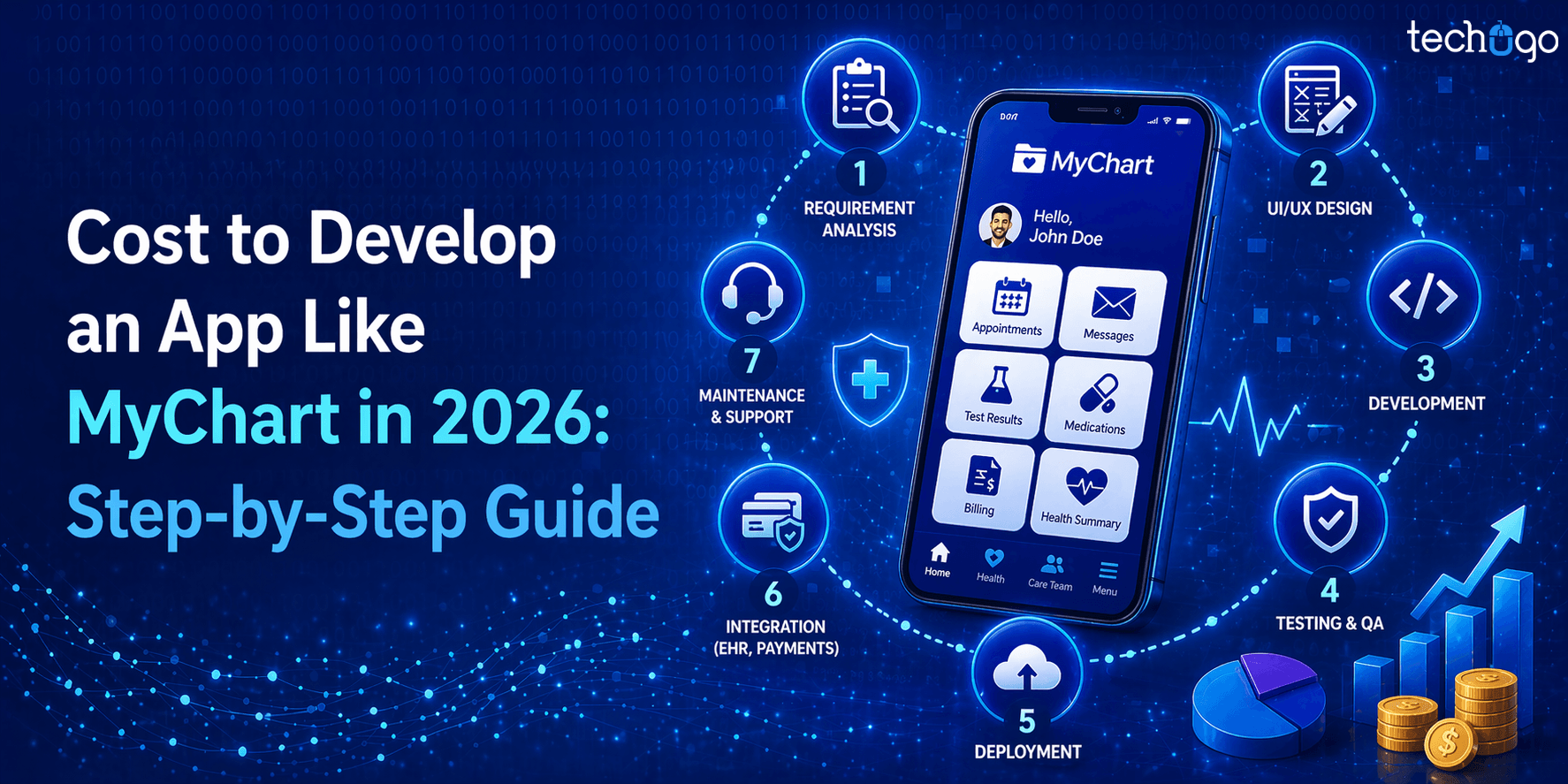
Follow These Steps to Build a Patient Portal App like MyChart
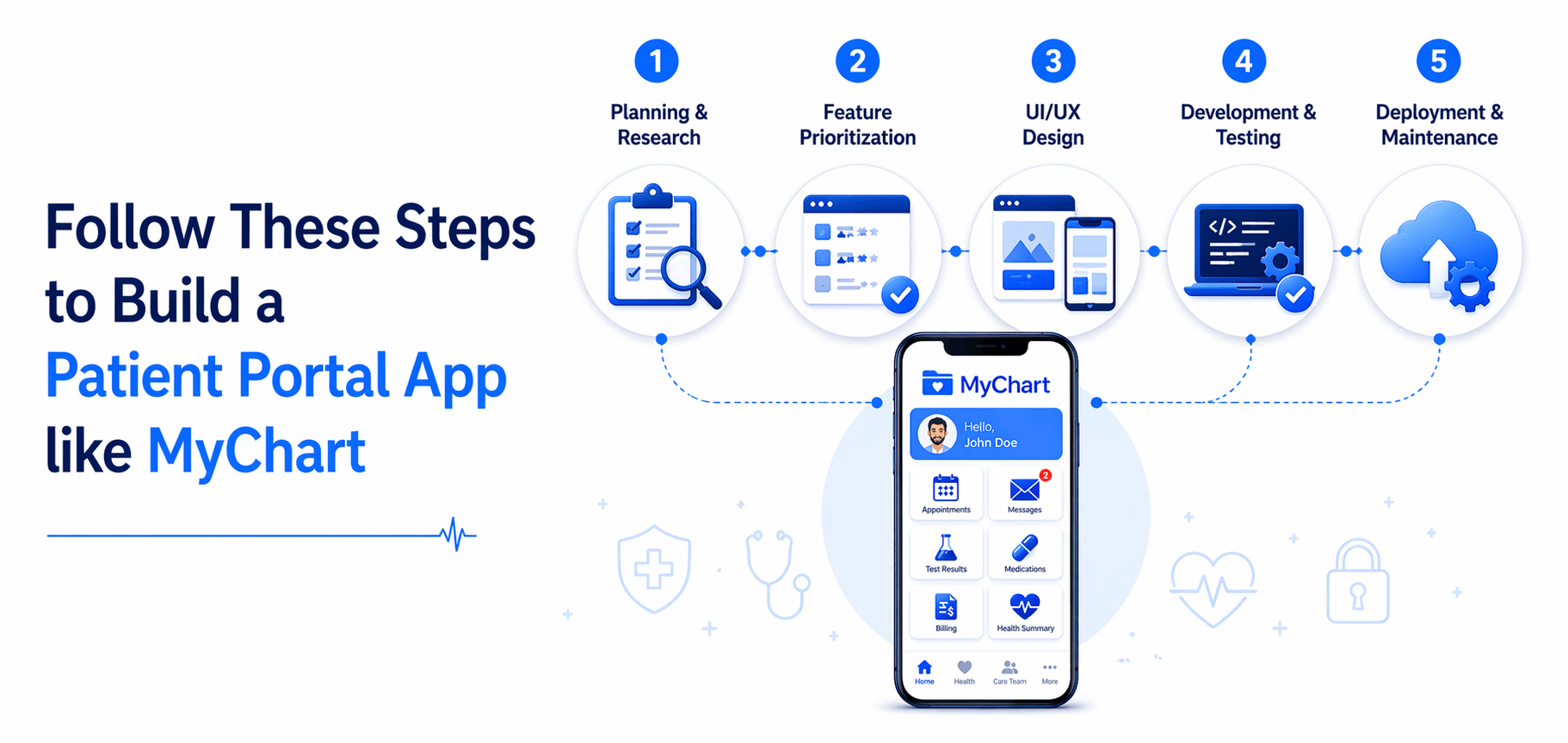
Building an app like MyChart might sound like a huge mountain to climb. You probably imagine endless coding, complicated regulations, and stressed-out doctors checking your app every five minutes. But here’s the thing, it doesn’t have to feel impossible.
The key is to break it down into simple, manageable steps.
These steps are your roadmap if you want to develop an app like MyChart, keep your team on track, and actually make an app that people love to use.
1. Planning & Research
You don’t just build an app because it sounds cool. You need to know who it’s for, what problems it’s solving, and what the healthcare rules are. Begin with your users, patients, and/or doctors. What frustrates them? What are the red flags in their daily health routine?
Then, check the rules. HIPAA, GDPR, or local healthcare standards are not voluntary. They’re the foundation. Fail to do this, and you can miss out on headaches, fines, or even have your app shut down before it launches.
It is also the stage of getting familiar with the market. What about the other apps, such as MyChart? In which areas do they perform well and fail in others? This study will save you time, money, and frustrations in the future.
2. Feature Prioritization
This is where the majority fail. You have a list of everything that you can add, as it would be cool: AI symptom checkers, video calls, push notifications, analytics dashboards, lab results, reminders, and so on and so forth.
The question is, what is core, and what is nice-to-have?
The core features are a requirement; you cannot compromise on them, as they enable your app to work. Consider the appointment booking, communication, laboratory findings, and prescription monitoring.
Additional or more advanced functionality can be added later, when your program is proven. It can be tempting to add everything all at the same time but it explodes your cost, time and even puts users off.
Doing this prioritization carefully is a huge step in keeping your MyChart app development cost reasonable while still building something valuable.
3. UI/UX Design
This is the place where your application begins to take form. Imagine those who will be using it. Patients are not necessarily tech-savvy. Physicians are in a hurry and are stressed. Your app should be intuitive, easy, and quick.
Every tap should make sense. Buttons should be obvious. The user should be guided by colors, fonts, and layouts, and not be confused.
Keep in mind: a patient portal application is not only about the attractive image. It is regarding simplifying healthcare. Unless your users are patient, they may uninstall even before they can attempt to use the features.
4. Development & Testing
Now comes the meat of the app: coding. You need both frontend (what the users see) and backend (how data flows, servers, and security) to work perfectly.
Testing is just as important. And I don’t mean one quick test. I mean rigorous, repeated, real-world testing. Check every tap, every message, every appointment scheduling flow. Make sure lab results load correctly, notifications pop up on time, and data stays secure.
Think like a user who’s tired, in a rush, and maybe a little stressed. If your app works flawlessly for them, it’s ready. If not, fix it before it goes live.
5. Deployment & Maintenance
You’ve built it. Tested it. Now it’s live. But don’t breathe easy just yet. Launching the MVP (minimal viable product) is just the beginning. Watch how users interact, gather feedback, and iterate quickly.
You’re mistaken if you think that maintenance is optional. It’s not. It is ongoing.
The app runs smoothly with updates, bug fixes, server management, and tweaking features. A patient portal application will not be effective unless it is dependable on a day-to-day basis.
These are the steps you have to follow, and you would not only create an app but an actual patient portal that people would be glad to utilise.
HIPAA Compliant App Development Guide for Your Healthcare App
HIPAA compliance is non-negotiable. Patients trust your app with sensitive information, so security is everything.
Key elements include:
- Data Encryption– Secure data when in motion and rest.
- Authentication– Data can be accessed by only authorized users.
- Secure storage and backup– Avert breaches and data losses.
Common mistakes? Bypassing audits, not following local laws, or short-changing encryption. To prevent this, select a mobile app development company that has experience in healthcare apps.
And no, adhering to an app development guide that complies with HIPAA will ensure that your app remains legal and secure and keeps your users happy.
MyChart App Development Cost
Cost varies widely depending on features, platforms, and complexity.
- MVP (basic features): $30,000 – $50,000
- Full-featured app: $150,000+
- AI Integration: $15,000 – $40,000 extra
- Platform choice: iOS, Android, or both
- Security & HIPAA compliance: adds to the budget
Additional reasons are the location of the team (US vs offshore) and maintenance that is being maintained. Knowing the MyChart app development cost and the cost to build a healthcare mobile app will help you budget accordingly.
Technologies Used in Healthcare App Development
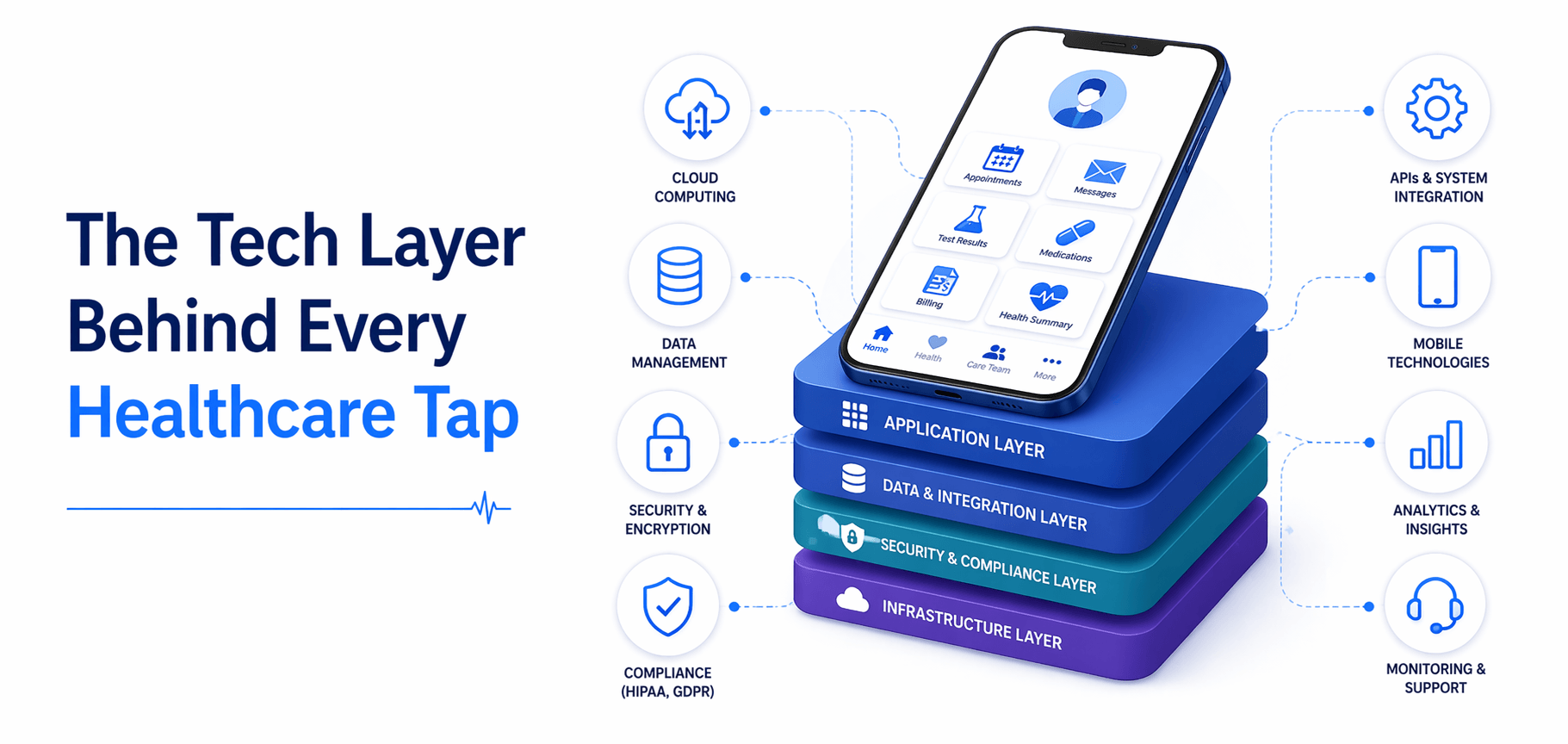
The right tech stack can make or break your app. Some popular choices:
- Backend: Node.js, Python, Ruby on Rails
- Frontend: React Native, Flutter, Swift, Kotlin
- Databases & Cloud: Firebase, MongoDB, PostgreSQL, AWS
- AI & Analytics Tools: TensorFlow, Azure ML
Using the right technologies used in healthcare app development will make your app fast, secure, and scalable. When you want to create an app such as MyChart, it is better to choose the tech stack at the initial stage and avoid the bother in the future.
Launching Your MyChart-Like App Successfully
Launch smart:
- Test everything before release
- Start with an MVP to gather feedback
- Onboard doctors and patients gradually
- Use marketing and engagement tools to drive adoption
Following these steps helps your app succeed right from the start.
Partner with Techugo: Your Healthcare App Experts
You’ve planned, sketched, and dreamed of building an app like MyChart.
But not all developers understand healthcare. You need the best healthcare app development company with experience in HIPAA rules, patient apps, and AI integration.
Techugo fits all your healthcare app needs.
As a trusted healthcare app development company that knows how to balance compliance, user experience, and smart features. We don’t just code; we design apps that patients actually enjoy using, and doctors actually rely on.
As a mobile app development company in USA, we’ve worked with clients across industries to turn concepts into smooth, secure, and scalable apps. From appointment scheduling to AI-powered symptom checkers, we take care of the tech so you can focus on your vision.
We understand the healthcare space: red flags, the rules, the features that really matter. That’s why working with Techugo means your app won’t just sit on someone’s phone; it actually helps people manage their health, saves doctors time, and makes the patient experience simple and stress-free.
At Techugo, we’re not just building another app. We’re building digital tools that make healthcare smarter, faster, and more human.
Healthcare apps don’t have to be complicated; we make them simple. Build with Techugo.
FAQs
1. How do I develop an app like MyChart?
Begin with the definition of user requirements, specifications, and regulations. Brainstorm your MVP, select the appropriate technology stack, and outsource the project to a mobile application development firm such as Techugo to make it a reality.
2. What are the must-have features of a MyChart-like app?
The basic functions are to schedule appointments, lab results, messaging, prescription tracking, and billing. The features may be advanced, such as telemedicine, AI symptom checkers, analytics, and push notifications.
3. How much does it cost to develop an app like MyChart?
Prices differ based on features, platforms, integration of AI, and security needs. An MVP would only cost approximately $30,000-$50,000, whilst a complete application would cost 150 000 dollars or more.
4. How do I ensure my app is HIPAA compliant?
Develop an app according to a HIPAA-compliant guide: encrypt data, limit access, keep and back up the data in a safe location, and do not neglect audits or the local requirements. The collaboration with a skilled healthcare app team is beneficial.
5. Which technologies are used in healthcare app development?
Backend: Node.js, Python, Ruby on Rails. Frontend: React Native, Flutter, Swift, Kotlin. Databases/Cloud: Firebase, MongoDB, PostgreSQL, AWS. AI & Analytics: TensorFlow, Azure ML.
6. Should I launch an MVP or a full app first?
Begin with MVP in order to test your idea, features, and obtain feedback. After it is proven, scale with advanced features and integrations is available.
7. How long does it take to develop a patient portal app?
Typically, an MVP takes 3–6 months, while a full-featured MyChart-like app can take 9–12 months, depending on complexity and features.

Get in touch
We'd love to hear from you.